torrust_tracker/lib.rs
1//! **Torrust Tracker** is a modern and feature-rich (private) [`BitTorrent`](https://www.bittorrent.org/) tracker.
2//!
3//! [`BitTorrent`](https://en.wikipedia.org/wiki/BitTorrent) is a protocol for distributing files using a peer-to-peer network.
4//!
5//! Peers in the networks need to know where they can find other peers with the files they are looking for.
6//!
7//! Tracker are services that allow peers to quickly find other peers. Client peers announce their existence to a tracker,
8//! and the tracker responds to the peer with a list of other peers in the swarm.
9//!
10//! You can learn more about `BitTorrent` and `BitTorrent` Trackers on these sites:
11//!
12//! - <https://www.bittorrent.org/>
13//! - <https://en.wikipedia.org/wiki/BitTorrent>
14//! - <https://en.wikipedia.org/wiki/BitTorrent_tracker>
15//!
16//! Torrust Tracker is a `BitTorrent` tracker with a focus on:
17//!
18//! - Performance
19//! - Robustness
20//! - Extensibility
21//! - Security
22//! - Usability
23//! - And with a community-driven development
24//!
25//! # Table of contents
26//!
27//! - [Features](#features)
28//! - [Services](#services)
29//! - [Installation](#installation)
30//! - [Minimum requirements](#minimum-requirements)
31//! - [Prerequisites](#prerequisites)
32//! - [Install from sources](#install-from-sources)
33//! - [Run with docker](#run-with-docker)
34//! - [Configuration](#configuration)
35//! - [Usage](#usage)
36//! - [API](#api)
37//! - [HTTP Tracker](#http-tracker)
38//! - [UDP Tracker](#udp-tracker)
39//! - [Components](#components)
40//! - [Implemented BEPs](#implemented-beps)
41//! - [Contributing](#contributing)
42//! - [Documentation](#documentation)
43//!
44//! # Features
45//!
46//! - Multiple UDP server and HTTP(S) server blocks for socket binding possible
47//! - Full IPv4 and IPv6 support for both UDP and HTTP(S)
48//! - Private and Whitelisted mode
49//! - Built-in API
50//! - Peer authentication using time-bound keys
51//! - Database persistence for authentication keys, whitelist and completed peers counter
52//! - DB Support for `SQLite` and `MySQl`
53//!
54//! # Services
55//!
56//! From the end-user perspective the Torrust Tracker exposes three different services.
57//!
58//! - A REST [`API`](crate::servers::apis)
59//! - One or more [`UDP`](crate::servers::udp) trackers
60//! - One or more [`HTTP`](crate::servers::http) trackers
61//!
62//! # Installation
63//!
64//! ## Minimum requirements
65//!
66//! - Rust Stable `1.68`
67//! - You might have problems compiling with a machine with low resources.
68//!
69//! It has been tested with:
70//!
71//! Docker containers with:
72//!
73//! - 6 CPUs
74//! - 7.5G of ram
75//! - 2GB of swap
76//!
77//! [VM](https://github.com/torrust/torrust-tracker/issues/321) with:
78//!
79//! - 1 core of Intel Xeon Processor (Icelake)
80//! - 1G of ram
81//! - 25G of disk
82//! - Debian 11
83//! - no swap by default
84//!
85//! Adding swap may help with compilation. See issue [#321](https://github.com/torrust/torrust-tracker/issues/321).
86//!
87//! ## Prerequisites
88//!
89//! The tracker has some system dependencies:
90//!
91//! Since we are using the `openssl` crate with the [vendored feature](https://docs.rs/openssl/latest/openssl/#vendored),
92//! enabled, you will need to install the following dependencies:
93//!
94//! ```text
95//! sudo apt-get install pkg-config libssl-dev make
96//! ```
97//!
98//! If you are using `SQLite3` as database driver, you will need to install the
99//! following dependency:
100//!
101//! ```text
102//! sudo apt-get install libsqlite3-dev
103//! ```
104//!
105//! > **NOTICE**: those are the commands for `Ubuntu`. If you are using a
106//! > different OS, you will need to install the equivalent packages. Please
107//! > refer to the documentation of your OS.
108//!
109//! With the default configuration you will need to create the `storage` directory:
110//!
111//! ```text
112//! ./storage/
113//! └── tracker
114//! ├── etc
115//! ├── lib
116//! │ ├── database
117//! │ │ └── sqlite3.db
118//! │ └── tls
119//! └── log
120//! ```
121//!
122//! The default configuration expects a directory `./storage/tracker/lib/database` to be writable by the tracker process.
123//!
124//! By default the tracker uses `SQLite` and the database file name `sqlite3.db`.
125//!
126//! You only need the `tls` directory in case you are setting up SSL for the HTTP tracker or the tracker API.
127//! Visit [`HTTP`](crate::servers::http) or [`API`](crate::servers::apis) if you want to know how you can use HTTPS.
128//!
129//! ## Install from sources
130//!
131//! First, you need to create a folder to clone the repository.
132//!
133//! ```text
134//! cd /tmp
135//! mkdir torrust
136//! ```
137//!
138//! ```text
139//! git clone https://github.com/torrust/torrust-tracker.git \
140//! && cd torrust-tracker \
141//! && cargo build --release \
142//! && mkdir -p ./storage/tracker/etc \
143//! && mkdir -p ./storage/tracker/lib/database \
144//! && mkdir -p ./storage/tracker/lib/tls \
145//! && mkdir -p ./storage/tracker/log
146//! ```
147//!
148//! To run the tracker we will have to use the command "cargo run" this will
149//! compile and after being compiled it will start running the tracker.
150//!
151//! ```text
152//! cargo run
153//! ```
154//!
155//! ## Run with docker
156//!
157//! You can run the tracker with a pre-built docker image. Please refer to the
158//! [tracker docker documentation](https://github.com/torrust/torrust-tracker/blob/develop/docs/containers.md).
159//!
160//! # Configuration
161//!
162//! In order to run the tracker you need to provide the configuration. If you
163//! run the tracker without providing the configuration, the tracker will
164//! generate the default configuration the first time you run it. It will
165//! generate a `tracker.toml` file with in the root directory.
166//!
167//! The default configuration is:
168//!
169//! ```toml
170//! [logging]
171//! threshold = "info"
172//!
173//! [core]
174//! inactive_peer_cleanup_interval = 600
175//! listed = false
176//! private = false
177//! tracker_usage_statistics = true
178//!
179//! [core.announce_policy]
180//! interval = 120
181//! interval_min = 120
182//!
183//! [core.database]
184//! driver = "sqlite3"
185//! path = "./storage/tracker/lib/database/sqlite3.db"
186//!
187//! [core.net]
188//! external_ip = "0.0.0.0"
189//! on_reverse_proxy = false
190//!
191//! [core.tracker_policy]
192//! max_peer_timeout = 900
193//! persistent_torrent_completed_stat = false
194//! remove_peerless_torrents = true
195//!
196//! [health_check_api]
197//! bind_address = "127.0.0.1:1313"
198//!```
199//!
200//! The default configuration includes one disabled UDP server, one disabled
201//! HTTP server and the enabled API.
202//!
203//! For more information about each service and options you can visit the
204//! documentation for the [torrust-tracker-configuration crate](https://docs.rs/torrust-tracker-configuration).
205//!
206//! Alternatively to the `tracker.toml` file you can use one environment
207//! variable `TORRUST_TRACKER_CONFIG_TOML` to pass the configuration to the tracker:
208//!
209//! ```text
210//! TORRUST_TRACKER_CONFIG_TOML=$(cat ./share/default/config/tracker.development.sqlite3.toml) ./target/release/torrust-tracker
211//! ```
212//!
213//! In the previous example you are just setting the env var with the contents
214//! of the `tracker.toml` file.
215//!
216//! The env var contains the same data as the `tracker.toml`. It's particularly
217//! useful in you are [running the tracker with docker](https://github.com/torrust/torrust-tracker/blob/develop/docs/containers.md).
218//!
219//! > NOTICE: The `TORRUST_TRACKER_CONFIG_TOML` env var has priority over the `tracker.toml` file.
220//!
221//! By default, if you don’t specify any `tracker.toml` file, the application
222//! will use `./share/default/config/tracker.development.sqlite3.toml`.
223//!
224//! > IMPORTANT: Every time you change the configuration you need to restart the
225//! > service.
226//!
227//! # Usage
228//!
229//! Running the tracker with the default configuration and enabling the UDP and
230//! HTTP trackers will expose the services on these URLs:
231//!
232//! - REST API: <http://localhost:1212>
233//! - UDP tracker: <http://localhost:6969>
234//! - HTTP tracker: <http://localhost:7070>
235//!
236//! ## API
237//!
238//! In order to use the tracker API you need to enable it in the configuration:
239//!
240//! ```toml
241//! [http_api]
242//! bind_address = "127.0.0.1:1212"
243//!
244//! [http_api.access_tokens]
245//! admin = "MyAccessToken"
246//! ```
247//!
248//! By default it's enabled on port `1212`. You also need to add access tokens in the configuration:
249//!
250//! ```toml
251//! [http_api.access_tokens]
252//! admin = "MyAccessToken"
253//! LABEL = "YOUR_TOKEN"
254//! ```
255//!
256//! All tokens give full access the the API. Once you have defined you token you can make request adding the token as a `GET` parameter. For example:
257//!
258//! <http://127.0.0.1:1212/api/v1/stats?token=MyAccessToken>
259//!
260//! That endpoint will give you the tracker metrics:
261//!
262//! ```json
263//! {
264//! "torrents": 0,
265//! "seeders": 0,
266//! "completed": 0,
267//! "leechers": 0,
268//! "tcp4_connections_handled": 0,
269//! "tcp4_announces_handled": 0,
270//! "tcp4_scrapes_handled": 0,
271//! "tcp6_connections_handled": 0,
272//! "tcp6_announces_handled": 0,
273//! "tcp6_scrapes_handled": 0,
274//! "udp4_connections_handled": 0,
275//! "udp4_announces_handled": 0,
276//! "udp4_scrapes_handled": 0,
277//! "udp6_connections_handled": 0,
278//! "udp6_announces_handled": 0,
279//! "udp6_scrapes_handled": 0
280//! }
281//! ```
282//!
283//! Refer to the [`API`](crate::servers::apis) documentation for more information about the [`API`](crate::servers::apis) endpoints.
284//!
285//! ## HTTP tracker
286//!
287//! The HTTP tracker implements two type of requests:
288//!
289//! - Announce: <http://127.0.0.1:7070/announce>
290//! - Scrape: <http://127.0.0.1:7070/scrape>
291//!
292//! In you are using the tracker in `private` or `private_listed` mode you will need to append the authentication key:
293//!
294//! - Announce: <http://127.0.0.1:7070/announce/key>
295//! - Scrape: <http://127.0.0.1:7070/scrape/key>
296//!
297//! In order to use the HTTP tracker you need to enable at least one server in the configuration:
298//!
299//! ```toml
300//! [[http_trackers]]
301//! bind_address = "0.0.0.0:7070"
302//! ```
303//!
304//! Refer to the [`HTTP`](crate::servers::http) documentation for more information about the [`HTTP`](crate::servers::http) tracker.
305//!
306//! ### Announce
307//!
308//! The `announce` request allows a peer to announce itself and obtain a list of peer for an specific torrent.
309//!
310//! A sample `announce` request:
311//!
312//! <http://0.0.0.0:7070/announce?info_hash=%81%00%00%00%00%00%00%00%00%00%00%00%00%00%00%00%00%00%00%00&peer_addr=2.137.87.41&downloaded=0&uploaded=0&peer_id=-qB00000000000000001&port=17548&left=0&event=completed&compact=0>
313//!
314//! If you want to know more about the `announce` request:
315//!
316//! - [BEP 03. The `BitTorrent` Protocol Specification](https://www.bittorrent.org/beps/bep_0003.html)
317//! - [BEP 23. Tracker Returns Compact Peer Lists](https://www.bittorrent.org/beps/bep_0023.html)
318//! - [Vuze announce docs](https://wiki.vuze.com/w/Announce)
319//!
320//! ### Scrape
321//!
322//! The `scrape` request allows a peer to get swarm metadata for multiple torrents at the same time.
323//!
324//! A sample `scrape` request for only one torrent:
325//!
326//! <http://0.0.0.0:7070/scrape?info_hash=%81%00%00%00%00%00%00%00%00%00%00%00%00%00%00%00%00%00%00%00>
327//!
328//! The response contains the swarm metadata for that torrent:
329//!
330//! - `complete`: the number of active peers that have completed downloading, also known as seeders. Peers from which other peers can get a full copy of the torrent.
331//! - `downloaded`: the number of peers that have ever completed downloading.
332//! - `incomplete`: the number of active peers that have not completed downloading, also known as leechers.
333//!
334//! The `scrape` response is a bencoded byte array like the following:
335//!
336//! ```text
337//! d5:filesd20:xxxxxxxxxxxxxxxxxxxxd8:completei11e10:downloadedi13772e10:incompletei19e20:yyyyyyyyyyyyyyyyyyyyd8:completei21e10:downloadedi206e10:incompletei20eee
338//! ```
339//!
340//! If you save the response as a file and you open it with a program that can handle binary data you would see:
341//!
342//! ```text
343//! 00000000: 6435 3a66 696c 6573 6432 303a 8100 0000 d5:filesd20:....
344//! 00000010: 0000 0000 0000 0000 0000 0000 0000 0000 ................
345//! 00000020: 6438 3a63 6f6d 706c 6574 6569 3165 3130 d8:completei1e10
346//! 00000030: 3a64 6f77 6e6c 6f61 6465 6469 3065 3130 :downloadedi0e10
347//! 00000040: 3a69 6e63 6f6d 706c 6574 6569 3065 6565 :incompletei0eee
348//! 00000050: 65 e
349//! ```
350//!
351//! `BitTorrent` uses a data formatting specification called [Bencode](https://en.wikipedia.org/wiki/Bencode).
352//!
353//! If you want to know more about the `scrape` request:
354//!
355//! - [BEP 48. Tracker Protocol Extension: Scrape](https://www.bittorrent.org/beps/bep_0048.html)
356//! - [Vuze scrape docs](https://wiki.vuze.com/w/Scrape)
357//!
358//! ### Authentication keys
359//!
360//! If the tracker is running in `private` or `private_listed` mode you will need to provide a valid authentication key.
361//!
362//! Right now the only way to add new keys is via the REST [`API`](crate::servers::apis). The endpoint `POST /api/vi/key/:duration_in_seconds`
363//! will return an expiring key that will be valid for `duration_in_seconds` seconds.
364//!
365//! Using `curl` you can create a 2-minute valid auth key:
366//!
367//! ```text
368//! $ curl -X POST "http://127.0.0.1:1212/api/v1/key/120?token=MyAccessToken"
369//! ```
370//!
371//! Response:
372//!
373//! ```json
374//! {
375//! "key": "nvCFlJCq7fz7Qx6KoKTDiMZvns8l5Kw7",
376//! "valid_until": 1679334334,
377//! "expiry_time": "2023-03-20 17:45:34.712077008 UTC"
378//! }
379//! ```
380//!
381//! You can also use the Torrust Tracker together with the [Torrust Index](https://github.com/torrust/torrust-index). If that's the case,
382//! the Index will create the keys by using the tracker [API](crate::servers::apis).
383//!
384//! ## UDP tracker
385//!
386//! The UDP tracker also implements two type of requests:
387//!
388//! - Announce: <udp://127.0.0.1:6969>
389//! - Scrape: <udp://127.0.0.1:6969>
390//!
391//! In order to use the UDP tracker you need to enable at least one server in the configuration:
392//!
393//! ```toml
394//! [[udp_trackers]]
395//! bind_address = "0.0.0.0:6969"
396//! ```
397//!
398//! Refer to the [`UDP`](crate::servers::udp) documentation for more information about the [`UDP`](crate::servers::udp) tracker.
399//!
400//! If you want to know more about the UDP tracker protocol:
401//!
402//! - [BEP 15. UDP Tracker Protocol for `BitTorrent`](https://www.bittorrent.org/beps/bep_0015.html)
403//!
404//! # Components
405//!
406//! Torrust Tracker has four main components:
407//!
408//! - The core tracker [`core`]
409//! - The tracker REST [`API`](crate::servers::apis)
410//! - The [`UDP`](crate::servers::udp) tracker
411//! - The [`HTTP`](crate::servers::http) tracker
412//!
413//! 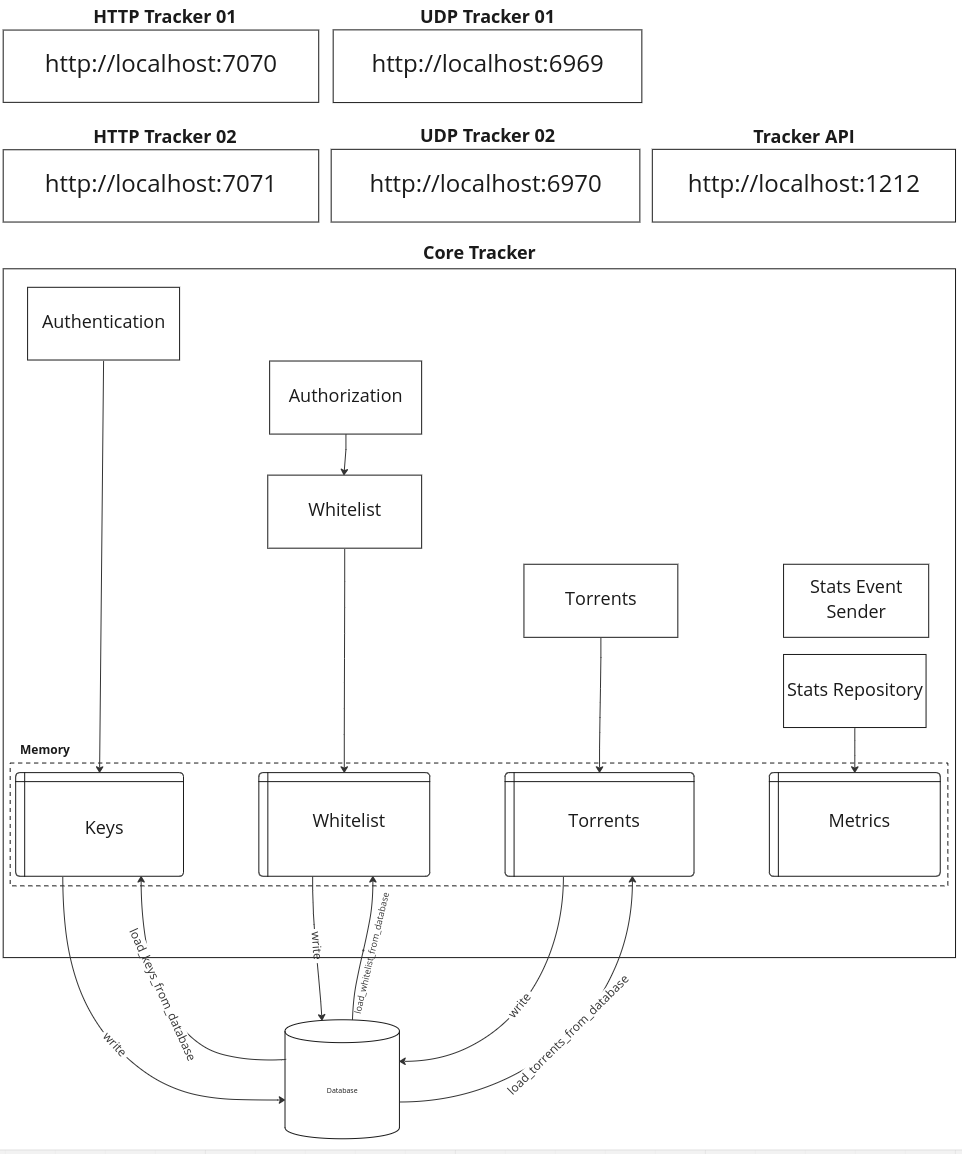
414//!
415//! ## Core tracker
416//!
417//! The core tracker is the main containing the tracker generic tracker logic.
418//!
419//! The core tracker handles:
420//!
421//! - Authentication with keys
422//! - Authorization using a torrent whitelist
423//! - Statistics
424//! - Persistence
425//!
426//! See [`core`] for more details on the [`core`] module.
427//!
428//! ## Tracker API
429//!
430//! The tracker exposes a REST API. The API has four resource groups:
431//!
432//! - Authentication keys: to handle the keys for the HTTP tracker
433//! - Statistics: to get the tracker metrics like requests counters
434//! - Torrents: to get peers for a torrent
435//! - Whitelist: to handle the torrent whitelist when the tracker runs on `listed` or `private_listed` mode
436//!
437//! See [`API`](crate::servers::apis) for more details on the REST API.
438//!
439//! ## UDP tracker
440//!
441//! UDP trackers are trackers with focus on performance. By Using UDP instead of HTTP the tracker removed the overhead
442//! of opening and closing TCP connections. It also reduces the response size.
443//!
444//! You can find more information about UDP tracker on:
445//!
446//! - [Wikipedia: UDP tracker](https://en.wikipedia.org/wiki/UDP_tracker)
447//! - [BEP 15: UDP Tracker Protocol for `BitTorrent`](https://www.bittorrent.org/beps/bep_0015.html)
448//!
449//! See [`UDP`](crate::servers::udp) for more details on the UDP tracker.
450//!
451//! ## HTTP tracker
452//!
453//! HTTP tracker was the original tracker specification defined on the [BEP 3]((https://www.bittorrent.org/beps/bep_0003.html)).
454//!
455//! See [`HTTP`](crate::servers::http) for more details on the HTTP tracker.
456//!
457//! You can find more information about UDP tracker on:
458//!
459//! - [Wikipedia: `BitTorrent` tracker](https://en.wikipedia.org/wiki/BitTorrent_tracker)
460//! - [BEP 3: The `BitTorrent` Protocol Specification](https://www.bittorrent.org/beps/bep_0003.html)
461//!
462//! # Implemented BEPs
463//!
464//! BEP stands for `BitTorrent` Enhancement Proposal. BEPs are documents providing information to the `BitTorrent`
465//! community or describing a new feature for the `BitTorrent` protocols.
466//!
467//! You can find all BEPs on <https://www.bittorrent.org/>
468//!
469//! Torrust Tracker implements these BEPs:
470//!
471//! - [BEP 3](https://www.bittorrent.org/beps/bep_0003.html): The `BitTorrent` Protocol
472//! - [BEP 7](https://www.bittorrent.org/beps/bep_0007.html): IPv6 Support
473//! - [BEP 15](https://www.bittorrent.org/beps/bep_0015.html): UDP Tracker Protocol for `BitTorrent`
474//! - [BEP 23](https://www.bittorrent.org/beps/bep_0023.html): Tracker Returns Compact Peer Lists
475//! - [BEP 27](https://www.bittorrent.org/beps/bep_0027.html): Private Torrents
476//! - [BEP 48](https://www.bittorrent.org/beps/bep_0048.html): Tracker Protocol Extension: Scrape
477//!
478//! # Contributing
479//!
480//! If you want to contribute to this documentation you can [open a new pull request](https://github.com/torrust/torrust-tracker/pulls).
481//!
482//! # Documentation
483//!
484//! You can find this documentation on [docs.rs](https://docs.rs/torrust-tracker/).
485//!
486//! If you want to contribute to this documentation you can [open a new pull request](https://github.com/torrust/torrust-tracker/pulls).
487//!
488//! In addition to the production code documentation you can find a lot of
489//! examples on the integration and unit tests.
490
491use torrust_tracker_clock::{clock, time_extent};
492
493pub mod app;
494pub mod bootstrap;
495pub mod console;
496pub mod core;
497pub mod servers;
498pub mod shared;
499
500#[macro_use]
501extern crate lazy_static;
502
503/// This code needs to be copied into each crate.
504/// Working version, for production.
505#[cfg(not(test))]
506#[allow(dead_code)]
507pub(crate) type CurrentClock = clock::Working;
508
509/// Stopped version, for testing.
510#[cfg(test)]
511#[allow(dead_code)]
512pub(crate) type CurrentClock = clock::Stopped;
513
514/// Working version, for production.
515#[cfg(not(test))]
516#[allow(dead_code)]
517pub(crate) type DefaultTimeExtentMaker = time_extent::WorkingTimeExtentMaker;
518
519/// Stopped version, for testing.
520#[cfg(test)]
521#[allow(dead_code)]
522pub(crate) type DefaultTimeExtentMaker = time_extent::StoppedTimeExtentMaker;