termal_core/lib.rs
1//! Core library of termal, contains the implementation.
2
3#![cfg_attr(docsrs, feature(doc_auto_cfg))]
4
5mod rgb;
6
7use std::{
8 io::{self, Write},
9 panic,
10};
11
12pub use self::{err::*, rgb::*};
13
14pub mod codes;
15mod err;
16#[cfg(feature = "term_image")]
17pub mod image;
18#[cfg(feature = "proc")]
19pub mod proc;
20#[cfg(feature = "raw")]
21pub mod raw;
22#[cfg(feature = "term_text")]
23pub mod term_text;
24
25/// Appends linear gradient to the given string.
26///
27/// The gradient consists of characters given by `s`. `s_len` is the length of
28/// `s` in characters. The result is written to `res`. `start` and `end` are
29/// the starting and ending colors of the gradient.
30///
31/// If you don't know the length of the string and you would like to allocate
32/// new string for the resulting gradient, consider using [`gradient`].
33///
34/// # Example
35/// ```no_run
36/// use termal_core::{codes, write_gradient};
37///
38/// let mut buf = codes::CLEAR.to_string();
39///
40/// let text = "gradient";
41/// write_gradient(
42/// &mut buf,
43/// text,
44/// text.len(),
45/// (0xFD, 0xB9, 0x75),
46/// (0x57, 0x9B, 0xDF)
47/// );
48///
49/// println!("{buf}");
50/// ```
51///
52/// ## Result in terminal
53/// 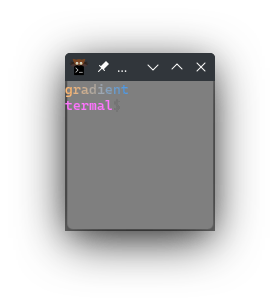
54pub fn write_gradient(
55 res: &mut String,
56 s: impl AsRef<str>,
57 s_len: usize,
58 start: impl Into<Rgb>,
59 end: impl Into<Rgb>,
60) {
61 let len = s_len as f32 - 1.;
62 let start = start.into().cast::<f32>();
63 let end = end.into().cast::<f32>();
64
65 let step = if s_len == 1 {
66 Rgb::<f32>::ZERO
67 } else {
68 (end - start) / len
69 };
70
71 for (i, c) in s.as_ref().chars().take(s_len).enumerate() {
72 let col = (start + step * i as f32).cast::<u8>();
73 res.push_str(&fg!(col.r(), col.g(), col.b()));
74 res.push(c);
75 }
76}
77
78/// Generates linear color gradient with the given text.
79///
80/// The gradient will be generated with characters in the string `s` and its
81/// color will start with `start` and end with `end`.
82///
83/// If you want more granular control and possibly more efficient results in
84/// some usecases, you can use [`write_gradient`].
85///
86/// # Example
87/// ```no_run
88/// use termal_core::{codes, gradient};
89///
90/// let mut buf = codes::CLEAR.to_string();
91/// buf += &gradient("gradient", (0xFD, 0xB9, 0x75), (0x57, 0x9B, 0xDF));
92/// println!("{buf}");
93/// ```
94///
95/// ## Result in terminal
96/// 
97pub fn gradient(
98 s: impl AsRef<str>,
99 start: impl Into<Rgb>,
100 end: impl Into<Rgb>,
101) -> String {
102 let mut res = String::new();
103 let len = s.as_ref().chars().count();
104 write_gradient(&mut res, s, len, start, end);
105 res
106}
107
108/// Resets terminal modes. This should in most cases restore terminal to state
109/// before your app started. Useful for example in case of panic.
110///
111/// The reset works on best-effort bases - it may not be fully reliable in all
112/// cases, but it should work in most cases as long as you use this crate to
113/// enable the terminal features.
114///
115/// What this doesn't do:
116/// - Doesn't clear the screen and buffer.
117/// - Doesn't move the cursor (it will be at the same position after this
118/// call).
119///
120/// What this does:
121/// - Disable raw mode (if feature `raw` is enabled on this crate).
122/// - Reset text modes.
123/// - Show cursor.
124/// - Disable mouse tracking and extensions.
125/// - Disable focus events.
126/// - Reset scroll region.
127/// - Disable alternative buffer.
128/// - Disable reverse color mode.
129/// - Disable bracketed paste.
130/// - Reset colors to their defaults (codes, fg, bg, cursor).
131///
132/// Note that this function internally uses codes [`codes::CUR_SAVE`] and
133/// [`codes::CUR_LOAD`] so the last saved position will not be preserved.
134pub fn reset_terminal() {
135 #[cfg(feature = "raw")]
136 if raw::is_raw_mode_enabled() {
137 _ = raw::disable_raw_mode();
138 }
139 let s = [
140 codes::RESET,
141 codes::ENABLE_LINE_WRAP,
142 codes::SHOW_CURSOR,
143 codes::DISABLE_MOUSE_XY_UTF8_EXT,
144 codes::DISABLE_MOUSE_XY_EXT,
145 codes::DISABLE_MOUSE_XY_URXVT_EXT,
146 codes::DISABLE_MOUSE_XY_PIX_EXT,
147 codes::DISABLE_MOUSE_XY_TRACKING,
148 codes::DISABLE_MOUSE_XY_PR_TRACKING,
149 codes::DISABLE_MOUSE_XY_DRAG_TRACKING,
150 codes::DISABLE_MOUSE_XY_ALL_TRACKING,
151 codes::DISABLE_FOCUS_EVENT,
152 codes::CUR_SAVE,
153 codes::RESET_SCROLL_REGION,
154 codes::CUR_LOAD,
155 codes::DISABLE_ALTERNATIVE_BUFFER,
156 codes::DISABLE_REVERSE_COLOR,
157 codes::DISABLE_BRACKETED_PASTE_MODE,
158 codes::RESET_ALL_COLOR_CODES,
159 codes::RESET_DEFAULT_FG_COLOR,
160 codes::RESET_DEFAULT_BG_COLOR,
161 codes::RESET_CURSOR_COLOR,
162 ]
163 .concat();
164 print!("{s}");
165 _ = io::stdout().flush();
166}
167
168/// Registers panic hook that will prepend terminal reset before the current
169/// panic hook. Useful for tui apps.
170///
171/// This will make sure that the terminal is set to reasonable state even when
172/// your app panics.
173///
174/// It will use the function [`reset_terminal`]. See that for more info.
175pub fn register_reset_on_panic() {
176 let hook = panic::take_hook();
177 panic::set_hook(Box::new(move |pci| {
178 reset_terminal();
179 hook(pci)
180 }));
181}