  1
  2
  3
  4
  5
  6
  7
  8
  9
 10
 11
 12
 13
 14
 15
 16
 17
 18
 19
 20
 21
 22
 23
 24
 25
 26
 27
 28
 29
 30
 31
 32
 33
 34
 35
 36
 37
 38
 39
 40
 41
 42
 43
 44
 45
 46
 47
 48
 49
 50
 51
 52
 53
 54
 55
 56
 57
 58
 59
 60
 61
 62
 63
 64
 65
 66
 67
 68
 69
 70
 71
 72
 73
 74
 75
 76
 77
 78
 79
 80
 81
 82
 83
 84
 85
 86
 87
 88
 89
 90
 91
 92
 93
 94
 95
 96
 97
 98
 99
100
101
102
103
104
105
106
107
108
109
110
111
112
113
114
115
116
117
118
119
120
121
122
123
124
125
126
127
128
129
130
131
132
133
134
135
136
137
138
139
140
141
142
143
144
145
146
147
148
149
150
151
152
153
154
155
156
157
158
159
160
161
162
163
164
165
166
167
168
169
170
171
172
173
174
175
176
177
178
179
180
181
182
183
184
185
186
187
188
189
190
191
192
193
194
195
196
197
198
199
200
201
202
203
204
205
206
207
208
209
210
211
212
213
214
215
216
217
218
219
220
221
222
223
224
225
226
227
228
229
230
231
232
233
234
235
236
237
238
239
240
241
242
243
244
245
246
247
248
249
250
251
252
253
254
255
256
257
258
259
260
261
262
263
264
265
266
267
268
269
270
271
272
273
274
275
276
277
278
279
280
281
282
283
284
285
286
287
288
289
290
291
292
293
294
295
296
297
298
299
300
301
302
303
304
305
306
307
308
309
310
311
312
313
314
315
316
317
318
319
320
321
322
323
324
325
use serde::{Deserialize, Serialize};
use crate::user::User;
/// This object represents a [custom keyboard](https://core.telegram.org/bots#keyboards) with reply options
/// (see [Introduction to bots](https://core.telegram.org/bots#keyboards) for details and examples).
#[derive(Serialize, Deserialize)]
pub struct ReplyKeyboardMarkup {
/// Array of button rows, each represented by an Array of [KeyboardButton](https://core.telegram.org/bots/api#keyboardbutton) objects
pub keyboard: Vec<Vec<KeyboardButton>>,
/// Requests clients to resize the keyboard vertically for optimal fit
// (e.g., make the keyboard smaller if there are just two rows of buttons).
/// Defaults to false, in which case the custom keyboard is always of the same height as the app's standard keyboard.
pub reisze_keyboard: Option<bool>,
/// Requests clients to hide the keyboard as soon as it's been used.
/// The keyboard will still be available, but clients will automatically display the usual letter-keyboard in the chat
/// – the user can press a special button in the input field to see the custom keyboard again.
/// Defaults to _false_.
pub one_time_keyboard: Option<bool>,
/// The placeholder to be shown in the input field when the keyboard is active; 1-64 characters
pub input_field_placeholder: Option<String>,
/// Use this parameter if you want to show the keyboard to specific users only.
///
/// Targets:
/// 1) users that are @mentioned in the text of the [Message](https://core.telegram.org/bots/api#message) object;
/// 2) if the bot's message is a reply (has *reply_to_message_id*), sender of the original message.
///
/// Example: A user requests to change the bot's language, bot replies to the request with a keyboard to select the new language.
/// Other users in the group don't see the keyboard.
pub selective: Option<bool>,
}
/// This object represents one button of the reply keyboard.
/// For simple text buttons *String* can be used instead of this object to specify text of the button.
/// Optional fields *request_contact*, *request_location*, and *request_poll* are mutually exclusive.
///
/// # Note
/// - *request_contact* and *request_location* options will only work in Telegram versions released after 9 April, 2016.
/// Older clients will display *unsupported message*.
/// - *request_poll* option will only work in Telegram versions released after 23 January, 2020.
/// Older clients will display *unsupported message*.
#[derive(Serialize, Deserialize)]
pub struct KeyboardButton {
/// Text of the button. If none of the optional fields are used,
/// it will be sent as a message when the button is pressed
pub text: String,
/// If True, the user's phone number will be sent as a contact when the button is pressed.
/// Available in private chats only
request_contact: Option<bool>,
/// If True, the user's current location will be sent when the button is pressed.
/// Available in private chats only
request_location: Option<bool>,
/// If specified, the user will be asked to create a poll and send it to the bot when the button is pressed.
/// Available in private chats only
request_poll: Option<KeyboardButtonPollType>,
}
/// This object represents type of a poll, which is allowed to be created and sent when the corresponding button is pressed.
#[derive(Serialize, Deserialize)]
pub struct KeyboardButtonPollType {
/// If *quiz* is passed, the user will be allowed to create only polls in the quiz mode.
/// If *regular* is passed, only regular polls will be allowed.
/// Otherwise, the user will be allowed to create a poll of any type.
#[serde(rename = "type")]
kind: Option<String>,
}
/// Upon receiving a message with this object, Telegram clients will remove the current custom keyboard and display the default letter-keyboard.
///
/// By default, custom keyboards are displayed until a new keyboard is sent by a bot.
/// An exception is made for one-time keyboards that are hidden immediately after the user presses a button (see ReplyKeyboardMarkup).
#[derive(Serialize, Deserialize)]
pub struct ReplyKeyboardRemove {
/// Requests clients to remove the custom keyboard
/// (user will not be able to summon this keyboard;
/// if you want to hide the keyboard from sight but keep it accessible, use *one_time_keyboard* in
/// [ReplyKeyboardMarkup](https://core.telegram.org/bots/api#replykeyboardmarkup))
remove_keyboard: bool,
/// Use this parameter if you want to show the keyboard to specific users only.
///
/// Targets:
/// 1) users that are @mentioned in the text of the [Message](https://core.telegram.org/bots/api#message) object;
/// 2) if the bot's message is a reply (has *reply_to_message_id*), sender of the original message.
///
/// Example: A user requests to change the bot's language, bot replies to the request with a keyboard to select the new language.
/// Other users in the group don't see the keyboard.
pub selective: Option<bool>,
}
/// This object represents an [inline keyboard](https://core.telegram.org/bots#inline-keyboards-and-on-the-fly-updating)
/// that appears right next to the message it belongs to.
#[derive(Serialize, Deserialize)]
pub struct InlineKeyboardMarkup {
/// Array of button rows, each represented by an Array of [InlineKeyboardButton](https://core.telegram.org/bots/api#inlinekeyboardbutton) objects
pub inline_keyboard: Vec<Vec<InlineKeyboardButton>>,
}
/// This object represents one button of an inline keyboard.
#[derive(Serialize, Deserialize)]
pub struct InlineKeyboardButton {
/// Label text on the button
pub text: String,
/// Button type
#[serde(flatten)]
pub kind: InlineKeyboardButtonKind,
}
/// Inline keyboard button type
#[derive(Serialize, Deserialize)]
#[serde(untagged)]
pub enum InlineKeyboardButtonKind {
Url {
/// HTTP or tg:// url to be opened when button is pressed
url: String,
},
Login {
/// An HTTP URL used to automatically authorize the user.
/// Can be used as a replacement for the [Telegram Login Widget](https://core.telegram.org/widgets/login).
login_url: LoginUrl,
},
Callback {
/// Data to be sent in a [callback query](https://core.telegram.org/bots/api#callbackquery) to the bot when button is pressed, 1-64 bytes
callback_data: String,
},
SwitchInlineQuery {
/// If set, pressing the button will prompt the user to select one of their chats, open that chat and insert the bot's username and the specified inline query in the input field. Can be empty, in which case just the bot's username will be inserted.
///
/// **Note:** This offers an easy way for users to start using your bot in [inline mode](https://core.telegram.org/bots/inline)
/// when they are currently in a private chat with it.
/// Especially useful when combined with [*switch_pm…*](https://core.telegram.org/bots/api#answerinlinequery) actions
/// – in this case the user will be automatically returned to the chat they switched from, skipping the chat selection screen.
switch_inline_query: String,
},
SwitchInlineQueryCurrentChat {
/// If set, pressing the button will insert the bot's username and the specified inline query in the current chat's input field.
/// Can be empty, in which case only the bot's username will be inserted.
///
/// This offers a quick way for the user to open your bot in inline mode in the same chat
/// – good for selecting something from multiple options.
switch_inline_query_current_chat: String,
},
CallbackGame {
/// Description of the game that will be launched when the user presses the button.
///
/// **NOTE:** This type of button **must** always be the first button in the first row.
callback_game: CallbackGame,
},
Pay {
/// Specify True, to send a Pay button.
///
/// **NOTE:** This type of button **must** always be the first button in the first row.
pay: bool,
},
}
/// A placeholder, currently holds no information. Use [BotFather](https://t.me/botfather) to set up your game.
#[derive(Serialize, Deserialize)]
pub struct CallbackGame;
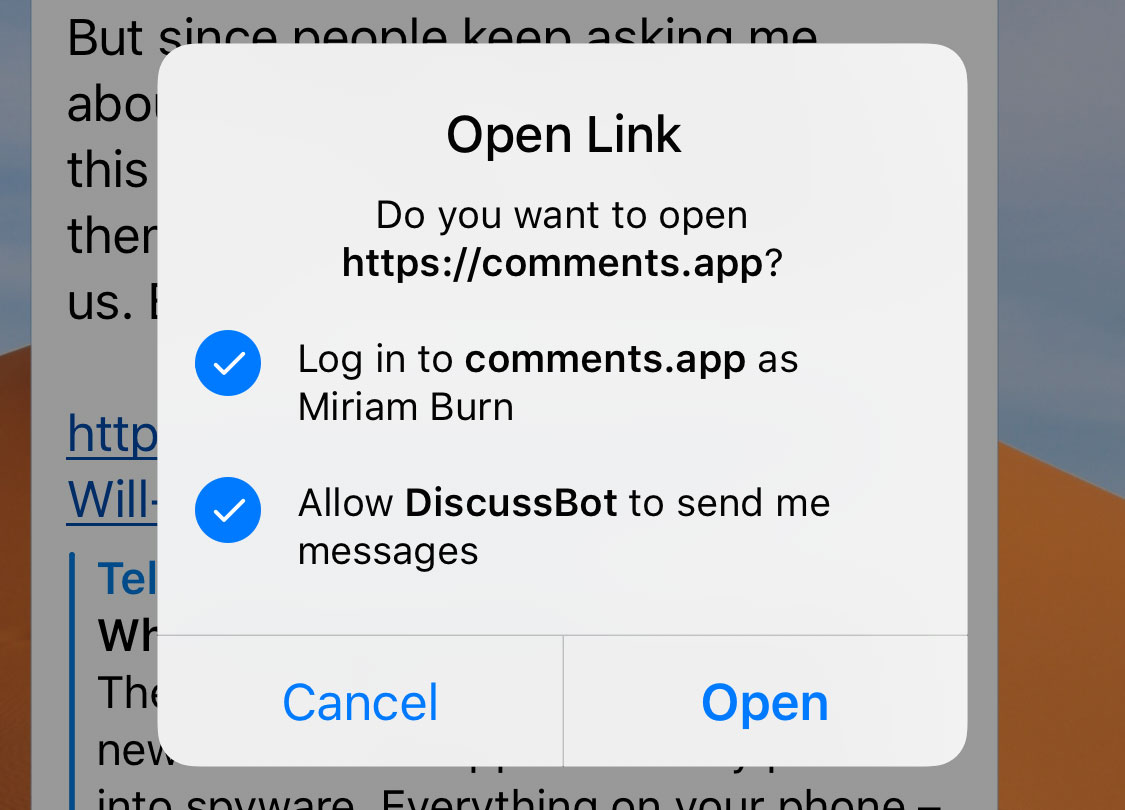
/// This object represents a parameter of the inline keyboard button used to automatically authorize a user.
///
/// Serves as a great replacement for the [Telegram Login Widget](https://core.telegram.org/widgets/login)
/// when the user is coming from Telegram.
/// All the user needs to do is tap/click a button and confirm that they want to log in:
/// 
/// Telegram apps support buttons as of [version 5.7](https://telegram.org/blog/privacy-discussions-web-bots#meet-seamless-web-bots)
/// > Sample bot: [@discussbot](https://t.me/discussbot)
#[derive(Serialize, Deserialize)]
pub struct LoginUrl {
/// An HTTP URL to be opened with user authorization data added to the query string when the button is pressed.
///
/// If the user refuses to provide authorization data, the original URL without information about the user will be opened.
/// The data added is the same as described in [Receiving authorization data](https://core.telegram.org/widgets/login#receiving-authorization-data).
///
/// **NOTE:** You **must** always check the hash of the received data to verify the authentication
/// and the integrity of the data as described in [Checking authorization](https://core.telegram.org/widgets/login#checking-authorization).
pub url: String,
/// New text of the button in forwarded messages.
pub forward_text: Option<String>,
/// Username of a bot, which will be used for user authorization.
/// See Setting up a bot for more details.
/// If not specified, the current bot's username will be assumed.
/// The url's domain must be the same as the domain linked with the bot.
/// See Linking your domain to the bot for more details.
pub bot_username: Option<String>,
/// Pass True to request the permission for your bot to send messages to the user.
pub request_write_access: Option<bool>,
}
/// Upon receiving a message with this object, Telegram clients will display a reply interface to the user
/// (act as if the user has selected the bot's message and tapped 'Reply').
///
/// This can be extremely useful if you want to create user-friendly step-by-step interfaces without having to sacrifice privacy mode.
///
/// > **Example:** A poll bot for groups runs in privacy mode (only receives commands, replies to its messages and mentions).
/// > There could be two ways to create a new poll:
/// >
/// > - Explain the user how to send a command with parameters (e.g. /newpoll question answer1 answer2).
/// > May be appealing for hardcore users but lacks modern day polish.
/// >
/// > - Guide the user through a step-by-step process.
/// > 'Please send me your question', 'Cool, now let's add the first answer option',
/// > 'Great. Keep adding answer options, then send /done when you're ready'.
/// >
/// > The last option is definitely more attractive.
/// > And if you use [ForceReply](https://core.telegram.org/bots/api#forcereply) in your bot's questions,
/// > it will receive the user's answers even if it only receives replies, commands and mentions
/// > — without any extra work for the user.
#[derive(Serialize, Deserialize)]
pub struct ForceReply {
/// Shows reply interface to the user, as if they manually selected the bot's message and tapped 'Reply'
force_reply: bool,
/// The placeholder to be shown in the input field when the reply is active; 1-64 characters
pub input_field_placeholder: Option<String>,
/// Use this parameter if you want to show the keyboard to specific users only.
///
/// Targets:
/// 1) users that are @mentioned in the text of the [Message](https://core.telegram.org/bots/api#message) object;
/// 2) if the bot's message is a reply (has *reply_to_message_id*), sender of the original message.
///
/// Example: A user requests to change the bot's language, bot replies to the request with a keyboard to select the new language.
/// Other users in the group don't see the keyboard.
pub selective: Option<bool>,
}
#[derive(Serialize, Deserialize, Clone, Copy)]
pub enum ParseMode {
MarkdownV2,
HTML,
Markdown,
}
/// This object represents one special entity in a text message.
///
/// For example, hashtags, usernames, URLs, etc.
#[derive(Serialize, Deserialize)]
pub struct MessageEntity {
/// Type of the entity
#[serde(flatten)]
pub kind: MessageEntityKind,
/// Offset in UTF-16 code units to the start of the entity
pub offset: usize,
/// Length of the entity in UTF-16 code units
pub length: usize,
}
/// Type of the message entity
#[derive(Serialize, Deserialize)]
#[serde(rename_all = "snake_case", tag = "type")]
pub enum MessageEntityKind {
/// `@username`
Mention,
/// `#hashtag`
Hashtag,
/// `$USD`
Cashtag,
/// `/start@jobs_bot`
BotCommand,
/// `https://telegram.org`
Url,
/// `do-not-reply@telegram.org`
Email,
/// `+1-212-555-0123`
PhoneNumber,
/// **bold text**
Bold,
/// *italic text*
Italic,
/// <ins>underlined text</ins>
Underline,
/// ~strikethrough text~
Strikethrough,
/// `monowidth string`
Code,
/// ```monowidth block```
Pre {
/// The programming language of the entity text
langauge: String,
},
/// clickable text URLs
TextLink {
/// Url that will be opened after user taps on the text
url: String,
},
/// mention for users [without usernames](https://telegram.org/blog/edit#new-mentions)
TextMention {
/// The mentioned user
user: User,
},
}
/// Reply markups
#[derive(Serialize)]
#[serde(untagged)]
pub enum ReplyMarkup {
InlineKeyboard(InlineKeyboardMarkup),
ReplyKeyboard(ReplyKeyboardMarkup),
RemoveReplyKeyboard(ReplyKeyboardRemove),
ForceReply(ForceReply),
}
impl From<InlineKeyboardMarkup> for ReplyMarkup {
fn from(markup: InlineKeyboardMarkup) -> Self {
Self::InlineKeyboard(markup)
}
}
impl From<ReplyKeyboardMarkup> for ReplyMarkup {
fn from(markup: ReplyKeyboardMarkup) -> Self {
Self::ReplyKeyboard(markup)
}
}
impl From<ReplyKeyboardRemove> for ReplyMarkup {
fn from(markup: ReplyKeyboardRemove) -> Self {
Self::RemoveReplyKeyboard(markup)
}
}
impl From<ForceReply> for ReplyMarkup {
fn from(markup: ForceReply) -> Self {
Self::ForceReply(markup)
}
}