Expand description
§Spliny: Working with Spline Curves
Spine curves are piecewise polynomial (parametric) curves, used for interpolation, curve fitting, and data smoothing.
Spliny is a (tiny) pure Rust library for using spline curves, based a spliny’s knots and control points in SplineCurve<K,N>,
and to plot splines –currently limited to 1 and 2D splines– to check the results.
It does not fit spline functions to data-sets: see the Splinify-crate for that purpose.
§Example 1: Lissajous Curve Fit
Get a spline curve for a Lissajous-dataset, with plot and JSON representation:
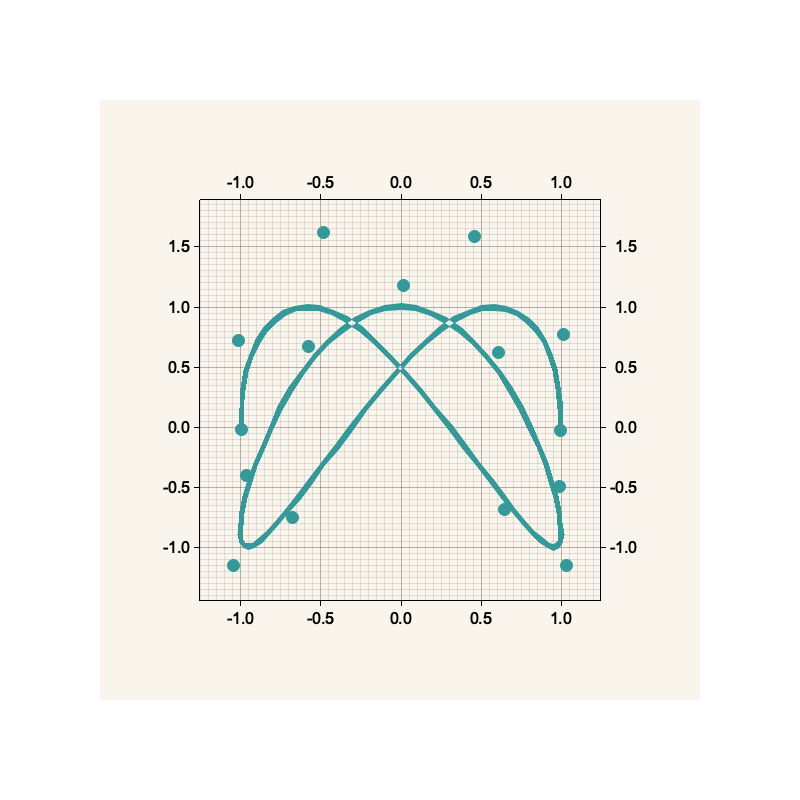
use splinify::{CubicSplineFit2D, Result};

fn lissajous(t:f64, a: f64, kx: f64, b: f64, ky: f64) -> [f64;2] {
    [
        a * (kx * t).cos(),
        b * (ky * t).sin()
    ]
}

fn main() -> Result<()> {

    // Generate Lissajous data points, with angle parameter `u`
    // ranging from 0 to 180º, with 1º-steps.
    let u: Vec<f64> = (0..=180u32).into_iter().map(|v|(v as f64).to_radians()).collect();
    let xy: Vec<f64> = u.iter().flat_map(|t|lissajous(*t,1.0, 3.0, 1.0, 5.0)).collect();

    // fit Cubic Spline with Splinify's CubicSplineFit
    let s = CubicSplineFit2D::new(u, xy)?.smoothing_spline(5e-3)?;

    // Output fit results as JSON file and plot
    println!("{}", serde_json::to_string_pretty(&s)?);
    s.plot_with_control_points("lissajous.png", (800,800))?;

    Ok(())
}
And here is its associated `Spliny`` JSON representation
{
  "t": [
    0.0, 0.0, 0.0, 0.0, 0.4014257279586958, 0.7853981633974483,
    0.9948376736367679, 1.1868238913561442, 1.3788101090755203,
    1.5707963267948966, 1.7802358370342162, 1.9722220547535925,
    2.1642082724729685, 2.356194490192345, 2.7576202181510405,
    3.141592653589793, 3.141592653589793, 3.141592653589793,
    3.141592653589793
  ],
  "c": [
    0.9961805460172887, 1.01581609212485, 0.45785551737300106,
    -0.6743400479743561, -1.04606086926188, -0.9655723250526262,
    -0.5757280827332156, 0.017487591989126007, 0.610401362313724,
    0.9866605336566671, 1.0335232431543322, 0.6453772441164307,
    -0.4846359310719992, -1.014195365951515, -0.9964502165043656,
    -0.027374797128379907, 0.770580186441133, 1.5844468932141083,
    -0.7504988105159386, -1.1533053154158592, -0.39940623356854926,
    0.669953241001308, 1.1822672685309246, 0.6182210556297563,
    -0.493261782484514, -1.1530136311265229, -0.6885569654105621,
    1.6217843337199846, 0.7207977628265237, -0.02317389641793977
  ],
  "k": 3,
  "n": 2
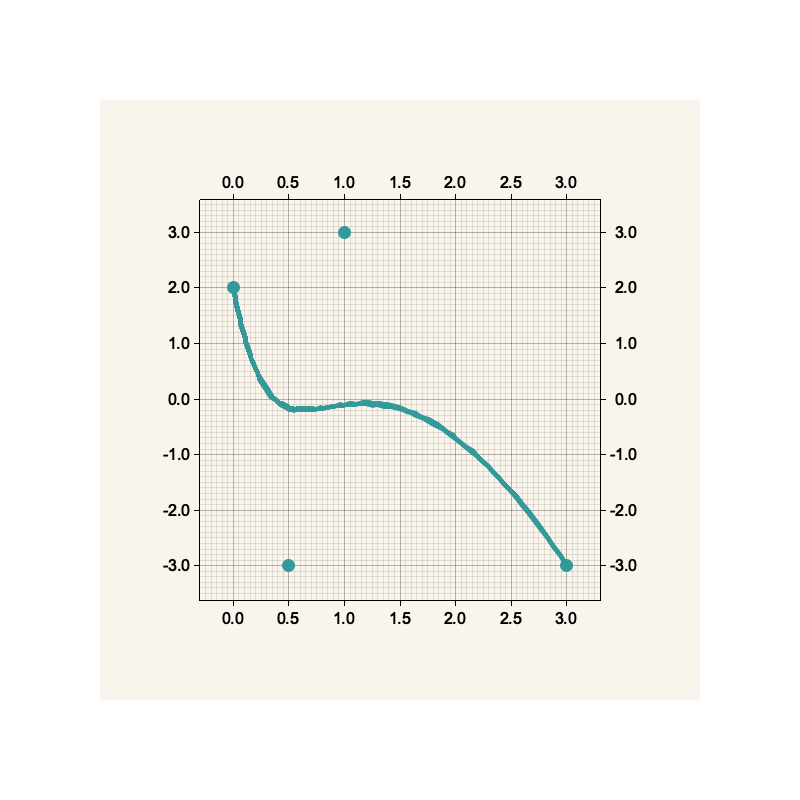
}§Example 2: 4 Control Point Cubic Spline
Here a Cubic Spline is constructed from 4 control points:
use spliny::{CubicSpline2D, Result};

pub fn main() -> Result<()> {

    let spline = CubicSpline2D::new(
        vec![1.0, 1.0, 1.0, 1.0, 2.0, 2.0, 2.0, 2.0],
        vec![0.0, 0.5, 1.0, 3.0, 2.0, -3.0, 3.0, -3.0]
    );

    spline.plot_with_control_points("cubic2d.png", (800,800))?;

    Ok(())
}
The control points are four control points: (0,2), (.5,-3), (1,3), and (3,-3), and the curve has 8 knots.
§Usage
Spliny is developed as part of a family of three crates but can be used independently too:
-
splinify fits (non-uniform) B-Spline curves to input data, and results in a fitted as a
spliny-crateCurveSpline. Data inputs arexandyvectors for 1-dimensional curves, anduandxynvectors in case of N-dimensional curves. -
Use spliny to to use the generated splines, for example, to calculate curve coordinates or spline curves derivatives. This package also implements basic tools for the input and output of spline representations in JSON files and spline plots. It is written in Rust and does not require a Fortran compiler.
-
dierckx-sys contains Fortran foreign function interfaces to Paul Dierckx’ FITPACK library. It is used by
splinify, but —unless you want to explore Paul Dierckx library yourself— can be ignored as concerned to usingsplinifyandspliny.
To use this library, add this to your Cargo.toml file:
[dependencies]
spliny = "0.3"§Spline Curve
The base spline representation in Spliny is the SplineCurve<K,N> object —a wrapper for a vector of knots, and
fit coefficients— with K the spline degree, N the space dimension of the curve spline.
For convenience, the following aliases have been defined:
| Alias | K | N |
|---|---|---|
LinearSpline | 1 | 1 |
CubicSpline | 3 | 1 |
QuinticSpline | 5 | 1 |
LinearSpline2D | 1 | 2 |
CubicSpline2D | 3 | 2 |
QuinticSpline2D | 5 | 2 |
LinearSpline3D | 1 | 3 |
CubicSpline3D | 3 | 3 |
QuinticSpline3D | 5 | 3 |
§License
All content ©2022 Harbers Bik LLC, and licensed under either of
- Apache License, Version 2.0 (LICENSE-APACHE or http://www.apache.org/licenses/LICENSE-2.0)
- MIT license (LICENSE-MIT or http://opensource.org/licenses/MIT?)
at your option.
§Contribution
Unless you explicitly state otherwise, any Contribution intentionally submitted for inclusion in the Work by you, as defined in the Apache-2.0 license, shall be dual licensed as above, without any additional terms or conditions.
Re-exports§
Modules§
Type Aliases§
- Cubic
Spline - 1D cubic spline. Supports plotting with the
plotfeature. - Cubic
Spline2D - 2D cubic spline. Supports plotting with the
plotfeature. - Cubic
Spline3D - 3D cubic spline. Plotting is not supported.
- Linear
Spline - 1D linear spline. Supports plotting with the
plotfeature. - Linear
Spline2D - 2D linear spline. Supports plotting with the
plotfeature. - Linear
Spline3D - 3D linear spline. Plotting is not supported.
- Quintic
Spline - 1D quintic spline. Supports plotting with the
plotfeature. - Quintic
Spline2D - 2D quintic spline. Supports plotting with the
plotfeature. - Quintic
Spline3D - 3D quintic spline. Plotting is not supported.
- Result
- Convenience
Resulttype used throughout this crate, with a boxed dynamic error.