spatial_led/lib.rs
1#![cfg_attr(not(feature = "std"), no_std)]
2
3//! # Spatial LED (Sled)
4//! <div> <img src="https://github.com/DavJCosby/sled/blob/master/resources/ripples-demo.gif?raw=true" width="49%" title="cargo run --example ripples"> <img src="https://github.com/DavJCosby/sled/blob/master/resources/warpspeed-demo.gif?raw=true" width="49%" title="cargo run --example warpspeed">
5//! </div>
6//!
7//! Sled is an ergonomic rust library that maps out the shape of your LED strips in 2D space to help you create stunning lighting effects.
8//!<details>
9//! <summary><strong>What Sled does:</strong></summary>
10//!
11//! - It exposes an API that lets you:
12//! - Modify virtual LED colors depending on each LED's position, distance, direction, line segment, etc;
13//! - Output that color data in a simple, contiguous data structure for your own usage;
14//! - Filter LEDs by their spatial properties to pre-compute important sets;
15//! - Additionally, some tools are provided to help you build functional apps faster (you may opt-out with compiler features):
16//! - `Driver` - Pack draw/compute logic into a Driver to simplify to the process of swapping between effects, or changing effect settings at runtime.
17//! - `Scheduler` - Lightweight tool to schedule redraws at a fixed rate, powered by [spin_sleep](https://github.com/alexheretic/spin-sleep).
18//! </details>
19//!
20//! <details>
21//! <summary><strong>What Sled does <ins>not</ins> do:</strong></summary>
22//!
23//! - It does not interface directly with your GPIO pins to control your LED hardware. Each project will be different, so it's up to you to bring your own glue. Check out the [Raspberry Pi example](https://github.com/DavJCosby/spatial_led_examples/tree/main/raspberry_pi) to get an idea what that might look like.
24//! - It does not allow you to represent your LEDs in 3D space. Could be a fun idea in the future, but it's just not planned for the time being.
25//!</details>
26//!
27//! See the [spatial_led_examples](https://github.com/DavJCosby/spatial_led_examples) repository for examples of Sled in action!
28//!
29//! <details open>
30//! <summary><h1>The Basics</h1></summary>
31//!
32//! In absence of an official guide, this will serve as a basic introduction to Sled. From here, you can use the documentation comments to learn what else Sled offers.
33//
34//! <details open>
35//! <summary><h3>Setup</h3></summary>
36//!
37//! To [create](Sled::new) a [Sled] struct, you need to create a configuration file and provide its path to the constructor.
38//! ```rust, ignore
39//! use spatial_led::Sled;
40//! use palette::rgb::Rgb;
41//! let mut sled = Sled::<Rgb>::new("/path/to/config.yap")?;
42//! ```
43//!
44//! A configuration file explains the layout of your LED strips in 2D space. This is used to pre-calculate some important information that's used to speed up complex draw calls.
45//!
46//! Example file:
47//! ```yaml, no_run
48//! center: (0.0, 0.5)
49//! density: 30.0
50//! --segments--
51//! (-2, 0) --> (0.5, -1) --> (3.5, 0) -->
52//! (2, 2) --> (-2, 2) --> (-2, 0)
53//! ```
54//! See [Sled::new()] for more information on this config format.
55//!
56//! //! Note the `::<Rgb>` in the constructor. In previous versions of Sled, [palette's Rgb struct](https://docs.rs/palette/latest/palette/rgb/struct.Rgb.html) was used interally for all color computation. Now, the choice is 100% yours! You just have to specify what data type you'd like to use.
57//!
58//! ```rust, ignore
59//! # use spatial_led::Sled;
60//! #[derive(Debug)]
61//! struct RGBW {
62//! r: f32,
63//! g: f32,
64//! b: f32,
65//! w: f32
66//! }
67//! let mut u8_sled = Sled::<(u8, u8, u8)>::new("/path/to/config.yap")?;
68//! let mut rgbw_sled = Sled::<RGBW>::new("/path/to/config.yap")?;
69//!
70//! u8_sled.set(4, (255, 0, 0))?; // set 5th led to red
71//! rgbw_sled.set_all(RGBW {
72//! r: 0.0,
73//! g: 1.0,
74//! b: 0.0,
75//! w: 0.0
76//! });
77//! ```
78//! For all further examples we'll use palette's Rgb struct as our backing color format (we really do highly recommend it and encourage its use wherever it makes sense), but just know that you can use any data type that implements `Debug`, `Default`, and `Copy`.
79//!
80//!</details>
81//!
82//!<details open>
83//!<summary><h3>Drawing</h3></summary>
84//!
85//! Once you have your [Sled] struct, you can start drawing to it right away! Here’s a taste of some of the things Sled lets you do:
86//!
87//! **Set all vertices to white:**
88//! ```rust
89//! # use spatial_led::{Sled};
90//! # use palette::rgb::Rgb;
91//! # let mut sled = Sled::<Rgb>::new("./benches/config.yap").unwrap();
92//! sled.set_vertices(Rgb::new(1.0, 1.0, 1.0));
93//! ```
94//! 
95//! > Note that this is a custom terminal UI visualization that is not packaged as part of the sled crate. It is ultimately up to you to decide how to visualize your LEDs, Sled just handles the computation.
96//!
97//! **Set all LEDs 2 units away from the `center_point` to red:**
98//! ```rust
99//! # use spatial_led::{Sled};
100//! # use palette::rgb::Rgb;
101//! # fn main() -> Result<(), spatial_led::SledError> {
102//! # let mut sled = Sled::<Rgb>::new("./benches/config.yap").unwrap();
103//! sled.set_at_dist(2.0, Rgb::new(1.0, 0.0, 0.0));
104//! # Ok(())
105//! # }
106//! ```
107//! 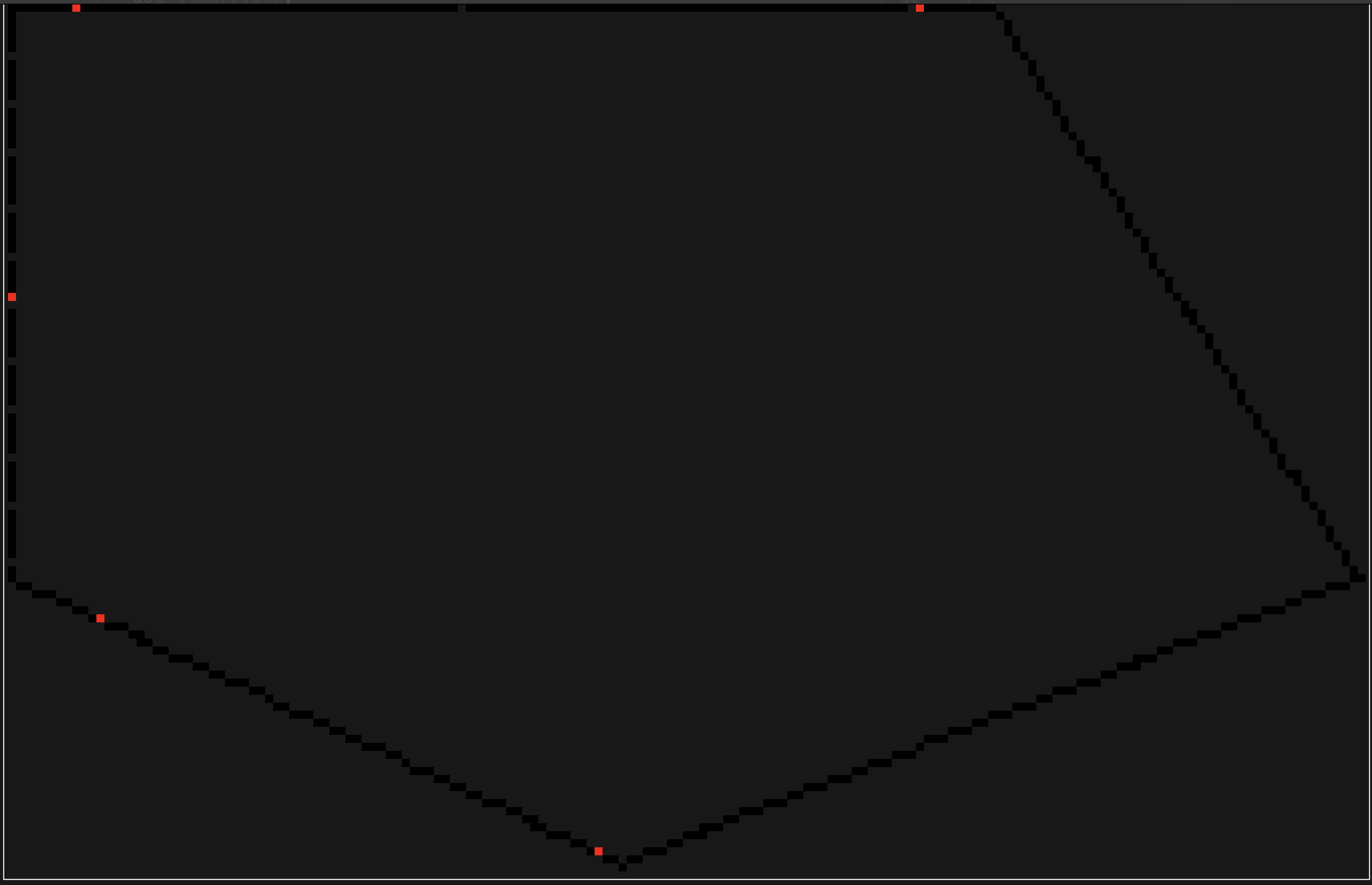
108//!
109//! **Set each LED using a function of its direction from point `(2, 1)`:**
110//! ```rust
111//! # use spatial_led::{Sled, Vec2};
112//! # use palette::rgb::Rgb;
113//! # let mut sled = Sled::<Rgb>::new("./benches/config.yap").unwrap();
114//! sled.map_by_dir_from(Vec2::new(2.0, 1.0), |dir| {
115//! let red = (dir.x + 1.0) * 0.5;
116//! let green = (dir.y + 1.0) * 0.5;
117//! Rgb::new(red, green, 0.5)
118//! });
119//! ```
120//! 
121//!
122//! **Dim one of the walls by 75%:**
123//! ```rust
124//! # use spatial_led::{Sled};
125//! # use palette::rgb::Rgb;
126//! # fn main() -> Result<(), spatial_led::SledError> {
127//! # let mut sled = Sled::<Rgb>::new("./benches/config.yap").unwrap();
128//! sled.modulate_segment(3, |led| led.color * 0.25)?;
129//! # Ok(())
130//! # }
131//! ```
132//! 
133//!
134//! **Set all LEDs within the overlapping areas of two different circles to blue:**
135//! ```rust
136//! # use spatial_led::{Sled, Filter, Vec2};
137//! # use palette::rgb::Rgb;
138//! # let mut sled = Sled::<Rgb>::new("./benches/config.yap").unwrap();
139//! let circle_1: Filter = sled.within_dist_from(
140//! 2.0,
141//! Vec2::new(1.0, 0.5)
142//! );
143//!
144//! let circle_2: Filter = sled.within_dist_from(
145//! 2.5,
146//! Vec2::new(-1.0, 1.5)
147//! );
148//!
149//! let overlap = circle_1.and(&circle_2);
150//! sled.set_filter(&overlap, Rgb::new(0.0, 0.0, 1.0));
151//! ```
152//! 
153//! For more examples, see the documentation comments on the [Sled] struct.
154//!
155//! </details>
156//!
157//! <details open>
158//! <summary><h3>Output</h3></summary>
159//!
160//! Once you’re ready to display these colors, you’ll probably want them packed in a nice contiguous array of color values. There are a few methods available to pack the information you need.
161//!
162//! ```rust
163//! # use spatial_led::{Sled, Vec2};
164//! # use palette::rgb::Rgb;
165//! # let mut sled = Sled::<Rgb>::new("./benches/config.yap").unwrap();
166//! // An Iterator of Rgbs, 32-bits/channel
167//! let colors_f32 = sled.colors();
168//!
169//! for color in colors_f32 {
170//! let red: f32 = color.red;
171//! // -snip- //
172//! }
173//! ```
174//!
175//! A few other handy output methods:
176//!
177//! ```rust
178//! # use spatial_led::{Sled, Vec2};
179//! # use palette::rgb::Rgb;
180//! # let mut sled = Sled::<Rgb>::new("./benches/config.yap").unwrap();
181//! // An Iterator of Vec2s, representing the position of each leds
182//! let positions = sled.positions();
183//! // An Iterator of (Rgb, Vec2) tuple pairs representing each leds color and position.
184//! let colors_f32_and_positions = sled.colors_and_positions();
185//! ```
186//! </details>
187//! </details>
188//!
189//!
190//! <details>
191//! <summary><h1>Advanced Features</h1></summary>
192//!
193//! For basic applications, the [Sled] struct gives you plenty of power. Odds are though, you'll want to create more advanced effects that might be time or user-input driven. A few optional (enabled by default, opt-out by disabling their compiler features) tools are provided to streamline that process.
194//!
195//! <details>
196//! <summary><h3>Drivers</h3></summary>
197//!
198//! [Drivers](driver::Driver) are useful for encapsulating everything you need to drive a lighting effect all in one place. Here's an example of what a simple, time-based one might look like:
199//!
200//! ```rust
201//! # use spatial_led::{Sled};
202//! # use palette::rgb::Rgb;
203//! use spatial_led::driver::Driver;
204//! let mut driver = Driver::<Rgb>::new(); // often auto-inferred
205//!
206//! driver.set_startup_commands(|_sled, data| {
207//! data.set::<Vec<Rgb>>("colors", vec![
208//! Rgb::new(1.0, 0.0, 0.0),
209//! Rgb::new(0.0, 1.0, 0.0),
210//! Rgb::new(0.0, 0.0, 1.0),
211//! ]);
212//! Ok(())
213//! });
214//!
215//! driver.set_draw_commands(|sled, data, time| {
216//! let elapsed = time.elapsed.as_secs_f32();
217//! let colors: &Vec<Rgb> = data.get("colors")?;
218//! let num_colors = colors.len();
219//! // clear our canvas each frame
220//! sled.set_all(Rgb::new(0.0, 0.0, 0.0));
221//!
222//! for i in 0..num_colors {
223//! let alpha = i as f32 / num_colors as f32;
224//! let angle = elapsed + (std::f32::consts::TAU * alpha);
225//! sled.set_at_angle(angle, colors[i]);
226//! }
227//!
228//! Ok(())
229//! });
230//! ```
231//! To start using the Driver, give it ownership over a Sled using [.mount()](driver::Driver::mount) and use [.step()](driver::Driver::step) to manually refresh it.
232//! ```rust, no_run
233//! # use spatial_led::{Sled, driver::Driver};
234//! use palette::rgb::Rgb;
235//! # fn main() -> Result<(), spatial_led::SledError> {
236//! let sled = Sled::<Rgb>::new("path/to/config.yap")?;
237//! # let mut driver = Driver::new();
238//! driver.mount(sled); // sled gets moved into driver here.
239//!
240//! loop {
241//! driver.step();
242//! let colors = driver.colors();
243//! // display those colors however you want
244//! }
245//!
246//! # Ok(())
247//! # }
248//! ```
249//! 
250//!
251//! If you need to retrieve ownership of your sled later, you can do:
252//! ```rust
253//! # use spatial_led::{Sled, driver::Driver};
254//! # use palette::rgb::Rgb;
255//! # let mut sled = Sled::<Rgb>::new("./benches/config.yap").unwrap();
256//! # let mut driver = Driver::new();
257//! # driver.mount(sled);
258//! let sled = driver.dismount();
259//! ```
260//!
261//! * [set_startup_commands()](driver::Driver::set_startup_commands) - Define a function or closure to run when `driver.mount()` is called. Grants mutable control over [Sled] and [Data](driver::Data).
262//!
263//! * [set_draw_commands()](driver::Driver::set_draw_commands) - Define a function or closure to run every time `driver.step()` is called. Grants mutable control over `Sled`, and immutable access to `Data` and `Time`.
264//!
265//! * [set_compute_commands()](driver::Driver::set_compute_commands) - Define a function or closure to run every time `driver.step()` is called, scheduled right before draw commands. Grants immutable access to `Sled` and `Time`, and mutable control over `Data`.
266//!
267//! Drivers need a representation of a time instant, which is provided as a generic `INSTANT` that must implement the trait `time::Instant`. For `std` targets, `std::time::Instant` can be used, and a type alias `Driver = CustomDriver<std::time::Instant>` is defined. For `no_std` targets, the client should define their own representation (e.g. using `embassy_time::Instant`).
268//!
269//! If you don't want to Drivers for your project, you can disable the `drivers` compiler feature to shed a couple dependencies.
270//!
271//! For more examples of ways to use drivers, see the [driver_examples folder](https://github.com/DavJCosby/spatial_led_examples/tree/main/driver_examples) in the spatial_led_examples repository.
272//!
273//! <details open>
274//! <summary><h4> Driver Data </h4></summary>
275//!
276//! A driver exposes a data structure called [Data](driver::Data). This struct essentially acts as a HashMap of `&str` keys to values of any type you choose to instantiate. This is particularly useful for passing important data and settings in to the effect.
277//!
278//! It's best practice to first use [startup commands](driver::Driver::set_startup_commands) to initialize your data, and then modify them through [compute commands](driver::Driver::set_compute_commands) or from [outside the driver](driver::Driver::data_mut) depending on your needs.
279//!
280//! ```rust
281//! # use spatial_led::{Sled, driver::{Data, Driver}, SledResult};
282//! # type Rgb = palette::rgb::Rgb<f32>;
283//! # #[derive(Debug)]
284//! # pub struct CustomDataType(i32);
285//! # impl CustomDataType {
286//! # pub fn new() -> Self {
287//! # CustomDataType(5)
288//! # }
289//! # }
290//!
291//! fn startup(sled: &mut Sled<Rgb>, data: &mut Data) -> SledResult {
292//! data.set("wall_toggles", vec![true, false, false]);
293//! data.set("wall_colors",
294//! vec![Rgb::new(1.0, 0.0, 0.0), Rgb::new(0.0, 1.0, 0.0), Rgb::new(0.0, 0.0, 1.0)]
295//! );
296//! data.set("brightness", 1.0);
297//! data.set("important_data", CustomDataType::new());
298//! Ok(())
299//! }
300//!
301//! # let mut driver = Driver::new();
302//!
303//! driver.set_startup_commands(startup);
304//! ```
305//!
306//! To access driver data externally, just do:
307//! ```rust
308//! # use spatial_led::{driver::{Data, Driver}};
309//! # use palette::rgb::Rgb;
310//! # let mut driver = Driver::<Rgb>::new();
311//! let data: &Data = driver.data();
312//! // or
313//! let data: &mut Data = driver.data_mut();
314//! ```
315//!
316//! Using that data is relatively straightforward.
317//! ```rust
318//! # type CustomDataType = f32;
319//! # use spatial_led::{Sled, driver::Driver, driver::Data};
320//! # use palette::rgb::Rgb;
321//! # let mut driver = Driver::new();
322//! driver.set_draw_commands(|sled: &mut Sled<Rgb>, data: &Data, _| {
323//! let wall_toggles = data.get::<Vec<bool>>("wall_toggles")?;
324//! let color = data.get::<Rgb>("room_color")?;
325//! let important_data: &CustomDataType = data.get("important_data")?;
326//!
327//! for i in 0..wall_toggles.len() {
328//! if wall_toggles[i] == true {
329//! sled.set_segment(i, *color)?;
330//! } else {
331//! sled.set_segment(i, Rgb::new(0.0, 0.0, 0.0))?;
332//! }
333//! }
334//!
335//! Ok(())
336//! });
337//! ```
338//!
339//! If you need to mutate data:
340//! ```rust
341//! // Mutable reference to the whole vector
342//! # use spatial_led::{driver::Data, SledError};
343//! # use palette::rgb::Rgb;
344//! # fn main() -> Result<(), spatial_led::SledError> {
345//! # let mut data = Data::new();
346//! # data.set("wall_toggles", vec![false, false, true]);
347//! let wall_toggles: &mut Vec<bool> = data.get_mut("wall_toggles")?;
348//! wall_toggles[1] = true;
349//! # Ok(())
350//! # }
351//! ```
352//!
353//! </details>
354//!
355//! <details open>
356//! <summary><h4>Filters</h4></summary>
357//!
358//! For exceptionally performance-sensitive scenarios, [Filters](Filter) can be used to predefine important LED regions. Imagine for example that we have an incredibly expensive mapping function that will only have a visible impact on the LEDs within some radius $R$ from a given point $P$.
359//!
360//! Rather than checking the distance of each LED from that point every frame, we can instead do something like this:
361//!
362//! ```rust
363//! # use spatial_led::{Sled, Led, Filter, Vec2, driver::Driver};
364//! # use palette::rgb::Rgb;
365//! # let mut sled = Sled::<Rgb>::new("./benches/config.yap").unwrap();
366//! let area: Filter = sled.within_dist_from(5.0, Vec2::new(-0.25, 1.5));
367//! sled.map_filter(&area, |led| {
368//! // expensive computation
369//! # Rgb::new(0.0, 0.0, 0.0)
370//! });
371//! ```
372//! Most getter methods on Sled will return a [Filter], but if you need more precise control you can do something like this:
373//! ```rust
374//! # use spatial_led::{Sled};
375//! # use palette::rgb::Rgb;
376//! # let mut sled = Sled::<Rgb>::new("./benches/config.yap").unwrap();
377//! let even_filter = sled.filter(|led| led.index() % 2 == 0);
378//! ```
379//! Once you've created a Filter, you can save it to `Data` for use in draw/compute stages. Using this pattern, we can pre-compute important sets at startup and then store them to the driver for later usage.
380//!
381//! A slightly better example would be to imagine that we have an incredibly expensive mapping function that will only have a visible impact on the LEDs within some radius $R$ from a given point $P$. Rather than checking the distance of each LED from that point every frame, we can instead do something like this:
382//! ```rust
383//! # use spatial_led::{Sled, Filter, Vec2, driver::{Driver, Data, Time}};
384//! # let mut driver = Driver::new();
385//!
386//! driver.set_startup_commands(|sled, data| {
387//! let area: Filter = sled.within_dist_from(
388//! 5.0, Vec2::new(-0.25, 1.5)
389//! );
390//!
391//! data.set("area_of_effect", area);
392//! Ok(())
393//! });
394//! driver.set_draw_commands(|sled, data, _| {
395//! let area_filter = data.get("area_of_effect")?;
396//! sled.map_filter(area_filter, |led| {
397//! // expensive computation
398//! });
399//! Ok(())
400//! });
401//! ```
402//! </details>
403//! </details>
404//!
405//! <details>
406//! <summary><h3>Scheduler</h3></summary>
407
408//! The [Scheduler](scheduler::Scheduler) struct makes it super easy to schedule redraws at a fixed rate.
409//!
410//! ```rust, no_run
411//! # use spatial_led::{scheduler::Scheduler, driver::Driver};
412//! # use palette::rgb::Rgb;
413//! # let mut driver = Driver::<Rgb>::new();
414//! let mut scheduler = Scheduler::new(120.0);
415//!
416//! scheduler.loop_forever(|| {
417//! driver.step();
418//! });
419//! ```
420//! Scheduler, by default, utilizes [spin_sleep](https://crates.io/crates/spin_sleep/) to minimize the high CPU usage you typically see when you spin to wait for the next update.
421//!
422//! Here are a few other methods that you might also consider:
423//!
424//! ```rust, no_run
425//! # use spatial_led::{scheduler::Scheduler, driver::Driver};
426//! # use palette::rgb::Rgb;
427//! # let mut driver = Driver::<Rgb>::new();
428//! # let mut scheduler = Scheduler::new(120.0);
429//! // loops until false is returned
430//! scheduler.loop_while_true(|| {
431//! // -snip-
432//! return true;
433//! });
434//!
435//! // loops until an error of any type is returned
436//! scheduler.loop_until_err(|| {
437//! // -snip-
438//! Ok(())
439//! });
440//!
441//! // best for where you don't wanna pass everything through a closure
442//! loop {
443//! // -snip-
444//! scheduler.sleep_until_next_frame();
445//! }
446//! ```
447//!
448//! Schedulers need a representation of a time instant, like drivers, and also a representation of a sleep function, which is provided as a generic `SLEEPER` that must implement the trait `time::Sleeper`. For `std` targets, `std::thread::sleep()` can be used, and a type alias `Scheduler = CustomScheduler<std::time::Instant, StdSleeper>` is defined. For `no_std` targets, the client should define their own representation.
449//!
450//! For async environments, AsyncScheduler can be used instead. No predefined implementation is provided, the client should define their own, e.g. using `embassy_time::Timer::after().await`.
451//!
452//! You can define your own `CustomScheduler` backed by whatever sleeping method you prefer if you wish. If you'd like to trim away the `spin_sleep` dependency, you can also disable the `spin_sleep` feature flag.
453
454//! If you don't need the Scheduler struct in general, you can disable the `scheduler` and `spin_sleep` flags.
455//!
456//! </details>
457//! </details>
458//!
459//! <details>
460//! <summary><h1><code>no_std</code> Support</h1></summary>
461//!
462//! Spatial LED is now usable in `no_std` environments as of 0.2.0 (though `alloc` is still required), thanks to some [awesome contributions](https://github.com/DavJCosby/sled/pull/86) by [Claudio Mattera](https://github.com/claudiomattera).
463//!
464//! To do this, disable the `std` flag and enable the `libm` flag (for use by glam and palette).
465//!
466//! Users on the nightly toolchain can also enable the `core-simd` for some extra performance if you know your target platform supports SIMD instructions.
467//!
468//! ## Drivers
469//! The default Driver implementation depends on [std::time::Instant] to track elapsed time between driver steps. For `no_std` environments, you must provide your own struct that implements the [crate::time::Instant] trait.
470//!
471//! Once you have that, building a [driver::CustomDriver] becomes as easy as:
472//!
473//! ```rust, ignore
474//! use spatial_led::driver::CustomDriver;
475//!
476//! let driver = CustomDriver<MyCustomInstant>::new();
477//! ```
478//!
479//!
480//! ## Schedulers
481//! Similarly, the default Scheduler relies on Instants, as well as methods only available through the standard library to handle sleeping. Thus, to build a Scheduler in `no_std` environments, you'll need to provide custom implementations of the [crate::time::Instant] and [crate::time::Sleeper] traits.
482//!
483//! ```rust, ignore
484//! use spatial_led::driver::CustomDriver;
485//!
486//! let scheduler = CustomScheduler<MyCustomInstant, MyCustomSleeper>::new(120.0);
487//!
488//! scheduler.loop_forever(|| {
489//! println!("tick!");
490//! });
491//! ```
492//!
493//! As embassy is gaining popularity in the embedded Rust scene, Claudio has also provided an async interface via the [scheduler::AsyncCustomScheduler] struct.
494//!
495//! ## Feedback and Contributions
496//! The author of this crate does not own any hardware that would allow him test spatial_led on real `no_std` environments, so bug reports and PRs are very appreciated.
497//!
498//! </details>
499//!
500//! <details>
501//! <summary><h1>Feature Flags</h1></summary>
502//!
503//! Enabled by Default:
504//! - `std`
505//! - `drivers` : Enables Drivers
506//! - `scheduler` : Enables Schedulers
507//! - `spin_sleep` : If `std` is enabled, sets the default Scheduler to use [spin_sleep](https://crates.io/crates/spin_sleep) to schedule tasks.
508//!
509//! Opt-in:
510//! - `libm` : Needed for some `no_std` environments.
511//! - `core-simd` (Nightly) : Enables portable SIMD support for use by glam.
512//! </details>
513
514extern crate alloc;
515/// Exposes [palette](https://crates.io/crates/palette)'s color management tools and brings the Rgb struct forward for easier use in Sled projects.
516pub mod color;
517mod config;
518mod error;
519mod led;
520mod spatial_led;
521
522/// Useful tools for building more complicated, time-based visual effects.
523///
524/// Drivers are an optional feature that can be disabled by turning off the `drivers` feature flag.
525#[cfg(feature = "drivers")]
526pub mod driver;
527
528#[cfg(feature = "scheduler")]
529/// Useful tool for scheduling redraws at a fixed rate.
530///
531/// Scheduler is an optional feature that can be disabled by turning off the `scheduler` feature flag.
532pub mod scheduler;
533
534pub use error::SledError;
535/// Equivalent to `Result<(), SledError>`
536pub type SledResult = Result<(), SledError>;
537/// Using [glam](https://crates.io/crates/glam)'s implementation.
538pub use glam::Vec2;
539pub use led::Led;
540pub use spatial_led::Filter;
541pub use spatial_led::Sled;
542
543pub mod time;