Expand description
sci-cream is a Rust library that facilitates the mathematical analysis of ice cream mixes and
their properties. It includes a comprehensive system to represent the composition of ingredients
and ice cream mixes, a system to define ingredients via user-friendly
specifications, an expansive collection of ingredient
definitions that can optionally be included as embedded data, an in-memory
ingredient database that can be used to look up ingredient definitions, and a system to calculate
the properties of ice cream mixes based on their composition. It has support for
WebAssembly, including TypeScript bindings and utilities to facilitate
JS <-> WASM interoperability, allowing it to be used in web applications. Lastly, it includes
documentation and literature references for ice cream science concepts which are
useful for understanding this library.
§Usage
Add sci-cream as a dependency in your Cargo.toml:
[dependencies]
sci-cream = "0.0.3"
Then, for example, you can use the library to instantiate an IngredientDatabase pre-seeded with
embedded ingredient data, and then create a Recipe from a const recipe format and the database.
This looks up the ingredients by name in the database, to access their full Compositions used to
calculate the composition and properties of the mix.
use sci_cream::{CompKey::*, FpdKey::*, IngredientDatabase, Recipe};

let db = IngredientDatabase::new_seeded_from_embedded_data();

let recipe = Recipe::from_const_recipe(
    Some("Chocolate Ice Cream".into()),
    &[
        ("Whole Milk", 245.0),
        ("Whipping Cream", 215.0),
        ("Cocoa Powder, 17% Fat", 28.0),
        ("Skimmed Milk Powder", 21.0),
        ("Egg Yolk", 18.0),
        ("Dextrose", 45.0),
        ("Fructose", 32.0),
        ("Salt", 0.5),
        ("Rich Ice Cream SB", 1.25),
        ("Vanilla Extract", 6.0),
    ],
    &db,
)?;
The Recipe can then be used to calculate the properties of the mix, which are returned in a
MixProperties struct. This struct contains a wide range of properties, including compositional
properties like grams of each component per 100g of mix, as well as functional properties like
freezing point depression, hardness at different
temperatures, and more. These properties can be accessed via MixProperties::get, using the
appropriate keys from either CompKey or FpdKey.
let mix_properties = recipe.calculate_mix_properties()?;

for (key, value) in [
    (Energy.into(), 228.865), // kcal per 100g
    (MilkFat.into(), 13.602), // grams per 100g
    (Lactose.into(), 4.836), // ...
    (MSNF.into(), 8.873),
    (MilkProteins.into(), 3.106),
    (MilkSolids.into(), 22.475),
    (CocoaButter.into(), 0.778),
    (CocoaSolids.into(), 3.799),
    (Glucose.into(), 6.767),
    (Fructose.into(), 5.23),
    (TotalSugars.into(), 16.834),
    (ABV.into(), 0.343), // Alcohol-by-value %
    (Salt.into(), 0.082),
    (TotalSolids.into(), 40.779),
    (Water.into(), 58.95),
    (POD.into(), 15.237),
    (PACsgr.into(), 27.633),
    (PACmlk.into(), 3.26),
    (PACalc.into(), 2.012),
    (PACtotal.into(), 33.383),
    (AbsPAC.into(), 56.63), // PACtotal / Water
    (HF.into(), 7.538),
    (FPD.into(), -3.604), // °C
    (ServingTemp.into(), -13.371), // °C
    (HardnessAt14C.into(), 76.268), // [0, 100] scale
] {
    assert_eq_float!(mix_properties.get(key), value);
}
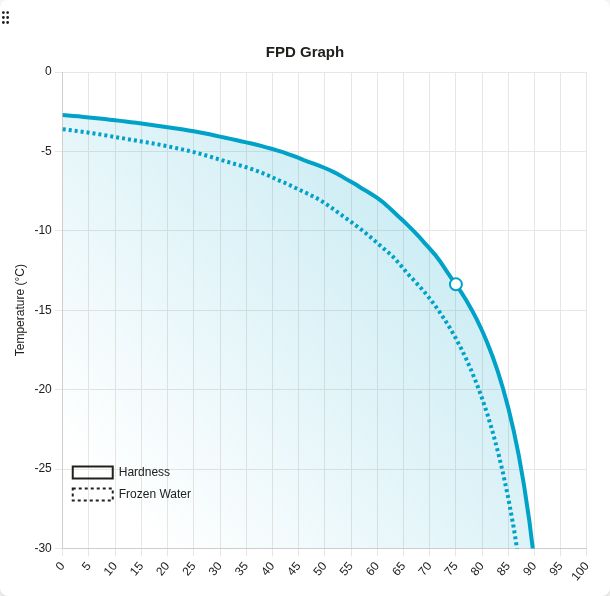
MixProperties::fpd contains an FPD struct which, in addition to the properties accessible
via FpdKey, also contains Curves with detailed data about the freezing point depression
curves of the mix. This can be accessed like this:
let curves = &mix_properties.fpd.curves;

assert_eq!(curves.frozen_water.len(), 100);
assert_eq!(curves.hardness.len(), 100);
assert_eq_float!(curves.frozen_water[0].temp, mix_properties.get(FPD.into()));
assert_eq_float!(curves.hardness[75].temp, mix_properties.get(ServingTemp.into()));
The data in Curves can be used to create visualizations of the freezing point depression
behavior of the mix, including the relationship between temperature and frozen water content, and
the relationship between temperature and estimated hardness. For example, the graph below shows the
frozen water and hardness curves:
§Features
The library has the following features that enable optional functionality:
data: Enables embedded ingredient definitions data fromdata/ingredients, accessible via thedatamodule, e.g.get_all_ingredient_specs. This can be used to access pre-definedIngredientSpecs, in most cases obviating the need for users to define their own. If thedatabasefeature is enabled, it can also be used to seed anIngredientDatabaseviaIngredientDatabase::new_seeded_from_embedded_data. This feature is enabled by default.database: Enables theIngredientDatabasestruct and related functionality, which provides an in-memory database ofIngredients that can be looked up by name. It can be seeded withIngredients andIngredientSpecs defined by the user. Alternatively, if thedatafeature is enabled, it can be seeded with the embedded ingredient definitions data viaIngredientDatabase::new_seeded_from_embedded_data. This feature is enabled by default.wasm: Enables WebAssembly support, including TypeScript bindings viawasm-bindgenandwasm-pack, and utilities to facilitate JS <-> WASM interoperability. This allows the library to be used in web applications. See WASM Interoperability for more information. This feature is not enabled by default.
§Ingredient/Mix Composition
The composition of an ingredient or mix is the most fundamental representation of its properties; it directly represents many key quantities and aspects that are relevant to the formulation of ice cream mixes, e.g. fat and sugar content, milk solids non-fat (MSNF), sweetness as Potere Dolcificante (POD), PAC, energy in kcal, etc., and is the basis for all further calculation and analyses, e.g. Freezing Point Depression (FPD) calculations. It is the core of the functionality of this library.
Composition is the top-level struct that holds the full breakdown of the composition of an
ingredient or mix, including various sub-structs that represent different aspects of the
composition, e.g. SolidsBreakdown, Fats, Carbohydrates, Sugars, etc. Most values are
expressed in terms of grams per 100g of total ingredient/mix, with some exceptions, e.g. POD and PAC
are expressed as a sucrose equivalence, energy is expressed in kcal per 100g, Abs.PAC is expressed
as a ratio, etc. See the composition module and each type’s documentation for more details.
Due to the complexity and level of detail of these types, they are primarily intended for
internal use within the library, and to be constructed internally from more user-friendly input
types; see Ingredient Specifications. They are not necessarily
intended to be constructed directly by users, but they are left public and can be used directly if
needed for advanced use cases not covered by the library. See the composition module for more
details and examples of how to construct and use these types.
As an example, the code snippet below shows how to construct a Composition for ‘2% Milk’,
utilizing various sub-structs, their calculations methods, e.g. to_pod,
to_pac, energy, etc. and several constants
from the constants module, e.g. STD_MSNF_IN_MILK_SERUM, STD_LACTOSE_IN_MSNF, etc.
use sci_cream::{CompKey::*, composition::*, constants::{composition::*, pac}};

let msnf = (100.0 - 2.0) * STD_MSNF_IN_MILK_SERUM;
let lactose = msnf * STD_LACTOSE_IN_MSNF;
let proteins = msnf * STD_PROTEIN_IN_MSNF;

let milk_solids = SolidsBreakdown::new()
    .fats(
        Fats::new()
            .total(2.0)
            .saturated(2.0 * STD_SATURATED_FAT_IN_MILK_FAT)
            .trans(2.0 * STD_TRANS_FAT_IN_MILK_FAT),
    )
    .carbohydrates(Carbohydrates::new().sugars(Sugars::new().lactose(lactose)))
    .proteins(proteins)
    .others(msnf - lactose - proteins);

let pod = milk_solids.carbohydrates.to_pod()?;
let pac = PAC::new()
    .sugars(milk_solids.carbohydrates.to_pac()?)
    .msnf_ws_salts(msnf * pac::MSNF_WS_SALTS / 100.0);

// Composition for 2% milk
let comp = Composition::new()
    .energy(milk_solids.energy()?)
    .solids(Solids::new().milk(milk_solids))
    .pod(pod)
    .pac(pac);

assert_eq_float!(comp.get(Energy), 49.576);
assert_eq_float!(comp.get(MilkFat), 2.0);
assert_eq_float!(comp.get(Lactose), 4.807);
assert_eq_float!(comp.get(MSNF), 8.82);
assert_eq_float!(comp.get(MilkProteins), 3.087);
// ...§Ingredient Specifications
An Ingredient is defined chiefly by its Composition, which is used to calculate its
contributions to the overall properties of a mix. The Composition struct is very complex and
subject to change as more tracking and properties are added, which makes directly defining it for
each ingredient very cumbersome and error-prone, to the point of being impractical.
Instead, we define various specifications or “specs” that provide greatly simplified interfaces for
defining ingredients of different common categories, such as dairy, sweeteners, fruits, etc. These
specs are then internally converted into the full Composition struct using a multitude of
researched calculation and typical composition data. This allows for much easier and more intuitive
ingredient definitions, while still providing accurate and detailed composition data for
calculations. See the specs module for more details about the different specs that are
available, and examples of how to use them.
As an example, the code snippet below shows how to define a Composition for ‘2% Milk’ using
the DairySpec, which only requires the user to specify the fat content. The resulting
composition is equivalent to the one constructed in the previous example.
use sci_cream::{CompKey::*, composition::IntoComposition, specs::DairySpec};

let dairy_spec = DairySpec { fat: 2.0, msnf: None };
let comp = dairy_spec.into_composition()?;

assert_eq_float!(comp.get(Energy), 49.576);
assert_eq_float!(comp.get(MilkFat), 2.0);
assert_eq_float!(comp.get(Lactose), 4.807);
assert_eq_float!(comp.get(MSNF), 8.82);
assert_eq_float!(comp.get(MilkProteins), 3.087);
// ...
Specs can also be deserialized from JSON format - they are actually designed to be most
user-friendly when defined in JSON. This allows them to be easily defined in external files, stored
in databases, sent over APIs, etc. See the documentation of each spec for more details and examples
of how to define them in JSON. More expansively, the ingredient definitions in the embedded data are
all defined as JSON strings of IngredientSpecs and serve as good examples, located at
data/ingredients.
For example, "DairySpec": { "fat": 2 } is the JSON representation of the DairySpec example
above for ‘2% Milk’. Typically they are defined as IngredientSpecs that
include the ingredient name and category as well. Below is an example for a ‘2% Milk’ ingredient.
{
  "name": "2% Milk",
  "category": "Dairy",
  "DairySpec": { "fat": 2 }
}
Below is an example of a more complex SweetenerSpec for ‘Splenda (Sucralose)’. This spec
has several more fields, including sweeteners holding a
Sweeteners struct which itself is relatively complex, as well as basis
for CompositionBasis specification, and Scaling and Unit specifiers for some fields like
pod and pac. See the specs::units module for
more details about composition basis, units, and scaling. The embedded ingredient definition JSON
files include comments that detail how the values in the spec were determined.
{
  "name": "Splenda (Sucralose)",
  "category": "Sweetener",
  "SweetenerSpec": {
    "sweeteners": {
      "sugars": { "glucose": 55.0 },
      "artificial": { "sucralose": 1.32 }
    },
    "other_carbohydrates": 38.68,
    "ByTotalWeight": { "water": 5 },
    "pod": { "OfWhole": 840 },
    "pac": { "OfWhole": { "grams": 112.6 } }
  },
  "comments": "POD value taken from..."
}
“POD value taken from the manufacturer’s suggested 2tsp:1packet sugar to sweetener conversion,
where a teaspoon of granulated sugar is 4.2g (see
constants::density::GRAMS_IN_TEASPOON_OF_SUGAR) and a packet is 1g (from the manufacturer’s
packaging and empirically measured with a 0.01g precision scale). The composition is inferred from
the ingredient list, assuming 55% dextrose, ~40% maltodextrin, 5% water, and enough sucralose to
reach a POD of 840 (works out to ~1.32% using a POD of 11 for maltodextrin). PAC is calculated for
55% dextrose and 40% Maltodextrin 10 DE with a PAC of 18. Energy is calculated internally from the
composition. https://www.splenda.com/product/splenda-sweetener-packets/”
§WASM Interoperability
If the wasm feature is enabled, the library can be compiled to WebAssembly - target
wasm32-unknown-unknown - and used in web applications. The library includes TypeScript bindings
via wasm-bindgen and
wasm-pack, and utilities to facilitate JS <-> WASM
interoperability. Running pnpm build:package either at the repo root or at the package level will
build the library with the wasm, data, and database features enabled and generate the
corresponding WASM and TypeScript bindings. These can be imported and used as such:
import {
  getIngredientSpecByName,
  into_ingredient_from_spec,
  Recipe,
  RecipeLine,
  CompKey,
  FpdKey,
  compToPropKey,
  fpdToPropKey,
  getMixProperty,
} from "@workspace/sci-cream";

const RECIPE = [
  ["Whole Milk", 245],
  ["Whipping Cream", 215],
  ["Cocoa Powder, 17% Fat", 28],
  ["Skimmed Milk Powder", 21],
  ["Egg Yolk", 18],
  ["Dextrose", 45],
  ["Fructose", 32],
  ["Salt", 0.5],
  ["Rich Ice Cream SB", 1.25],
  ["Vanilla Extract", 6],
];

const recipeLines = RECIPE.map(
([name, quantity]) =>
    new RecipeLine(
    into_ingredient_from_spec(getIngredientSpecByName(name as string)!),
    quantity as number,
    ),
);

const recipe = new Recipe("Chocolate Ice Cream", recipeLines);
const mix_properties = recipe.calculate_mix_properties();

const comp = mix_properties.composition;
expect(comp.get(CompKey.Energy)).toBeCloseTo(228.865);
expect(comp.get(CompKey.MilkFat)).toBeCloseTo(13.602);
expect(comp.get(CompKey.Lactose)).toBeCloseTo(4.836);
// ...

const fpd = mix_properties.fpd;
expect(fpd.get(FpdKey.FPD)).toBeCloseTo(-3.604);
expect(fpd.get(FpdKey.ServingTemp)).toBeCloseTo(-13.371);
expect(fpd.get(FpdKey.HardnessAt14C)).toBeCloseTo(76.268);

// Via prop keys:
expect(getMixProperty(mix_properties, compToPropKey(CompKey.Energy))).toBeCloseTo(228.865);
expect(getMixProperty(mix_properties, fpdToPropKey(FpdKey.FPD))).toBeCloseTo(-3.604);
When using the package in this manner, one needs to be mindful of the performance overhead of doing
JS <-> WASM crossings, which can be very expensive in some cases. See the benchmarks in
benches/ts that explore this issue, tracked here. In general, it
is best to minimize the number of crossings and keep as much of the logic as possible on the WASM
side. To facilitate this, the library provides the [wasm::Bridge], which in addition to being
performant, also provides a more ergonomic interface for JS <-> WASM interoperability. It can be
used as such:
import {
  Bridge as WasmBridge,
  new_ingredient_database_seeded_from_embedded_data,
} from "@workspace/sci-cream";

const bridge = new WasmBridge(new_ingredient_database_seeded_from_embedded_data());
const mix_properties = bridge.calculate_recipe_mix_properties(RECIPE);

expect(mix_properties.composition.get(CompKey.Energy)).toBeCloseTo(228.865);
// ...
expect(mix_properties.fpd.get(FpdKey.FPD)).toBeCloseTo(-3.604);
// ...Re-exports§
pub use composition::CompKey;pub use composition::Composition;pub use fpd::FPD;pub use fpd::FpdKey;pub use ingredient::Category;pub use ingredient::Ingredient;pub use properties::MixProperties;pub use properties::PropKey;pub use recipe::Recipe;pub use database::IngredientDatabase;
Modules§
- composition
Compositionand related constituent types which represent the full breakdown of an ingredient or ice cream mix’s composition, including all key components and their properties.- constants
- Constants and associated utilities for various ingredient properties
- data
- Inclusion and access of embedded ingredient specification data
- database
- In-memory database for ingredient definition lookups
- display
- Utilities to facilitate displaying various keys and values
- docs
- Freezing Point Depression
- error
- Error types for Sci-Cream.
- fpd
- Freezing Point Depression (FPD) properties and associated calculations.
- ingredient
- Types and utilities for representing ice cream ingredients
- properties
- Types that encapsulate various properties of ice cream mixes
- recipe
- Recipe related logic, including the main
Recipestruct and related types. - specs
- This module contains the various specifications that are used to define ingredient compositions.
- util
- Miscellaneous utility functions used across the codebase.
- validate
- Functions and framework for validating data structures and values across sci-cream.
Macros§
- assert_
eq_ float - Asserts for floating point comparisons in doc tests
- main_
recipe - Main recipe as
OwnedLightRecipefor doc tests