raster/image.rs
1//! A module for generic representation of image.
2
3
4// from rust
5use std::collections::HashMap;
6
7// from external crate
8
9
10// from local crate
11use error::{RasterError, RasterResult};
12use color::Color;
13
14/// A struct for easily representing a raster image.
15#[derive(Debug, Clone)]
16pub struct Image {
17 /// Width of image in pixels.
18 pub width: i32, // i32 type is used as computation with negative integers is common.
19
20 /// Height of image in pixels.
21 pub height: i32,
22
23 /// Vector containing sequence of bytes in RGBA format.
24 pub bytes: Vec<u8>,
25}
26
27impl<'a> Image {
28
29 /// Create a blank image. Default color is black.
30 ///
31 /// # Examples
32 ///
33 /// ```
34 /// use raster::Image;
35 ///
36 /// let image = Image::blank(2, 2);
37 ///
38 /// println!("{:?}", image.bytes);
39 ///
40 /// assert_eq!(image.width, 2);
41 /// assert_eq!(image.height, 2);
42 /// ```
43 pub fn blank(w:i32, h:i32) -> Image {
44
45 let mut bytes = Vec::with_capacity((w * h) as usize * 4);
46 for _ in 0..h {
47 for _ in 0..w {
48 bytes.extend_from_slice(&[0, 0, 0, 255]);
49 }
50 }
51 Image {
52 width: w,
53 height: h,
54 bytes: bytes
55 }
56 }
57
58 /// Check if there is a pixel at this location given by x and y.
59 ///
60 /// # Examples
61 ///
62 /// ```
63 /// use raster::Image;
64 ///
65 /// let image = Image::blank(2, 2);
66 ///
67 /// assert_eq!(image.check_pixel(0, 0), true);
68 /// assert_eq!(image.check_pixel(3, 3), false);
69 /// ```
70 pub fn check_pixel(&self, x: i32, y:i32) -> bool {
71 if y < 0 || y > self.height { // TODO: check on actual vectors and not just width and height?
72 false
73 } else {
74 !(x < 0 || x > self.width)
75 }
76 }
77
78 /// Get the histogram of the image.
79 ///
80 /// # Examples
81 ///
82 /// Visualizing the histogram of the red channel of this image:
83 ///
84 /// Image:
85 ///
86 /// 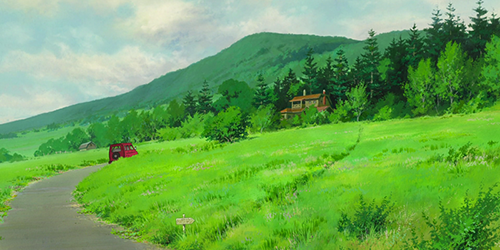
87 ///
88 /// Code:
89 ///
90 /// ```
91 /// use raster::Image;
92 /// use raster::Color;
93 ///
94 /// let image = raster::open("tests/in/sample.png").unwrap();
95 ///
96 /// let (r_bin, _, _, _) = image.histogram().unwrap();
97 ///
98 /// let mut max_r_bin = 0;
99 /// for (_, count) in &r_bin {
100 /// if *count > max_r_bin {
101 /// max_r_bin = *count;
102 /// }
103 /// }
104 ///
105 /// let canvas_w = 256;
106 /// let canvas_h: i32 = 100;
107 /// let mut image = Image::blank(canvas_w, canvas_h);
108 /// raster::editor::fill(&mut image, Color::rgb(214, 214, 214)).unwrap();
109 ///
110 /// for x in 0..256 as i32 { // 0-255
111 /// let key = x as u8;
112 /// match r_bin.get(&key) {
113 /// Some(count) => {
114 ///
115 /// let height = (canvas_h as f32 * (*count as f32 / max_r_bin as f32)).round() as i32;
116 ///
117 /// for y in canvas_h-height..canvas_h {
118 ///
119 /// image.set_pixel(x, y, Color::hex("#e22d11").unwrap()).unwrap();
120 ///
121 /// }
122 /// },
123 /// None => {}
124 /// }
125 /// }
126 ///
127 /// raster::save(&image, "tests/out/histogram.png").unwrap();
128 /// ```
129 ///
130 /// Histogram:
131 ///
132 /// 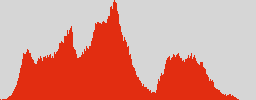
133 ///
134 /// Photoshop's result:
135 ///
136 /// 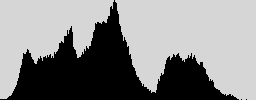
137 ///
138 pub fn histogram(&self) -> RasterResult<Histogram> {
139 let w = self.width;
140 let h = self.height;
141
142 let mut r_bin: HashMap<u8, u32> = HashMap::new();
143 let mut g_bin: HashMap<u8, u32> = HashMap::new();
144 let mut b_bin: HashMap<u8, u32> = HashMap::new();
145 let mut a_bin: HashMap<u8, u32> = HashMap::new();
146 for y in 0..h {
147 for x in 0..w {
148 let pixel = try!(self.get_pixel(x, y));
149
150 let r_bin_c = r_bin.entry(pixel.r).or_insert(0); // Insert the key with a value of 0 if key does not exist yet. Then return the count (which is zero).
151 *r_bin_c += 1; // +1 to the count.
152
153 let g_bin_c = g_bin.entry(pixel.g).or_insert(0);
154 *g_bin_c += 1;
155
156 let b_bin_c = b_bin.entry(pixel.b).or_insert(0);
157 *b_bin_c += 1;
158
159 let a_bin_c = a_bin.entry(pixel.a).or_insert(0);
160 *a_bin_c += 1;
161
162 }
163 }
164
165 Ok((r_bin, g_bin, b_bin, a_bin))
166 }
167
168 /// Get pixel in a given x and y location of an image.
169 ///
170 /// # Errors
171 ///
172 /// If either the x or y coordinate falls out of bounds, this will fail with
173 /// `RasterError::PixelOutOfBounds`.
174 ///
175 /// # Examples
176 ///
177 /// ```
178 /// use raster::Image;
179 /// use raster::Color;
180 ///
181 /// let mut image = Image::blank(2, 2); // Creates a 2x2 black image.
182 ///
183 /// let pixel = image.get_pixel(0, 0).unwrap();
184 ///
185 /// assert_eq!(0, pixel.r);
186 /// assert_eq!(0, pixel.g);
187 /// assert_eq!(0, pixel.b);
188 /// assert_eq!(255, pixel.a);
189 /// ```
190 pub fn get_pixel(&self, x: i32, y:i32) -> RasterResult<Color> {
191 let rgba = 4;
192 let start = (y * self.width) + x;
193 let start = start * rgba;
194 let end = start + rgba;
195 let len = self.bytes.len();
196
197 if start as usize > len || end as usize > len {
198 Err(RasterError::PixelOutOfBounds(x, y))
199 } else {
200 let slice = &self.bytes[start as usize..end as usize];
201 Ok(Color {
202 r: slice[0],
203 g: slice[1],
204 b: slice[2],
205 a: slice[3],
206 })
207 }
208 }
209
210 /// Set pixel in a given x and y location of an image.
211 ///
212 /// # Errors
213 ///
214 /// If either the x or y coordinate falls out of bounds, this will fail with
215 /// `RasterError::PixelOutOfBounds`.
216 ///
217 /// If the calculated byte start index is less than 0, this will fail with
218 /// `RasterError::InvalidStartIndex`.
219 ///
220 /// # Examples
221 ///
222 /// ```
223 /// use raster::Image;
224 /// use raster::Color;
225 ///
226 /// let mut image = Image::blank(2, 2); // Creates a 2x2 black image.
227 ///
228 /// let _ = image.set_pixel(0, 0, Color::rgba(255, 0, 0, 255)); // Set first pixel to red
229 ///
230 /// let pixel = image.get_pixel(0, 0).unwrap();
231 ///
232 /// assert_eq!(255, pixel.r);
233 /// assert_eq!(0, pixel.g);
234 /// assert_eq!(0, pixel.b);
235 /// assert_eq!(255, pixel.a);
236 /// ```
237 pub fn set_pixel(&mut self, x: i32, y:i32, color: Color ) -> RasterResult<()> {
238 let rgba = 4; // length
239 let start = (y * &self.width) + x;
240 let start = start * rgba;
241
242 if x >= self.width || y >= self.height {
243 Err(RasterError::PixelOutOfBounds(x, y))
244 } else if start < 0 {
245 Err(RasterError::InvalidStartIndex(start))
246 } else {
247 self.bytes[start as usize] = color.r;
248 self.bytes[start as usize + 1] = color.g;
249 self.bytes[start as usize + 2] = color.b;
250 self.bytes[start as usize + 3] = color.a;
251
252 Ok(())
253 }
254 }
255}
256
257/// Holds histogram information.
258pub type Histogram = (HashMap<u8, u32>, HashMap<u8, u32>, HashMap<u8, u32>, HashMap<u8, u32>);
259
260/// Enumeration of supported raster formats.
261#[derive(Debug)]
262pub enum ImageFormat {
263 Gif,
264 Jpeg,
265 Png,
266}