plotpy/lib.rs
1//! Rust plotting library using Python and Matplotlib
2//!
3//! This library implements high-level functions to generate plots and drawings.
4//! Although we use Python/Matplotlib, the goal is to provide a convenient Rust library
5//! that is **different** than Matplotlib. The difference happens because we want **convenience**
6//! for the Rust developer while getting the **fantastic quality of Matplotlib** 😀.
7//!
8//! Internally, we use [Matplotlib](https://matplotlib.org/) via a Python 3 script.
9//! First, we generate a python code in a directory of your choice (e.g., `/tmp/plotpy`),
10//! and then we call **python3** using Rust's [std::process::Command].
11//!
12//! The Python script has the same name as the figure name given to the [Plot::save] function,
13//! but with the `.py` extension. The figure name can have the (png, pdf, or svg) extension
14//! (see [Matplotlib](https://matplotlib.org/stable/api/_as_gen/matplotlib.pyplot.savefig.html))
15//! for more information regarding file extensions.
16//!
17//! We generate the Python script with the preamble listed in [PYTHON_HEADER] and the file
18//! should be useful for double checking or even directly adding Python/Matplotlib commands,
19//! in case the functionality is not implemented here yet.
20//!
21//! When calling [Plot::save()] or [Plot::show()], if an error occurs, we generate a log
22//! file in the same output directory with the same filename as the figure (and python script),
23//! but with the `.log` extension.
24//!
25//! The typical use of this library is by allocating structures such as [Canvas], [Curve], [Contour],
26//! [Histogram], [Surface], [Text] (and more) and then passing them to [Plot] for the generation
27//! of the files mentioned above. The [Plot::show()] function may also be used to immediately
28//! see the plot or drawing on the screen.
29//!
30//! Alternatively, [if evcxr is installed](https://github.com/evcxr/evcxr), the function
31//! [Plot::show_in_jupyter()] can be used to show the resulting figure in a Jupyter notebook.
32//!
33//! Each structure (e.g. [Curve], [Legend], or [Text]) defines many configuration options
34//! that can be set by calling their own `set_...` function. Typically, these structures provide
35//! `draw_...` functions to plot/draw features. Afterwards, we call [Plot::add] to add these structures
36//! to the [Plot] and then call [Plot::save]. The `draw` method of each object must be called
37//! before adding to `Plot`.
38//!
39//! # Example
40//!
41//! ```
42//! use plotpy::{generate3d, Plot, StrError, Surface};
43//!
44//! fn main() -> Result<(), StrError> {
45//! let mut surface = Surface::new();
46//! surface
47//! .set_with_wireframe(true)
48//! .set_colormap_name("Pastel1")
49//! .set_with_colorbar(true)
50//! .set_colorbar_label("temperature")
51//! .set_wire_line_color("#1862ab")
52//! .set_wire_line_style(":")
53//! .set_wire_line_width(0.75);
54//!
55//! // draw surface
56//! let n = 9;
57//! let (x, y, z) = generate3d(-2.0, 2.0, -2.0, 2.0, n, n, |x, y| x * x + y * y);
58//! surface.draw(&x, &y, &z);
59//!
60//! // add surface to plot
61//! let mut plot = Plot::new();
62//! plot.add(&surface);
63//!
64//! // save figure
65//! plot.save("/tmp/plotpy/example_main.svg")?;
66//! Ok(())
67//! }
68//! ```
69//!
70//! 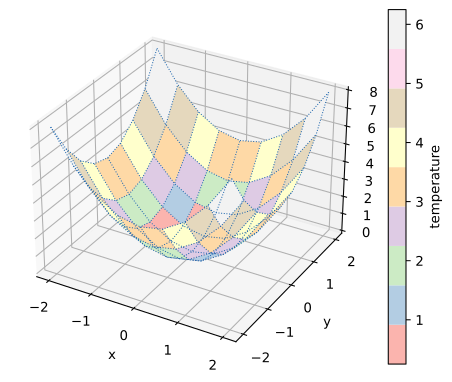
71
72/// Defines a type alias for the error type as a static string
73pub type StrError = &'static str;
74
75// modules
76mod as_matrix;
77mod as_vector;
78mod auxiliary;
79mod barplot;
80mod boxplot;
81mod canvas;
82mod constants;
83mod contour;
84mod conversions;
85mod curve;
86mod fileio;
87mod histogram;
88mod image;
89mod inset_axes;
90mod legend;
91mod plot;
92mod slope_icon;
93mod super_title_params;
94mod surface;
95mod surface_geometry;
96mod text;
97
98// re-export
99pub use as_matrix::*;
100pub use as_vector::*;
101pub use auxiliary::*;
102pub use barplot::*;
103pub use boxplot::*;
104pub use canvas::*;
105pub use constants::*;
106pub use contour::*;
107use conversions::*;
108pub use curve::*;
109use fileio::*;
110pub use histogram::*;
111pub use image::*;
112pub use inset_axes::*;
113pub use legend::*;
114pub use plot::*;
115pub use slope_icon::*;
116pub use super_title_params::*;
117pub use surface::*;
118pub use text::*;
119
120// run code from README file
121#[cfg(doctest)]
122mod test_readme {
123 macro_rules! external_doc_test {
124 ($x:expr) => {
125 #[doc = $x]
126 extern "C" {}
127 };
128 }
129 external_doc_test!(include_str!("../README.md"));
130}