
nimbus-tui
A ranger-style terminal file manager over nimbus vaults: a list of registered vaults, and inside
each one a browsable object tree, backed by any nimbus-vault origin — a local
directory, an HTTP API, a shell command, or another vault. Every operation goes through
nimbus-core's App, so the TUI and nimbus-cli do the same things by the
same code path.
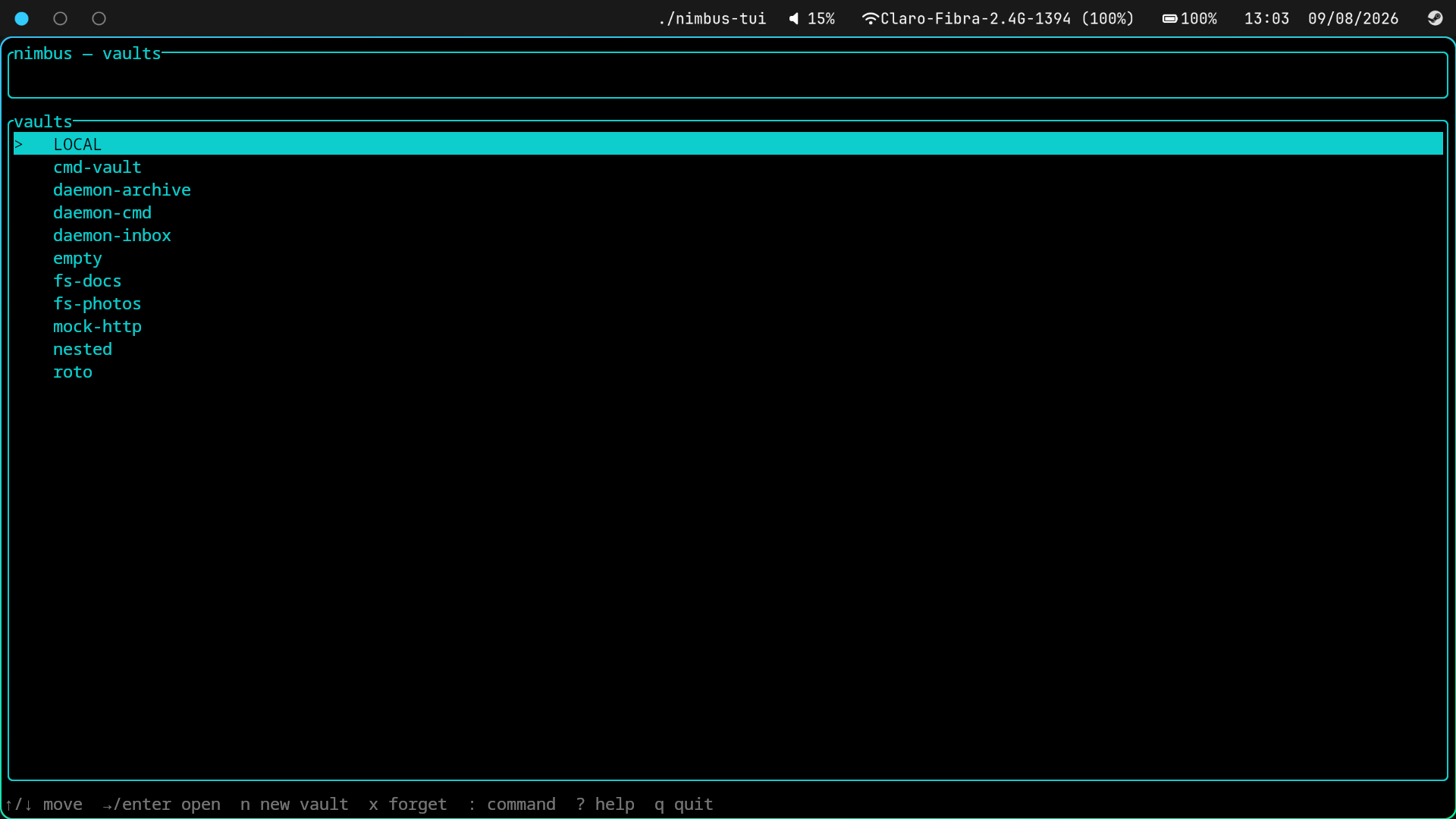
The vault list comes up first: every registered vault, with the root-level keybinding hints along the bottom. Entering one shows its objects with size and modified-time columns, directories grouped first and accented so they read at a glance.
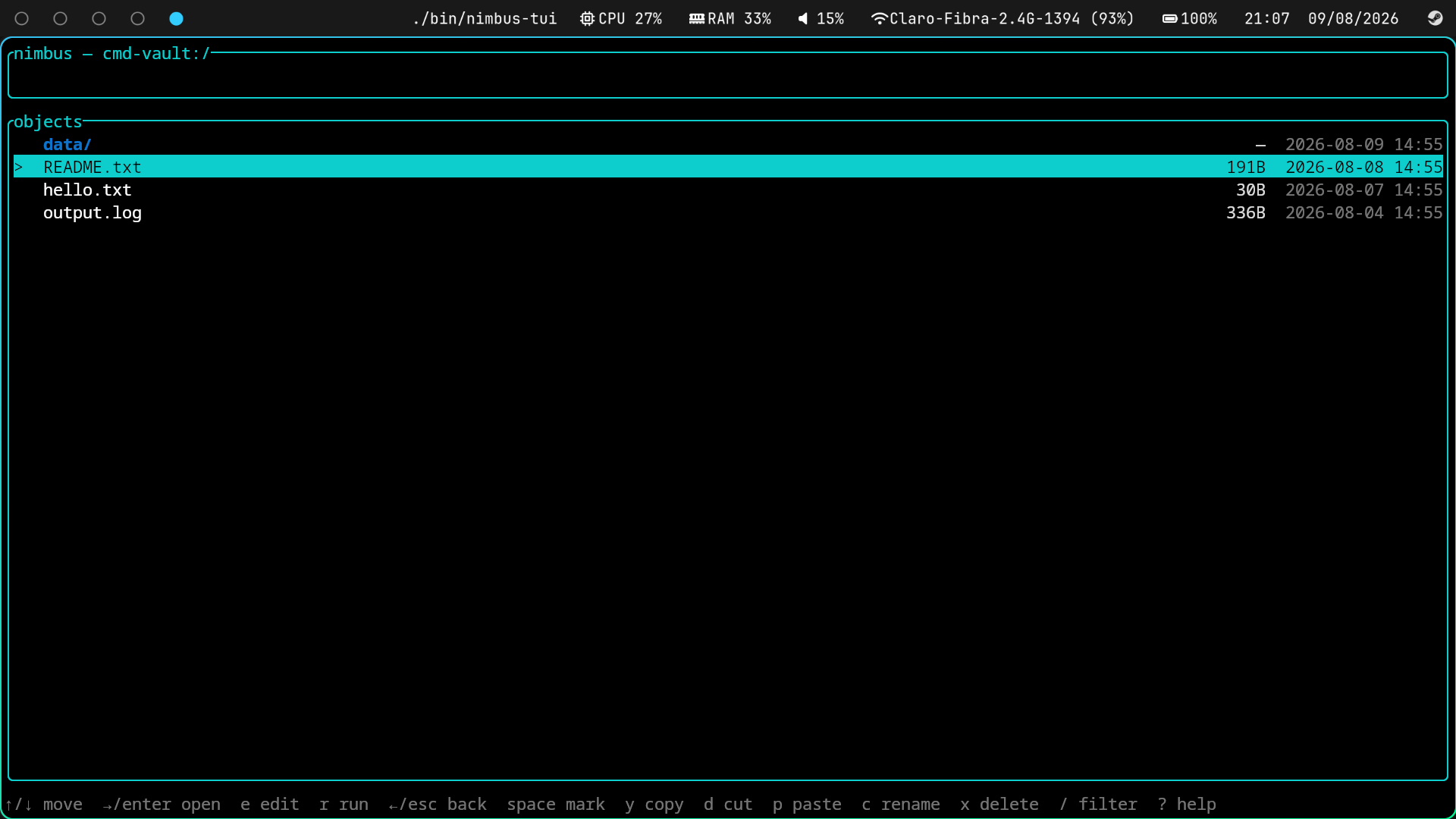
Which backend a vault happens to use stops mattering at that point. The one above is a
command origin — a POSIX script answers list and get, a cat reads an object, an rm
deletes one — and it browses exactly like the local directory below it.
Just a file manager
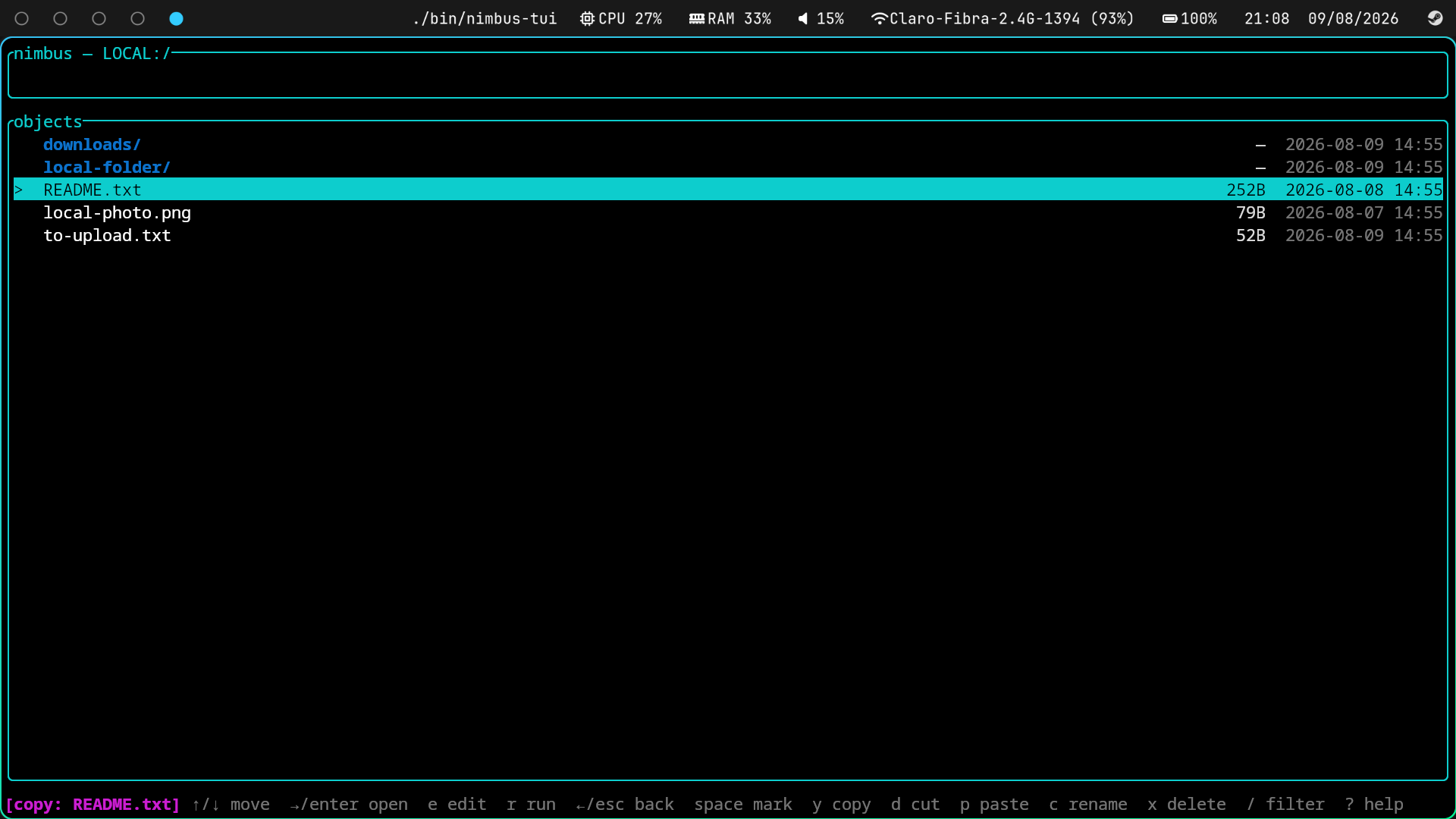
Nothing has to be configured first. LOCAL is your own filesystem, registered automatically and
rooted at $HOME (default_local_vault and local_vault_path in nimbus-core's
cli_config.toml change both), so a fresh install is already a working terminal file manager:
navigate, mark, copy, move, rename, create, delete, sort, filter, open files in $EDITOR, run
them. Every key below works inside LOCAL with no vault registered at all.
Registering vaults is what turns it into a sync tool, and it's opt-in — add one when there's
somewhere else the files should go. default_local_vault = false goes the other way and keeps it
off your filesystem entirely.
Keys
Navigation
| Key | Does |
|---|---|
↑/↓ or k/j |
move the selection |
→/Enter or l |
enter a vault or directory, or open a file |
←/Esc or h |
go up a directory, or back to the vault list |
q / Ctrl-C |
quit |
Opening files
| Key | Does |
|---|---|
→/Enter or l |
open with the OS's default application |
e |
open in $EDITOR, whatever the OS would have picked |
r |
run the file as a program |
See Opening files for what each one does with the temp copy.
Selecting
| Key | Does |
|---|---|
Space |
mark/unmark the object, and step down |
/ |
filter the listing as you type |
Esc |
clear the filter (then: go up a directory) |
Copy, cut and delete act on every marked object at once, or on the object under the cursor when nothing is marked. Marks and filters are dropped when you leave the directory.
Copy & move
| Key | Does |
|---|---|
y |
yank (copy) the marked objects, or the cursor |
d |
cut the marked objects, or the cursor |
p |
paste into the directory you're browsing |
The clipboard holds fully-qualified vault:/path specs, so navigating to a different vault
before pasting is what makes a cross-vault copy or move. Directories are copied recursively.
While something is held, the footer leads with [copy: <what>] or [cut: <what>] — the pending
p is the one piece of state you can't see anywhere else in the list, and it survives walking
out of the vault you yanked from, which is exactly when you need reminding of it.
Create, rename & delete
| Key | Does |
|---|---|
a |
add a directory here |
t |
add an empty file here |
c / F2 |
rename the selected object |
x / Del |
delete marked objects, or the cursor — asks first |
c opens a prompt pre-filled with the object's current name, so a rename is an edit rather
than a retype — changing an extension or adding a suffix costs a few keys. Enter applies it,
Esc abandons it, and submitting the name unchanged is a silent no-op rather than an error.
a and t pre-fill the : command line instead: a new object's name has to be typed from
scratch either way, so there'd be nothing for a dedicated prompt to offer.
Deleting a directory takes everything inside it. There is no trash and no undo — the y/N
confirmation is the only thing between you and a gone directory.
View
| Key | Does |
|---|---|
s / S |
cycle the sort key (name → size → modified) / reverse the order |
. |
show or hide dot-prefixed names |
R |
reload the listing from the origin |
Directories always sort before files, whichever key and direction you pick — S reverses within
each group rather than burying every directory at the bottom.
Other
| Key | Does |
|---|---|
n |
create a vault with the setup wizard |
x (on the vault list) |
stop tracking a vault |
: |
open the command line |
? |
toggle the help overlay |
Forgetting a vault only unregisters it — its config file and everything in its origin are left where they are.
The : command line
: accepts the same commands as nimbus-cli, with the same syntax:
:mkdir docs
:rename notes.txt journal.md
:cp notes.txt backup:/inbox
:delete old.txt --force
:push backup
The grammar is AppEvent (in event.rs), which derives clap::Subcommand — so the command
line, the keybindings, and the help overlay's COMMANDS section all come from one definition and
can't drift apart. :help (or ?) opens the overlay; it's intercepted before clap, which would
otherwise render help as a parse error whose multi-line text is unreadable in a one-line status
bar.
Paths
| Spec | Means |
|---|---|
notes.txt |
relative to the directory you're in |
/docs/notes.txt |
absolute within the current vault |
backup:/inbox |
the vault named backup, from its root |
A vault: prefix is what tells a vault apart from a directory of the same name — docs is
always a path, docs: is always the vault. A prefix is only recognised when it names a
registered vault, so an object whose name happens to contain a colon still resolves as a path.
cp/mv take either an existing directory (the object keeps its name) or a path that doesn't
exist yet (it lands under that new name). An existing file as the destination is refused rather
than overwritten.
Opening files
All three keys fetch the file to a temp copy first; they differ in what they hand it to.
Enter uses the OS default handler (xdg-open/open/start), falling back to $EDITOR (then
$VISUAL, then vi/notepad) when there's no working association. e skips the association and
goes straight to that same editor — the answer for a file the OS would rather give to a GUI app,
or has no answer for at all. On exit, any edit from either is written back to the object's
origin.
r runs the file itself. The temp copy is chmod'd +x first (a vault stores bytes and names, not
permission bits, so it never arrives executable), and the program inherits the terminal and the
TUI's working directory — so whatever it writes relative to the cwd lands where you started
nimbus, not buried beside the temp copy. When it exits, its output is held on screen until you
press a key; reclaiming the alt screen would otherwise wipe it. Running a program is not editing
it, so nothing is written back — the status line reports ran X or X exited with <status>.
Before handing over the terminal, r checks that the bytes are something this machine can
actually execute: a #! shebang line, or a native binary for this platform (ELF on Linux,
Mach-O on macOS, .exe/.com with an MZ header plus .bat/.cmd on Windows). A document, or
a binary built for another OS, gets X isn't a program instead of a bare Exec format error from
the kernel — and isn't made executable on the way.
None of the three is guaranteed to detach from the terminal — a .desktop entry can carry
Terminal=true (nvim's ships with it), and without a terminal-emulator wrapper xdg-open execs
it straight onto the controlling tty, exactly as $EDITOR and a run program always do. So they
all get the same treatment: the event thread is suspended and raw mode/alt screen released before
spawning, then reclaimed once the child exits. Without that, the TUI and the child fight over the
same stdin and the terminal appears to hang.
Write-back compares content rather than uploading unconditionally, because a plain "look at this
file" would otherwise rewrite it with a new modification time — enough to make the next
push/pull think it diverged. Three honest outcomes:
saved X— the bytes changed and were written back.closed X — unchanged— the editor exited and nothing changed.opened X — edits made after this won't be saved back— the OS opener handed off to a GUI app and returned immediately, so there is genuinely nothing left to capture.
How the editor exited is a note, not a failure — saved X (editor exited with exit status: 1).
Editors exit non-zero for reasons that say nothing about whether the file was written (vim's
:cq, a wrapper script passing something else's status through, a signal), and what goes back to
the vault is decided by what's on disk. The one real failure is an editor that never started.
r is outside all of that: it reports ran X/X exited with <status> and never writes back.
Job control
Everything the TUI launches is in this process's group, so the terminal's signals arrive here too
— and the default action for most of them is to die quietly behind the editor you were typing at.
event.rs watches for that:
- Ctrl-C / Ctrl-\ at a child (SIGINT/SIGQUIT) are dropped while a child holds the terminal.
With no child up they're an outside
kill -INT, and quit properly. The TUI's own Ctrl-C never gets here: raw mode delivers it as a key event, not a signal. - Ctrl-z then
fg(SIGCONT) means claiming the terminal again — being stopped doesn't ask first, so raw mode and the alt screen were left to whatever took over. While a child is up,fgcontinues it too, and reclaiming here would take the terminal out from under it. - SIGTSTP is deliberately not caught. Stopping is what should happen on Ctrl-z — it's what hands the shell back its prompt. Intercepting it would leave the job half-stopped, with the terminal owned by something that isn't listening.
What's here
app.rs—App: the state machine. Holds thenimbus-core::App, the vault/object listings, the clipboard, marks, filter, sort, and any pending confirmation or embedded wizard. It opens on its own vault picker, so it deliberately doesn't callrestore_session()— andnimbus-core'ssave()leaves an unrestored session untouched, so browsing here doesn't wipe wherenimbus-cliwas standing.visible: Vec<usize>indexes intoobjectsand is what the list selects against, so the filter and sort work without disturbing what the vault actually reported; anything reading the selection must go throughselected_object().event.rs—AppEvent(the command grammar, see above) andEventHandler: the tick + crossterm event thread, withsuspend/resumefor handing the terminal to a child, and the signal watcher behind Job control.command.rs— parses a typed:line into anAppEventvia clap, and generates the help overlay's command list from the same definitions.ui.rs— header, footer and help overlay. The footer is built byfooter_lines()and the layout asks it for its height first, so a long error wraps across up to four lines instead of being truncated at the terminal edge.ui/widgets/— the vault and object lists, including the size/modified columns, mark indicators, and middle-eliding name truncation (which keeps a file's extension visible).opener.rs— executable sniffing and launching, the OS-default opener, and the$EDITORfallback.
The vault creation wizard (nimbus-creator) is driven from this crate's own event
loop rather than its blocking run() entry point, so the two never compete for terminal input.
Marks are names, not indices
App::marked is a HashSet<String> of object names. A refresh renumbers the list but doesn't
rename its contents, so indices would silently come to mean different objects after any mutation.
refresh_objects also prunes marks for objects that vanished, or a deleted-then-recreated name
would quietly rejoin the next bulk operation.
Known limits
- Every operation blocks the event loop. Transfers are awaited inline, so the UI freezes for the duration with no progress and no cancel. Imperceptible against a local directory; against a slow HTTP origin a large transfer looks like a hang.
fetch_object_bytescollectsOrigin::fetch's stream into oneVec<u8>rather than streaming it to the temp copy, so opening a large file costs its full size in memory.- No undo and no trash.
Commands
To drive it against origins other than a plain filesystem, see
crates/cli/test/, which holds a vault config per origin type (fs,
http, command, and a vault wrapping another vault) along with reference http/command
origin implementations.
License
Licensed under either of Apache License, Version 2.0 or MIT license at your option — the same terms as the rest of the workspace.