
docs.rs failed to build mctext-1.1.3
Please check the build logs for more information.
See Builds for ideas on how to fix a failed build, or Metadata for how to configure docs.rs builds.
If you believe this is docs.rs' fault, open an issue.
Please check the build logs for more information.
See Builds for ideas on how to fix a failed build, or Metadata for how to configure docs.rs builds.
If you believe this is docs.rs' fault, open an issue.
mctext
Minecraft text formatting, parsing, and rendering library. Features all the exact glyphs used ingame, for the fonts of both pre and post-1.13.
Language Support
| Language | Package | Registry |
|---|---|---|
| Rust | mctext |
crates.io |
| Python | mctext |
PyPI |
| JavaScript | @hexze/mctext |
npm |
Features
- Builder API - Fluent interface for constructing formatted text
- Color Support - All 16 named Minecraft colors plus RGB hex colors
- Style Handling - Bold, italic, underlined, strikethrough, obfuscated
- Font Rendering - Measure and render text with authentic Minecraft fonts
- Legacy Support - Parse
§formatting codes and JSON chat components
Font Showcase
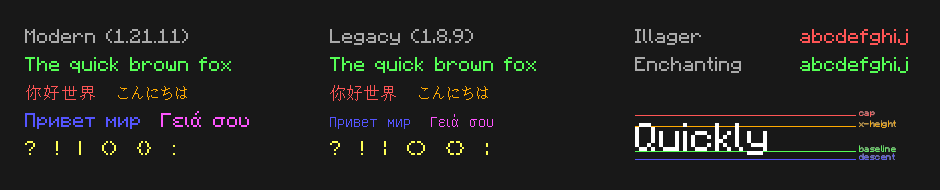
Fonts Only
Looking for just the TTF files? Download them from the releases page:
minecraft-fonts-modern.zip- Latest Minecraft fonts (updated, cleaner look)minecraft-fonts-legacy.zip- Classic fonts for those who prefer pre-1.13minecraft-fonts-special.zip- Enchanting and Illager fonts
Usage
Rust
[]
= "1.0"
# With legacy fonts:
= { = "1.0", = ["legacy-fonts"] }
use ;
let text = new
.span.color
.then.color.bold
.build;
for span in text.spans
Python
=
JavaScript
import init from '@hexze/mctext';
await ;
let text = ......;
License
MIT