1#![doc(html_favicon_url = "https://raw.githubusercontent.com/zenialexandre/lotus/main/assets/textures/icons/lotus_pink_aligned.ico")]
2#![doc(html_logo_url = "https://raw.githubusercontent.com/zenialexandre/lotus/main/assets/textures/lotus_pink_256x256_aligned.png")]
3
4#
6
7Lotus is a game engine with the main focus of being easy-to-use and straight forward on developing 2D games.
8It's based on the Entity-Component-System paradigm, providing windowing, rendering, physics, input handling, and more.<br>
9Heavily inspired by awesome open-source projects like [`Bevy`](https://github.com/bevyengine/bevy), [`Comfy`](https://github.com/darthdeus/comfy) and [`LÖVE`](https://github.com/love2d/love).
10
11----------------
12
13## How it works?
14
15With the power of macros, the engine basic template could be very abstracted and easy to look up to.<br>
16The `your_game!` macro only needs three parameters to make a game real.
17
18-> The window configuration
19- This parameter will be used to personalize and create the game window.
20
21-> The setup function
22- This parameter is a real function that will be ran once at the start of the application.
23- The function should contain a mutable reference to the context as the parameter.
24- Should contain all the initial entity spawning code for the game.
25
26-> The update function
27- This parameter is a real function as well, that will be ran at each frame of the application.
28- The function should contain a mutable reference to the context as the parameter.
29- Should contain all the logic functions behind the game.
30
31----------------
32
33## About assets
34
35Make sure your textures, fonts, sounds and all that nice stuff are inside of the **assets** folder located in the root of your project!<br>
36The engine will use the **CARGO_MANIFEST_DIR** to search for your assets and make sure that all is loaded correctly.<br>
37Your folder tree should look similar to this:<br>
38
39```shell
40my_awesome_2d_application/
41├── assets/
42│ ├── textures/
43│ ├── fonts/
44│ ├── sounds/
45│ └── ...
46├── src/
47│ ├── main.rs
48└── Cargo.toml
49```
50
51You should use your relative paths like this:
52
53```rust
54use lotus_engine::*;
55
56your_game!(
57 WindowConfiguration::default(),
58 setup,
59 update
60);
61
62fn setup(_context: &mut Context) {
63 // As you can see, you DON'T need to use 'assets/' in your relative path.
64 let sprite: Sprite = Sprite::new("textures/lotus_pink_256x256.png".to_string());
65}
66
67fn update(_context: &mut Context) {}
68```
69
70----------------
71
72## The Entity-Component-System paradigm
73
74Lotus uses a custom Entity-Component-System (ECS) archictecture.<br>
75You can see the documentation about it [`here`](https://docs.rs/lotus_engine/0.1.4/lotus_engine/core/ecs/index.html).<br>
76
77As a brief overview:
78
79- Structs defined with the derive macro *Component* are Components that can be spawned in our World within an Entity.
80- Structs defined with the derive macro *Resource* are Resources that can be added to in our World.
81- *Entities* are defined by it's components and every entity has a unique ID.
82- Entities are stored in what is called as *Archetypes* in our World.
83- Archetypes are defined by the Components that our Entities have, so a Archetype will only have Entities with the same Components.
84- The World can store multiple Archetypes, Entities, Components and Resources!
85- And all of them can be queried using the *Query* struct.
86<br><br>
87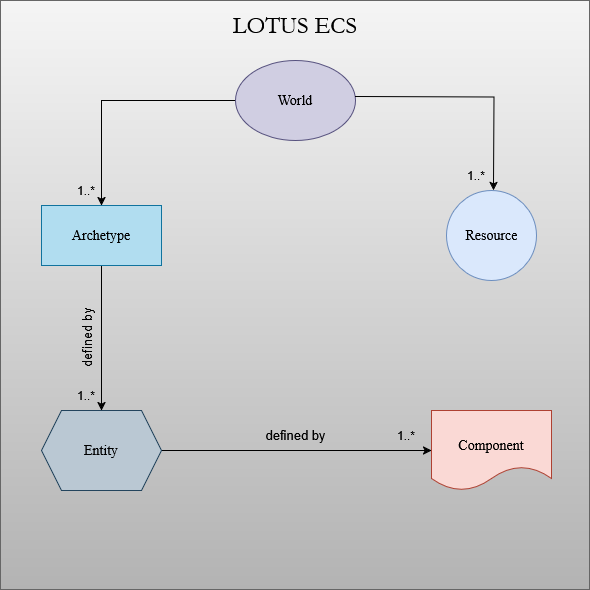
88
89----------------
90
91## Examples
92
93The classic hello world:
94
95```rust
96use lotus_engine::*;
97
98your_game!(
99 WindowConfiguration::default(),
100 setup,
101 update
102);
103
104fn setup(_context: &mut Context) {}
105
106fn update(_context: &mut Context) {
107 eprintln!("Hello World!");
108}
109```
110
111Refer to the [`tutorial`](https://github.com/zenialexandre/lotus/blob/main/tutorial/README.md).<br>
112And here are some more complex initial examples to demonstrate the engine's potential:<br>
113
114- **Pong:** [`examples/pong.rs`](https://github.com/zenialexandre/lotus/blob/main/examples/pong.rs)
115- **Breakout:** [`examples/breakout.rs`](https://github.com/zenialexandre/lotus/blob/main/examples/breakout.rs)
116- **Rendering geometric forms:** [`examples/simple_shapes.rs`](https://github.com/zenialexandre/lotus/blob/main/examples/simple_shapes.rs)
117- **Rendering sprites:** [`examples/simple_sprite.rs`](https://github.com/zenialexandre/lotus/blob/main/examples/simple_sprite.rs)
118- **Simple physics simulation:** [`examples/physics_simulation.rs`](https://github.com/zenialexandre/lotus/blob/main/examples/physics_simulation.rs)
119
120----------------
121
122## Engine Architecture Overview
123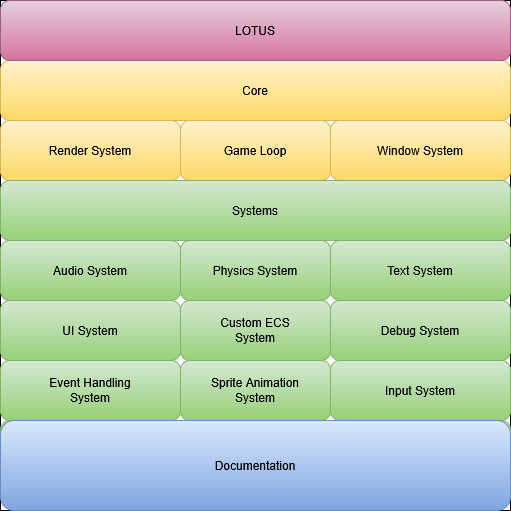
124"#]
125
126pub mod core;
128
129pub mod utils;
131
132pub use core::managers::rendering::manager::*;
133pub use core::managers::windowing::manager::*;
134pub use core::game_loop::*;
135pub use core::asset_loader::AssetLoader;
136pub use core::engine::*;
137pub use core::color::*;
138pub use core::visibility::*;
139pub use core::shape::*;
140pub use core::texture::sprite::*;
141pub use core::texture::sprite_sheet::*;
142pub use core::input::*;
143pub use core::text::*;
144pub use core::camera::camera2d::*;
145pub use core::physics::transform::Transform;
146pub use core::physics::transform::*;
147pub use core::physics::acceleration::*;
148pub use core::physics::collision::*;
149pub use core::physics::velocity::*;
150pub use core::time::timer::*;
151pub use core::draw_order::*;
152pub use core::audio::audio_source::*;
153pub use core::audio::audio_error::*;
154pub use core::ecs::world::*;
155pub use core::ecs::entity::*;
156pub use core::ecs::component::*;
157pub use core::ecs::resource::*;
158pub use core::ecs::query::*;
159pub use lotus_proc_macros::Component;
160pub use lotus_proc_macros::Resource;
161pub use cgmath::*;
162pub use kira::*;
163pub use pollster::block_on;
164pub use winit::keyboard::{KeyCode, PhysicalKey};
165pub use winit::event::MouseButton;
166pub use winit::window::WindowButtons;