1
2
3
4
5
6
7
8
9
10
11
12
13
14
15
16
17
18
19
20
21
22
23
24
25
26
27
28
29
30
31
32
33
34
35
36
37
38
39
40
41
42
43
44
45
46
47
48
49
50
51
52
53
54
55
56
57
58
59
60
61
62
63
64
65
66
67
68
69
70
71
72
73
74
75
76
77
78
79
80
81
82
83
84
85
86
87
88
89
90
91
92
93
94
95
96
97
98
99
100
101
102
103
104
105
106
107
108
109
110
111
112
113
114
115
116
117
118
119
120
121
122
123
124
125
126
127
128
129
130
131
132
133
134
135
136
137
138
139
140
141
142
143
144
145
146
147
148
149
150
151
152
153
154
155
156
157
158
159
160
161
162
163
164
165
166
167
168
169
170
171
172
173
174
175
176
177
178
179
180
181
182
183
184
185
186
187
188
189
190
191
192
193
194
195
196
197
198
199
200
201
202
203
204
205
206
207
208
209
210
211
212
213
214
215
216
217
218
219
220
221
222
223
224
225
226
227
228
229
230
231
232
233
234
235
236
237
238
239
240
241
242
243
244
245
246
247
248
249
250
251
252
253
254
255
256
257
258
259
260
261
262
263
264
265
266
267
268
269
270
271
272
273
274
275
276
277
278
279
280
281
282
283
284
285
286
287
288
289
290
291
292
293
294
295
296
297
298
299
300
301
302
303
304
305
306
307
308
309
310
311
312
313
314
315
316
317
318
319
320
321
322
323
324
325
326
327
328
329
330
331
332
333
334
335
336
337
338
339
340
341
342
343
344
345
346
347
348
349
350
351
352
353
354
355
356
357
358
359
360
361
362
363
364
365
366
367
368
369
370
371
372
373
374
375
376
377
378
379
380
381
382
383
//! Easily create Leptos table components from structs.
//!
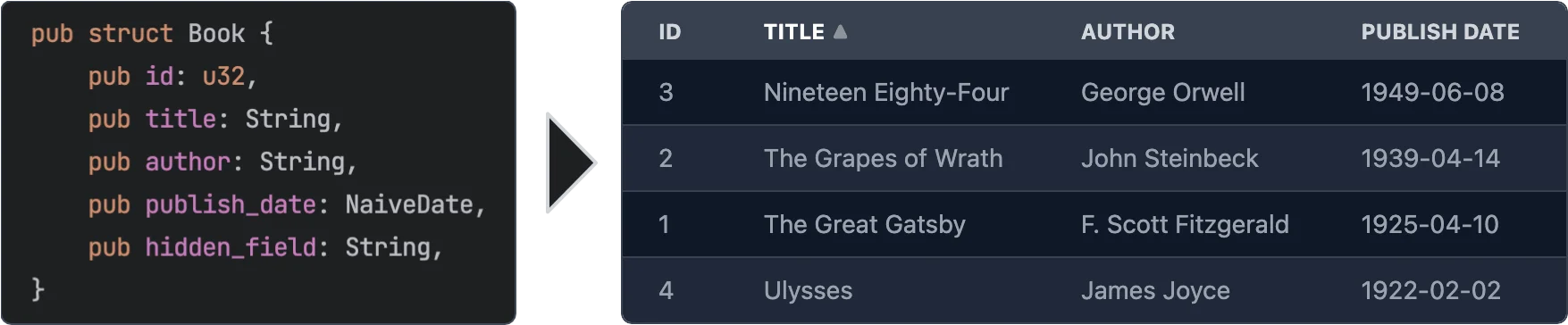
//! 
//!
//! # Features
//!
//! - **Easy to use** - yet powerful.
//! - **Async data loading** - The data is loaded asynchronously. This allows to load data from a REST API or a database etc.
//! - **Selection** - Can be turned off or single/multi select
//! - **Customization** - You can customize every aspect of the table by plugging in your own components for rendering rows, cells, headers. See [Custom Renderers](#custom-renderers) for more information.
//! - **Headless** - No default styling is applied to the table. You can fully customize the classes that are applied to the table. See [Classes customization](#classes-customization) for more information.
//! - **Sorting** - Optional. If turned on: Click on a column header to sort the table by that column. You can even sort by multiple columns.
//! - **Virtualization** - Only the visible rows are rendered. This allows for very large tables.
//! - **Pagination** - Instead of virtualization you can paginate the table.
//! - **Caching** - Only visible rows are loaded and cached.
//! - **Editing** - Optional. You can provide custom renderers for editable cells. See [Editable Cells](#editable-cells) for more information.
//!
//! # Usage
//!
//! ```
//! use leptos::*;
//! use leptos_struct_table::*;
//!
//! #[derive(TableRow, Clone)]
//! #[table(impl_vec_data_provider)]
//! pub struct Person {
//! id: u32,
//! name: String,
//! age: u32,
//! }
//!
//! fn main() {
//! mount_to_body(|| {
//! let rows = vec![
//! Person { id: 1, name: "John".to_string(), age: 32 },
//! Person { id: 2, name: "Jane".to_string(), age: 28 },
//! Person { id: 3, name: "Bob".to_string(), age: 45 },
//! ];
//!
//! view! {
//! <table>
//! <TableContent rows />
//! </table>
//! }
//! });
//! }
//! ```
//!
//! # Macro options
//!
//! The `#[table(...)]` attribute can be used to customize the generated component. The following options are available:
//!
//! ## Struct attributes
//!
//! These attributes can be applied to the struct itself.
//!
//! - **`sortable`** - Specifies that the table should be sortable. This makes the header titles clickable to control sorting. See the [simple example](https://github.com/synphonyte/leptos-struct-table/blob/master/examples/simple/src/main.rs) for more information.
//! - **`classes_provider`** - Specifies the name of the class provider. Used to quickly customize all of the classes that are applied to the table.
//! For convenience sensible presets for major CSS frameworks are provided. See [`TableClassesProvider`] and [tailwind example](https://github.com/synphonyte/leptos-struct-table/blob/master/examples/tailwind/src/main.rs) for more information.
//! - **`head_cell_renderer`** - Specifies the name of the header cell renderer component. Used to customize the rendering of header cells. Defaults to [`DefaultTableHeaderRenderer`]. See the [custom_renderers_svg example](https://github.com/Synphonyte/leptos-struct-table/blob/master/examples/custom_renderers_svg/src/main.rs) for more information.
//! - **`impl_vec_data_provider`** - If given, then [`TableDataProvider`] is automatically implemented for `Vec<ThisStruct>` to allow
//! for easy local data use. See the [simple example](https://github.com/synphonyte/leptos-struct-table/blob/master/examples/simple/src/main.rs) for more information.
//! - **`row_type`** - Specifies the type of the rows in the table. Defaults to the struct that this is applied to. See the [custom_type example](https://github.com/synphonyte/leptos-struct-table/blob/master/examples/custom_type/src/main.rs) for more information.
//!
//! ## Field attributes
//!
//! These attributes can be applied to any field in the struct.
//!
//! - **`class`** - Specifies the classes that are applied to each cell (head and body) in the field's column. Can be used in conjuction with `classes_provider` to customize the classes.
//! - **`head_class`** - Specifies the classes that are applied to the header cell in the field's column. Can be used in conjuction with `classes_provider` to customize the classes.
//! - **`cell_class`** - Specifies the classes that are applied to the body cells in the field's column. Can be used in conjuction with `classes_provider` to customize the classes.
//! - **`skip`** - Specifies that the field should be skipped. This is useful for fields that are not displayed in the table.
//! - **`skip_sort`** - Only applies if `sortable` is set on the struct. Specifies that the field should not be used for sorting. Clicking it's header will not do anything.
//! - **`skip_header`** - Makes the title of the field not be displayed in the head row.
//! - **`title`** - Specifies the title that is displayed in the header cell. Defaults to the field name converted to title case (`this_field` becomes `"This Field"`).
//! - **`renderer`** - Specifies the name of the cell renderer component. Used to customize the rendering of cells.
//! Defaults to [`DefaultNumberTableCellRenderer`] for number types and [`DefaultTableCellRenderer`] for anything else.
//! As long as Leptos supports rendering the type it will work.
//! If the feature `chrono` is enabled then [`DefaultNaiveDateTableCellRenderer`], [`DefaultNaiveDateTimeTableCellRenderer`] and
//! [`DefaultNaiveTimeTableCellRenderer`] are used for [`chrono::NaiveDate`], [`chrono::NaiveDateTime`] and [`chrono::NaiveTime`] respectively.
//! - **`format`** - Quick way to customize the formatting of cells without having to create a custom renderer. See [Formatting](#formatting) below for more information.
//! - **`getter`** - Specifies a method that returns the value of the field instead of accessing the field directly when rendering.
//! - **`none_value`** - Specifies a display value for `Option` types when they are `None`. Defaults to empty string
//!
//! ### Formatting
//!
//! The `format` attribute can be used to customize the formatting of cells. It is an easier alternative to creating a custom renderer when you just want to customize some basic formatting.
//!
//! - **`precision`** - Specifies the number of digits to display after the decimal point. Only works for numbers.
//! - **`string`** - Specifies a format string. Currently only used for `NaiveDate`, `NaiveDateTime` and `NaiveTime`. See [`chrono::format::strftime`] for more information.
#![cfg_attr(
feature = "chrono",
doc = r##"
Example:
```
# use leptos::*;
# use leptos_struct_table::*;
# use chrono::{NaiveDate, NaiveDateTime, NaiveTime};
#
#[derive(TableRow, Clone)]
pub struct TemperatureMeasurement {
#[table(title = "Temperature (°C)", format(precision = 2))]
temperature: f32,
#[table(format(string = "%m.%d.%Y"))]
date: NaiveDate,
}
```
"##
)]
//! # Classes Customization
//!
//! Classes can be easily customized by using the `classes_provider` attribute on the struct.
//! You can specify any type that implementats the trait [`TableClassesProvider`]. Please see the documentation for that trait for more information.
//! You can also look at [`TailwindClassesPreset`] for an example how this can be implemented.
//!
//! Example:
//!
//! ```
//! # use leptos::*;
//! # use leptos_struct_table::*;
//! #
//! #[derive(TableRow, Clone)]
//! #[table(classes_provider = "TailwindClassesPreset")]
//! pub struct Book {
//! id: u32,
//! title: String,
//! }
//! ```
//!
//! # Field Getters
//!
//! Sometimes you want to display a field that is not part of the struct but a derived value either
//! from other fields or sth entirely different. For this you can use either the [`FieldGetter`] type
//! or the `getter` attribute.
//!
//! Let's start with [`FieldGetter`] and see an example:
//!
//! ```
//! # use leptos::*;
//! # use leptos_struct_table::*;
//! # use serde::{Deserialize, Serialize};
//! # use async_trait::async_trait;
//! #
//! #[derive(TableRow, Clone)]
//! #[table(classes_provider = "TailwindClassesPreset")]
//! pub struct Book {
//! id: u32,
//! title: String,
//! author: String,
//!
//! // this tells the macro that you're going to provide a method called `title_and_author` that returns a `String`
//! title_and_author: FieldGetter<String>
//! }
//!
//! impl Book {
//! // Returns the value that is displayed in the column
//! pub fn title_and_author(&self) -> String {
//! format!("{} by {}", self.title, self.author)
//! }
//! }
//! ```
//!
//! To provide maximum flexibility you can use the `getter` attribute.
//!
//! ```
//! # use leptos::*;
//! # use leptos_struct_table::*;
//! #
//! #[derive(TableRow, Clone)]
//! #[table(classes_provider = "TailwindClassesPreset")]
//! pub struct Book {
//! // this tells the macro that you're going to provide a method called `get_title` that returns a `String`
//! #[table(getter = "get_title")]
//! title: String,
//! }
//!
//! impl Book {
//! pub fn get_title(&self) -> String {
//! format!("Title: {}", self.title)
//! }
//! }
//! ```
//!
//! ## When to use `FieldGetter` vs `getter` attribute
//!
//! A field of type `FieldGetter<T>` is a virtual field that doesn't really exist on the struct.
//! Internally `FieldGetter` is just a new-typed `PhatomData` and thus is removed during compilation.
//! Hence it doesn't increase memory usage. That means you should use it for purely derived data.
//!
//! The `getter` attribute should be used on a field that actually exists on the struct but whose
//! value you want to modify before it's rendered.
//!
//! # Custom Renderers
//!
//! Custom renderers can be used to customize almost every aspect of the table.
//! They are specified by using the various `...renderer` attributes on the struct or fields or props of the [`TableContent`] component.
//! To implement a custom renderer please have a look at the default renderers listed below.
//!
//! On the struct level you can use this attribute:
//! - **`thead_cell_renderer`** - Defaults to [`DefaultTableHeaderCellRenderer`] which renders `<th><span>Title</span></th>`
//! together with sorting functionality (if enabled).
//!
//! As props of the [`TableContent`] component you can use the following:
//! - **`thead_renderer`** - Defaults to [`DefaultTableHeadRenderer`] which just renders the tag `thead`.
//! - **`thead_row_renderer`** - Defaults to [`DefaultTableHeadRowRenderer`] which just renders the tag `tr`.
//! - **`tbody_renderer`** - Defaults to the tag `tbody`. Takes no attributes.
//! - **`row_renderer`** - Defaults to [`DefaultTableRowRenderer`].
//! - **`loading_row_renderer`** - Defaults to [`DefaultLoadingRowRenderer`].
//! - **`error_row_renderer`** - Defaults to [`DefaultErrorRowRenderer`].
//! - **`row_placeholder_renderer`** - Defaults to [`DefaultRowPlaceholderRenderer`].
//!
//! On the field level you can use the **`renderer`** attribute.
//!
//! It defaults to [`DefaultNumberTableCellRenderer`] for number types and [`DefaultTableCellRenderer`] for anything else.
//! As long as Leptos supports rendering the type it will work.
//! If the feature `chrono` is enabled then [`DefaultNaiveDateTableCellRenderer`], [`DefaultNaiveDateTimeTableCellRenderer`] and
//! [`DefaultNaiveTimeTableCellRenderer`] are used for [`chrono::NaiveDate`], [`chrono::NaiveDateTime`] and [`chrono::NaiveTime`] respectively.
//!
//! Example:
//!
//! ```
//! # use leptos::*;
//! # use leptos_struct_table::*;
//! #
//! #[derive(TableRow, Clone)]
//! pub struct Book {
//! title: String,
//! #[table(renderer = "ImageTableCellRenderer")]
//! img: String,
//! }
//!
//! // Easy cell renderer that just displays an image from an URL.
//! #[component]
//! fn ImageTableCellRenderer<F>(
//! class: String,
//! #[prop(into)] value: MaybeSignal<String>,
//! on_change: F,
//! index: usize,
//! ) -> impl IntoView
//! where
//! F: Fn(String) + 'static,
//! {
//! view! {
//! <td class=class>
//! <img src=value alt="Book image" height="64"/>
//! </td>
//! }
//! }
//! ```
//!
//! For more detailed information please have a look at the [custom_renderers_svg example](https://github.com/synphonyte/leptos-struct-table/blob/master/examples/custom_renderers_svg/src/main.rs) for a complete customization.
//!
//!
//! ## Editable Cells
//!
//! You might have noticed the type parameter `F` in the custom cell renderer above. This can be used
//! to emit an event when the cell is changed. In the simplest case you can use a cell renderer that
//! uses an `<input>`.
//!
//! ```
//! # use leptos::*;
//! # use leptos_struct_table::*;
//! #
//! #[derive(TableRow, Clone, Default, Debug)]
//! #[table(impl_vec_data_provider)]
//! pub struct Book {
//! id: u32,
//! #[table(renderer = "InputCellRenderer")]
//! title: String,
//! }
//!
//! // Easy input cell renderer that emits `on_change` when the input is changed.
//! #[component]
//! fn InputCellRenderer<F>(
//! class: String,
//! #[prop(into)] value: MaybeSignal<String>,
//! on_change: F,
//! index: usize,
//! ) -> impl IntoView
//! where
//! F: Fn(String) + 'static,
//! {
//! view! {
//! <td class=class>
//! <input type="text" value=value on:change=move |evt| { on_change(event_target_value(&evt)); } />
//! </td>
//! }
//! }
//!
//! // Then in the table component you can listen to the `on_change` event:
//!
//! #[component]
//! pub fn App() -> impl IntoView {
//! let rows = vec![Book::default(), Book::default()];
//!
//! let on_change = move |evt: ChangeEvent<Book>| {
//! logging::log!("Changed row at index {}:\n{:#?}", evt.row_index, evt.changed_row);
//! };
//!
//! view! {
//! <table>
//! <TableContent rows on_change />
//! </table>
//! }
//! }
//! ```
//!
//! Please have a look at the [editable example](https://github.com/Synphonyte/leptos-struct-table/tree/master/examples/editable/src/main.rs) for fully working example.
//!
//! # Pagination / Virtualization / InfiniteScroll
//!
//! This table component supports different display acceleration strategies. You can set them through the `display_strategy` prop of
//! the [`TableContent`] component.
//!
//! The following options are available. Check their docs for more details.
//! - [`DisplayStrategy::Virtualization`] (default)
//! - [`DisplayStrategy::InfiniteScroll`]
//! - [`DisplayStrategy::Pagination`]
//!
//! Please have a look at the [pagination example](https://github.com/Synphonyte/leptos-struct-table/tree/master/examples/pagination/src/main.rs) for more information on how to use pagination.
//!
//! # Contribution
//!
//! All contributions are welcome. Please open an issue or a pull request if you have any ideas or problems.
#![allow(non_snake_case)]
#![feature(doc_cfg)]
mod class_providers;
mod components;
mod data_provider;
mod display_strategy;
mod events;
mod loaded_rows;
mod reload_controller;
mod scroll_container;
mod selection;
mod table_row;
#[cfg(feature = "uuid")]
pub mod uuid;
pub use class_providers::*;
pub use components::*;
pub use data_provider::*;
pub use display_strategy::*;
pub use events::*;
pub use leptos_struct_table_macro::TableRow;
pub use reload_controller::*;
pub use scroll_container::*;
pub use selection::*;
use serde::{Deserialize, Serialize};
use std::marker::PhantomData;
pub use table_row::*;
/// Type of sorting of a column
#[derive(Copy, Clone, Debug, PartialEq, Eq, Deserialize, Serialize)]
pub enum ColumnSort {
Ascending,
Descending,
None,
}
impl ColumnSort {
pub fn as_class(&self) -> &'static str {
match self {
ColumnSort::Ascending => "sort-asc",
ColumnSort::Descending => "sort-desc",
_ => "",
}
}
}
/// Type of struct field used to specify that the value of this field is
/// obtained by calling a getter method on the struct.
///
/// Please refer to the [`getter` example](https://github.com/Synphonyte/leptos-struct-table/tree/master/examples/getter) for how this is used
#[derive(
Copy, Clone, Debug, PartialEq, Eq, Hash, PartialOrd, Ord, Default, Serialize, Deserialize,
)]
pub struct FieldGetter<T>(PhantomData<T>);