leptos_struct_table/lib.rs
1//! Easily create Leptos table components from structs.
2//!
3//! 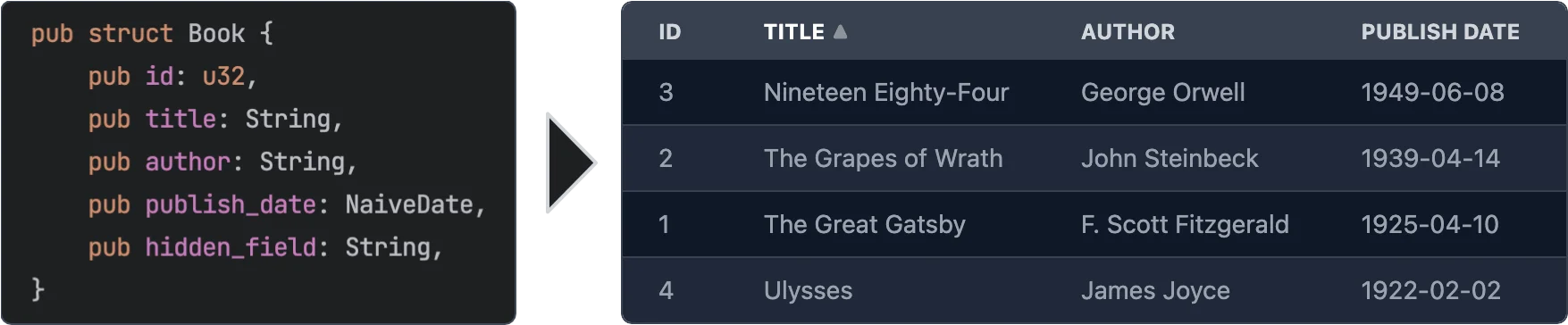
4//!
5//! # Features
6//!
7//! - **Easy to use** - yet powerful.
8//! - **Async data loading** - The data is loaded asynchronously. This allows to load data from a REST API or a database etc.
9//! - **Selection** - Can be turned off or single/multi select
10//! - **Customization** - You can customize every aspect of the table by plugging in your own components for rendering rows, cells, headers. See [Custom Renderers](#custom-renderers) for more information.
11//! - **Headless** - No default styling is applied to the table. You can fully customize the classes that are applied to the table. See [Classes customization](#classes-customization) for more information.
12//! - **Sorting** - Optional. If turned on: Click on a column header to sort the table by that column. You can even sort by multiple columns.
13//! - **Virtualization** - Only the visible rows are rendered. This allows for very large tables.
14//! - **Pagination** - Instead of virtualization you can paginate the table.
15//! - **Caching** - Only visible rows are loaded and cached.
16//! - **Editing** - Optional. You can provide custom renderers for editable cells. See [Editable Cells](#editable-cells) for more information.
17//!
18//! # Usage
19//!
20//! ```
21//! use leptos::prelude::*;
22//! use leptos_struct_table::*;
23//!
24//! #[derive(TableRow, Clone)]
25//! #[table(impl_vec_data_provider)]
26//! pub struct Person {
27//! id: u32,
28//! name: String,
29//! age: u32,
30//! }
31//!
32//! #[component]
33//! fn Demo() -> impl IntoView {
34//! let rows = vec![
35//! Person { id: 1, name: "John".to_string(), age: 32 },
36//! Person { id: 2, name: "Jane".to_string(), age: 28 },
37//! Person { id: 3, name: "Bob".to_string(), age: 45 },
38//! ];
39//!
40//! view! {
41//! <table>
42//! <TableContent rows scroll_container="" />
43//! </table>
44//! }
45//! }
46//! ```
47//!
48//! # Leptos Compatibility
49//!
50//! | Crate version | Compatible Leptos version |
51//! |-------------------------------|---------------------------|
52//! | <= 0.2 | 0.3 |
53//! | 0.3 | 0.4 |
54//! | 0.4, 0.5, 0.6 | 0.5 |
55//! | 0.7 – 0.12 | 0.6 |
56//! | 0.14.0-beta | 0.7 |
57//! | 0.15 – 0.19 | 0.8 |
58//!
59//! # Server-Side Rendering
60//!
61//! To use this with Leptos' server-side rendering, you can have to add `leptos-use` as a dependency to your `Cargo.toml` and
62//! then configure it for SSR like the following.
63//!
64//! ```toml
65//! [dependencies]
66//! leptos-use = "<current version>"
67//! # ...
68//!
69//! [features]
70//! hydrate = [
71//! "leptos/hydrate",
72//! # ...
73//! ]
74//! ssr = [
75//! "leptos/ssr",
76//! # ...
77//! "leptos-use/ssr",
78//! ]
79//! ```
80//!
81//! Please see the [serverfn_sqlx example](https://github.com/Synphonyte/leptos-struct-table/blob/master/examples/serverfn_sqlx/Cargo.toml)
82//! for a working project with SSR.
83//!
84//! # Data Providers
85//!
86//! As shown in the initial usage example, when you add `#[table(impl_vec_data_provider)]` to your struct,
87//! the table will automatically generate a data provider for you. You can then directly pass a `Vec<T>` to the `rows` prop.
88//! Internally this implements the trait [`TableDataProvider`] for `Vec<T>`.
89//!
90//! To leverage the full power of async partial data loading with caching you should implement the trait
91//! [`PaginatedTableDataProvider`] or the trait [`TableDataProvider`] yourself. It's quite easy to do so.
92//! Which of the two traits you choose depends on your data source. If your data source provides
93//! paginated data, as is the case for many REST APIs, you should implement [`PaginatedTableDataProvider`].
94//! Otherwise you should probably implement [`TableDataProvider`].
95//!
96//! See the [paginated_rest_datasource example](https://github.com/Synphonyte/leptos-struct-table/blob/master/examples/paginated_rest_datasource/src/data_provider.rs)
97//! and the [serverfn_sqlx example](https://github.com/Synphonyte/leptos-struct-table/blob/master/examples/serverfn_sqlx/src/data_provider.rs)
98//! for working demo projects that implement these traits.
99//!
100//! # Macro options
101//!
102//! The `#[table(...)]` attribute can be used to customize the generated component. The following options are available:
103//!
104//! ## Struct attributes
105//!
106//! These attributes can be applied to the struct itself.
107//!
108//! - **`sortable`** - Specifies that the table should be sortable. This makes the header titles clickable to control sorting.
109//! You can specify two sorting modes with the prop `sorting_mode` on the `TableContent` component:
110//! - `sorting_mode=SortingMode::MultiColumn` (the default) allows the table to be sorted by multiple columns ordered by priority.
111//! - `sorting_mode=SortingMode::SingleColumn"` allows the table to be sorted by a single column. Clicking on another column will simply replace the sorting column.
112//!
113//! See the [simple example](https://github.com/synphonyte/leptos-struct-table/blob/master/examples/simple/src/main.rs) and the
114//! [selectable example](https://github.com/synphonyte/leptos-struct-table/blob/master/examples/selectable/src/main.rs) for more information.
115//! - **`classes_provider`** - Specifies the name of the class provider. Used to quickly customize all of the classes that are applied to the table.
116//! For convenience sensible presets for major CSS frameworks are provided. See [`TableClassesProvider`] and [tailwind example](https://github.com/synphonyte/leptos-struct-table/blob/master/examples/tailwind/src/main.rs) for more information.
117//! - **`head_cell_renderer`** - Specifies the name of the header cell renderer component. Used to customize the rendering of header cells. Defaults to [`DefaultTableHeaderRenderer`]. See the [custom_renderers_svg example](https://github.com/Synphonyte/leptos-struct-table/blob/master/examples/custom_renderers_svg/src/main.rs) for more information.
118//! - **`impl_vec_data_provider`** - If given, then [`TableDataProvider`] is automatically implemented for `Vec<ThisStruct>` to allow
119//! for easy local data use. See the [simple example](https://github.com/synphonyte/leptos-struct-table/blob/master/examples/simple/src/main.rs) for more information.
120//! - **`row_type`** - Specifies the type of the rows in the table. Defaults to the struct that this is applied to. See the [custom_type example](https://github.com/synphonyte/leptos-struct-table/blob/master/examples/custom_type/src/main.rs) for more information.
121//! - **`column_index_type`** - A type by which the columns are indexed, "usize" is the default. "enum" will generate an enum with the row-struct's field names as variants. See the [column_index_type example](https://github.com/synphonyte/leptos-struct-table/blob/master/examples/column_index_type/src/main.rs) for more information.
122//! - **`i18n`** - Allows to specify the i18n scope for all fields of the struct as well as the `i18n` module path which defaults to `crate::i18n`. See [I18n](#i18n) for more information.
123//!
124//! ## Field attributes
125//!
126//! These attributes can be applied to any field in the struct.
127//!
128//! - **`class`** - Specifies the classes that are applied to each cell (head and body) in the field's column. Can be used in conjunction with `classes_provider` to customize the classes.
129//! - **`head_class`** - Specifies the classes that are applied to the header cell in the field's column. Can be used in conjunction with `classes_provider` to customize the classes.
130//! - **`cell_class`** - Specifies the classes that are applied to the body cells in the field's column. Can be used in conjunction with `classes_provider` to customize the classes.
131//! - **`skip`** - Specifies that the field should be skipped. This is useful for fields that are not displayed in the table.
132//! - **`skip_sort`** - Only applies if `sortable` is set on the struct. Specifies that the field should not be used for sorting. Clicking it's header will not do anything.
133//! - **`skip_header`** - Makes the title of the field not be displayed in the head row.
134//! - **`title`** - Specifies the title that is displayed in the header cell. Defaults to the field name converted to title case (`this_field` becomes `"This Field"`).
135//! - **`renderer`** - Specifies the name of the cell renderer component. Used to customize the rendering of cells.
136//! Defaults to [`DefaultTableCellRenderer`].
137//! - **`format`** - Quick way to customize the formatting of cells without having to create a custom renderer. See [Formatting](#formatting) below for more information.
138//! - **`getter`** - Specifies a method that returns the value of the field instead of accessing the field directly when rendering.
139//! - **`none_value`** - Specifies a display value for `Option` types when they are `None`. Defaults to empty string
140//! - **`i18n`** - Overrides the i18n key for the field. See [I18n](#i18n) for more information.
141//!
142//! ### Formatting
143//!
144//! The `format` attribute can be used to customize the formatting of cells. It is an easier alternative to creating a custom renderer when you just want to customize some basic formatting.
145//! It is type safe and tied to the type the formatting is applied on. see [`CellValue`] and the associated type for the type you are rendering to see a list of options
146//!
147//! See:
148//! - [`cell_value::NumberRenderOptions`]
149#![cfg_attr(feature = "chrono", doc = r##"- [`chrono::RenderChronoOptions`]"##)]
150#![cfg_attr(feature = "jiff", doc = r##"- [`jiff::RenderJiffOptions`]"##)]
151#![cfg_attr(
152 feature = "rust_decimal",
153 doc = r##"- [`rust_decimal::DecimalNumberRenderOptions`]"##
154)]
155#![cfg_attr(feature = "time", doc = r##"- [`time::RenderTimeOptions`]"##)]
156//!
157//!
158#![cfg_attr(
159 feature = "chrono",
160 doc = r##"
161Example:
162
163```
164# use leptos::prelude::*;
165# use leptos_struct_table::*;
166# use ::chrono::{NaiveDate, NaiveDateTime, NaiveTime};
167#
168#[derive(TableRow, Clone)]
169pub struct TemperatureMeasurement {
170 #[table(title = "Temperature (°C)", format(precision = 2usize))]
171 temperature: f32,
172 #[table(format(string = "%m.%d.%Y"))]
173 date: NaiveDate,
174}
175```
176"##
177)]
178
179//! # Features
180//!
181//! - **`chrono`** - Adds support for types from the crate `chrono`.
182//! - **`jiff`** - Adds support for types from the crate `jiff`.
183//! - **`rust_decimal`** - Adds support for types from the crate `rust_decimal`.
184//! - **`time`** - Adds support for types from the crate `time`.
185//! - **`uuid`** - Adds support for types from the crate `uuid`.
186//!
187//! # Classes Customization
188//!
189//! Classes can be easily customized by using the `classes_provider` attribute on the struct.
190//! You can specify any type that implements the trait [`TableClassesProvider`]. Please see the documentation for that trait for more information.
191//! You can also look at [`TailwindClassesPreset`] for an example how this can be implemented.
192//!
193//! Example:
194//!
195//! ```
196//! # use leptos::prelude::*;
197//! # use leptos_struct_table::*;
198//! #
199//! #[derive(TableRow, Clone)]
200//! #[table(classes_provider = "TailwindClassesPreset")]
201//! pub struct Book {
202//! id: u32,
203//! title: String,
204//! }
205//! ```
206//!
207//! # Field Getters
208//!
209//! Sometimes you want to display a field that is not part of the struct but a derived value either
210//! from other fields or sth entirely different. For this you can use either the [`FieldGetter`] type
211//! or the `getter` attribute.
212//!
213//! Let's start with [`FieldGetter`] and see an example:
214//!
215//! ```
216//! # use leptos::prelude::*;
217//! # use leptos_struct_table::*;
218//! # use serde::{Deserialize, Serialize};
219//! #
220//! #[derive(TableRow, Clone)]
221//! #[table(classes_provider = "TailwindClassesPreset")]
222//! pub struct Book {
223//! id: u32,
224//! title: String,
225//! author: String,
226//!
227//! // this tells the macro that you're going to provide a method called `title_and_author` that returns a `String`
228//! title_and_author: FieldGetter<String>
229//! }
230//!
231//! impl Book {
232//! // Returns the value that is displayed in the column
233//! pub fn title_and_author(&self) -> String {
234//! format!("{} by {}", self.title, self.author)
235//! }
236//! }
237//! ```
238//!
239//! To provide maximum flexibility you can use the `getter` attribute.
240//!
241//! ```
242//! # use leptos::prelude::*;
243//! # use leptos_struct_table::*;
244//! #
245//! #[derive(TableRow, Clone)]
246//! #[table(classes_provider = "TailwindClassesPreset")]
247//! pub struct Book {
248//! // this tells the macro that you're going to provide a method called `get_title` that returns a `String`
249//! #[table(getter = "get_title")]
250//! title: String,
251//! }
252//!
253//! impl Book {
254//! pub fn get_title(&self) -> String {
255//! format!("Title: {}", self.title)
256//! }
257//! }
258//! ```
259//!
260//! ## When to use `FieldGetter` vs `getter` attribute
261//!
262//! A field of type `FieldGetter<T>` is a virtual field that doesn't really exist on the struct.
263//! Internally `FieldGetter` is just a new-typed `PhantomData` and thus is removed during compilation.
264//! Hence it doesn't increase memory usage. That means you should use it for purely derived data.
265//!
266//! The `getter` attribute should be used on a field that actually exists on the struct but whose
267//! value you want to modify before it's rendered.
268//!
269//! # Custom Renderers
270//!
271//! Custom renderers can be used to customize almost every aspect of the table.
272//! They are specified by using the various `...renderer` attributes on the struct or fields or props of the [`TableContent`] component.
273//! To implement a custom renderer please have a look at the default renderers listed below.
274//!
275//! On the struct level you can use this attribute:
276//! - **`thead_cell_renderer`** - Defaults to [`DefaultTableHeaderCellRenderer`] which renders `<th><span>Title</span></th>`
277//! together with sorting functionality (if enabled).
278//!
279//! As props of the [`TableContent`] component you can use the following:
280//! - **`thead_renderer`** - Defaults to [`DefaultTableHeadRenderer`] which just renders the tag `thead`.
281//! - **`thead_row_renderer`** - Defaults to [`DefaultTableHeadRowRenderer`] which just renders the tag `tr`.
282//! - **`tbody_renderer`** - Defaults to the tag `tbody`. Takes no attributes.
283//! - **`row_renderer`** - Defaults to [`DefaultTableRowRenderer`].
284//! - **`loading_row_renderer`** - Defaults to [`DefaultLoadingRowRenderer`].
285//! - **`error_row_renderer`** - Defaults to [`DefaultErrorRowRenderer`].
286//! - **`row_placeholder_renderer`** - Defaults to [`DefaultRowPlaceholderRenderer`].
287//!
288//! On the field level you can use the **`renderer`** attribute.
289//!
290//! It defaults to [`DefaultTableCellRenderer`]
291//! Works for any type that implements the [`CellValue`] trait that is implemented for types in the standard library, popular crates with feature flags and for your own type if you implement this trait for them.
292//!
293//! Example:
294//!
295//! ```
296//! # use leptos::prelude::*;
297//! # use leptos_struct_table::*;
298//! #
299//! #[derive(TableRow)]
300//! pub struct Book {
301//! title: String,
302//! #[table(renderer = "ImageTableCellRenderer")]
303//! img: String,
304//! }
305//!
306//! // Easy cell renderer that just displays an image from an URL.
307//! #[component]
308//! fn ImageTableCellRenderer(
309//! class: String,
310//! value: Signal<String>,
311//! row: RwSignal<Book>,
312//! index: usize,
313//! ) -> impl IntoView
314//! {
315//! view! {
316//! <td class=class>
317//! <img src=value alt="Book image" height="64"/>
318//! </td>
319//! }
320//! }
321//! ```
322//!
323//! For more detailed information please have a look at the [custom_renderers_svg example](https://github.com/synphonyte/leptos-struct-table/blob/master/examples/custom_renderers_svg/src/main.rs) for a complete customization.
324//!
325//! For custom row renderers, you may want to have a look at [table_grouping example](https://github.com/synphonyte/leptos-struct-table/blob/master/examples/table_grouping/src/grouping.rs), this example reuses existing
326//! cell renders via `Row::cell_renderer_for_column` (useful for hiding cells in a column-grouping context).
327//!
328//!
329//! ## Editable Cells
330//!
331//! You might have noticed the prop `row` in the custom cell renderer above. This can be used
332//! to edit the data. Simply use the `RwSignal` to access the row and change the fields.
333//!
334//! ```
335//! # use leptos::{prelude::*, logging};
336//! # use leptos_struct_table::*;
337//! #
338//! #[derive(TableRow, Clone, Default, Debug)]
339//! #[table(impl_vec_data_provider)]
340//! pub struct Book {
341//! id: u32,
342//! #[table(renderer = "InputCellRenderer")]
343//! title: String,
344//! }
345//!
346//! #[component]
347//! fn InputCellRenderer(
348//! class: String,
349//! value: Signal<String>,
350//! row: RwSignal<Book>,
351//! index: usize,
352//! ) -> impl IntoView {
353//! let on_change = move |evt| {
354//! row.write().title = event_target_value(&evt);
355//! };
356//!
357//! view! {
358//! <td class=class>
359//! <input type="text" value=value on:change=on_change />
360//! </td>
361//! }
362//! }
363//!
364//! // Then in the table component you can listen to the `on_change` event:
365//!
366//! #[component]
367//! pub fn App() -> impl IntoView {
368//! let rows = vec![Book::default(), Book::default()];
369//!
370//! let on_change = move |evt: ChangeEvent<Book>| {
371//! logging::log!("Changed row at index {}:\n{:#?}", evt.row_index, evt.changed_row.get_untracked());
372//! };
373//!
374//! view! {
375//! <table>
376//! <TableContent rows on_change scroll_container="" />
377//! </table>
378//! }
379//! }
380//! ```
381//!
382//! Please have a look at the [editable example](https://github.com/Synphonyte/leptos-struct-table/tree/master/examples/editable/src/main.rs) for a fully working example.
383//!
384//! # Column index type
385//! Configured via the table annotation on a TableRow struct.
386//!
387//! ```ignore
388//! #[table(column_index_type = value)]
389//! ```
390//!
391//! Current supported column index type **values**: `"usize"` or `"enum"`.\
392//! The column type is used to refer to columns in various places, some of which listed below:
393//! - Custom cell renderers via [`DefaultTableCellRendererProps#index`](DefaultTableCellRendererProps#structfield.index)
394//! - Custom header cell renderers via [`DefaultTableHeaderCellRendererProps#index`](DefaultTableHeaderCellRendererProps#structfield.index)
395//! - Head events via [`TableHeadEvent#index`](TableHeadEvent#structfield.index)
396//! - In [`TableRow#col_name`](TableRow#tymethod.col_name) as `col_index` parameter type.
397//! - In [`get_sorting_for_column`] in both parameters.
398//!
399//! ## usize column index type
400//! This is the default index type.
401//!
402//! It can be set explicitely:
403//! ```rust
404//! # use leptos::{prelude::*, logging};
405//! # use leptos_struct_table::*;
406//! #
407//! #[derive(TableRow, Clone, Default, Debug)]
408//! #[table(impl_vec_data_provider, column_index_type = "usize")]
409//! pub struct Book {
410//! id: u32, // index = 0
411//! #[table(skip)]
412//! content: String, // no index (skipped)
413//! title: String, // index = 1
414//! }
415//! ```
416//! Usize indexes start at 0 at the first relevant struct field. Fields marked `skip` do not have an index.
417//!
418//! ## Enum column index type
419//!
420//! Used as follows:
421//! ```rust
422//! # use leptos::{prelude::*, logging};
423//! # use leptos_struct_table::*;
424//! #
425//! #[derive(TableRow, Clone, Default, Debug)]
426//! #[table(impl_vec_data_provider, column_index_type = "enum")]
427//! // Proc-macro `table` generates enum "{struct_name}Column", in this case: BookColumn
428//! pub struct Book {
429//! id: u32, // index = BookColumn::Id
430//! #[table(skip)]
431//! content: String, // no index (skipped)
432//! title: String, // index = BookColumn::Title
433//! }
434//! ```
435//!
436//! Fields are converted to UpperCammelCase for their generated enum variant.
437//! See the [column_index_type example](https://github.com/synphonyte/leptos-struct-table/blob/master/examples/column_index_type/src/main.rs) for more information.
438//!
439//! # Pagination / Virtualization / InfiniteScroll
440//!
441//! This table component supports different display acceleration strategies. You can set them through the `display_strategy` prop of
442//! the [`TableContent`] component.
443//!
444//! The following options are available. Check their docs for more details.
445//! - [`DisplayStrategy::Virtualization`] (default)
446//! - [`DisplayStrategy::InfiniteScroll`]
447//! - [`DisplayStrategy::Pagination`]
448//!
449//! Please have a look at the [pagination example](https://github.com/Synphonyte/leptos-struct-table/tree/master/examples/pagination/src/main.rs) for more information on how to use pagination.
450//!
451//! # I18n
452//!
453//! To translate the column titles of the table using `leptos-i18n` you can enable the `"i18n"`
454//! feature. The field names of the struct are used as keys by default and can be customized using the `i18n` attribute.
455//!
456//! Please have a look at the
457//! [i18n example](https://github.com/Synphonyte/leptos-struct-table/tree/master/examples/i18n)
458//! and at the sections [Struct attributes](#struct-attributes) and
459//! [Field attributes](#field-attributes) for more information.
460//!
461//! # Contribution
462//!
463//! All contributions are welcome. Please open an issue or a pull request if you have any ideas or problems.
464
465#![allow(non_snake_case)]
466
467mod cell_value;
468#[cfg(feature = "chrono")]
469pub mod chrono;
470mod class_providers;
471mod components;
472mod data_provider;
473mod display_strategy;
474mod events;
475#[cfg(feature = "jiff")]
476pub mod jiff;
477mod loaded_rows;
478mod reload_controller;
479mod row_reader;
480#[cfg(feature = "rust_decimal")]
481pub mod rust_decimal;
482mod selection;
483mod sorting;
484mod table_row;
485#[cfg(feature = "time")]
486pub mod time;
487#[cfg(feature = "uuid")]
488mod uuid;
489
490pub use cell_value::*;
491pub use class_providers::*;
492pub use components::*;
493pub use data_provider::*;
494pub use display_strategy::*;
495pub use events::*;
496pub use leptos_struct_table_macro::TableRow;
497pub use loaded_rows::RowState;
498pub use reload_controller::*;
499pub use row_reader::*;
500pub use selection::*;
501pub use sorting::*;
502pub use table_row::*;
503
504use serde::{Deserialize, Serialize};
505use std::marker::PhantomData;
506
507/// Type of sorting of a column
508#[derive(Copy, Clone, Debug, PartialEq, Eq, Deserialize, Serialize)]
509pub enum ColumnSort {
510 Ascending,
511 Descending,
512 None,
513}
514
515impl ColumnSort {
516 /// Returns the a default class name
517 pub fn as_class(&self) -> &'static str {
518 match self {
519 ColumnSort::Ascending => "sort-asc",
520 ColumnSort::Descending => "sort-desc",
521 _ => "",
522 }
523 }
524
525 /// Returns the SQL sort order (ASC or DESC) or `None` if `ColumnSort::None`.
526 pub fn as_sql(&self) -> Option<&'static str> {
527 match self {
528 ColumnSort::Ascending => Some("ASC"),
529 ColumnSort::Descending => Some("DESC"),
530 _ => None,
531 }
532 }
533}
534
535/// Type of struct field used to specify that the value of this field is
536/// obtained by calling a getter method on the struct.
537///
538/// Please refer to the [`getter` example](https://github.com/Synphonyte/leptos-struct-table/tree/master/examples/getter) for how this is used
539#[derive(
540 Copy, Clone, Debug, PartialEq, Eq, Hash, PartialOrd, Ord, Default, Serialize, Deserialize,
541)]
542pub struct FieldGetter<T>(PhantomData<T>);