Expand description
Google Chat Types
§About Google Chat Message
type helper for construct Google Chat message There two type of Google Chat message
- Text Message
- Card Message
they are all represented as a json string.
Text Message represented like
{
    "text":"some text"
}
Card Message represented like
{
 "cards": [
    {
      "sections": [
        {
          "widgets": [
            {
              "image": { "imageUrl": "https://..." }
            },
            {
              "buttons": [
                {
                  "textButton": {
                    "text": "OPEN IN GOOGLE MAPS",
                    "onClick": {
                      "openLink": {
                        "url": "https://..."
                      }
                    }
                  }
                }
              ]
            }
          ]
        }
      ]
    }
  ]
}
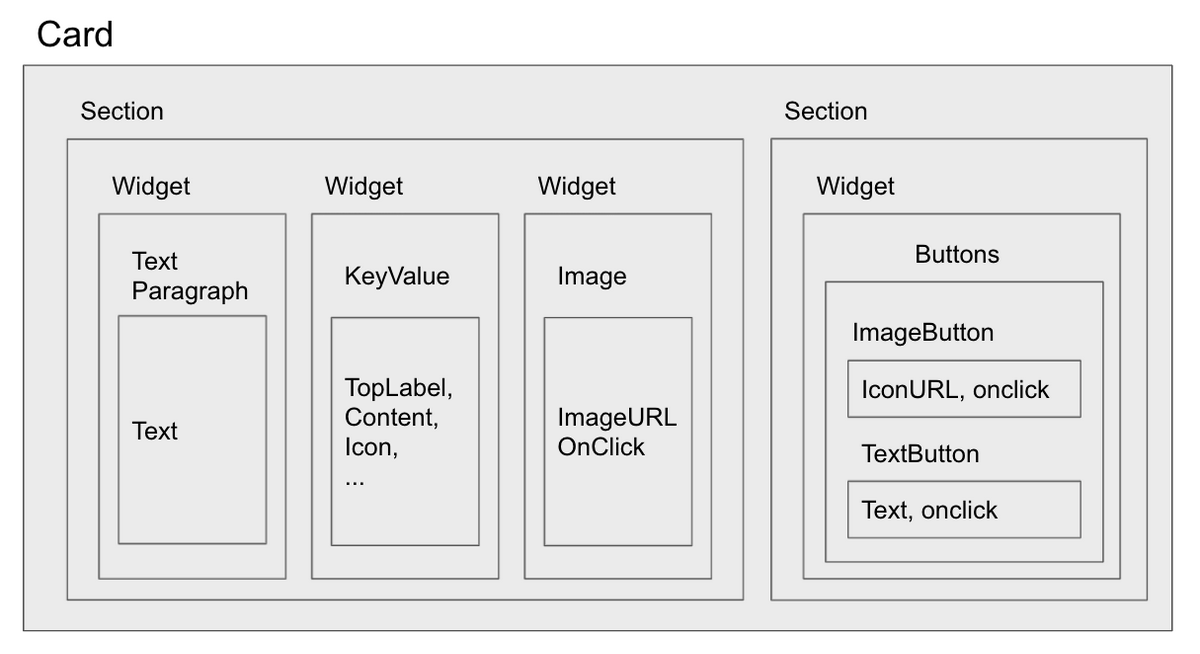
the relationship between elements of cards should looks like below
§How to use this crate
you should construct Cards or Text struct, then serialize them to json string as a Google Chat API(for instance incoming webhook) http request body.
Structs§
- Button
- Button
Builder - Builder for
Button. - Card
- the Card response. construct this by call default() method of this type
- Card
Builder - Builder for
Card. - Cards
- The Card message type
- Cards
Builder - Builder for
Cards. - Chat
Type Build Error - Header
- Header
Builder - Builder for
Header. - Image
- Image
Builder - Builder for
Image. - Image
Button - Image
Button Builder - Builder for
ImageButton. - KeyValue
- KeyValue
Builder - Builder for
KeyValue. - OnClick
- OnClick
Builder - Builder for
OnClick. - Open
Link - Open
Link Builder - Builder for
OpenLink. - Section
- Section
Builder - Builder for
Section. - Text
- The Text message type
- Text
Builder - Builder for
Text. - Text
Button - Text
Button Builder - Builder for
TextButton. - Text
Paragraph - Text
Paragraph Builder - Builder for
TextParagraph. - Widget
- Widget
Builder - Builder for
Widget.