Expand description
§Face ID
face_id is a crate for face detection, facial recognition (embeddings),
and attribute estimation (age/gender) using ONNX Runtime.
§Overview
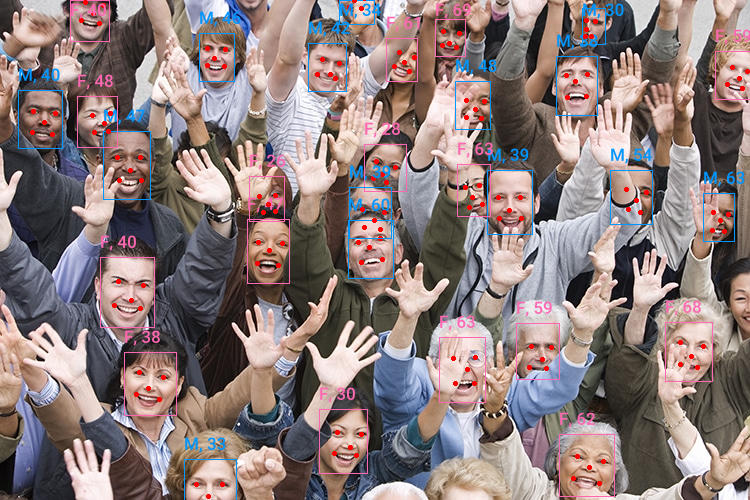
This crate provides a pipeline for facial analysis. It wraps several
models (SCRFD for detection, ArcFace for recognition) and handles the
maths of face alignment and image preprocessing internally.
§The Pipeline
- Detection: Finds bounding boxes and 5-point facial landmarks (eyes, nose, mouth). Coordinates are relative to image dimensions (0.0 to 1.0).
- Alignment: Uses the Umeyama algorithm to warp the face into a canonical 112x112 pose.
- Analysis: Runs the aligned crops through specialized models to produce:
- Embeddings: 512-dimensional vectors representing identity.
- Attributes: Gender and age estimation.
§Quick Start
The analyzer::FaceAnalyzer is the main entry point. It manages the sub-models
and performs batch inference for efficiency.
use face_id::analyzer::FaceAnalyzer;

#[tokio::main]
async fn main() -> color_eyre::Result<()> {
    // Initialize the analyzer.
    // This downloads default models from HuggingFace on the first run.
    let analyzer = FaceAnalyzer::from_hf().build().await?;

    let img = image::open("assets/img/crowd.jpg")?;
    let faces = analyzer.analyze(&img)?;

    for (i, face) in faces.iter().enumerate() {
        println!("Face {i}");
        println!("    Box: {:?}", &face.detection.bbox); // Relative coordinates [0, 1]
        println!("    Score: {:?}", &face.detection.score); // Confidence score of detection
        println!("    Landmarks: {:?}", &face.detection.landmarks); // location of eyes, mouth, nose (relative)
        println!("    Gender: {:?}", face.gender);
        println!("    Age: {:?}", face.age);
        println!("    Embedding [..5]: {:?}", &face.embedding[..5]);
    }
    Ok(())
}§Individual Components
For more granular control, you can use the individual models directly.
§Detection
Use detector::ScrfdDetector to find faces. Bounding boxes and landmarks are returned in relative coordinates.
To convert them back to absolute pixels, use detector::DetectedFace::to_absolute.
let mut detector = ScrfdDetector::from_hf().build().await?;
let detections = detector.detect(&image::open("input.jpg")?)?;§Recognition and Alignment
Recognition models like ArcFace require faces to be “aligned”—rotated and scaled so that
landmarks are in specific positions.
let mut embedder = ArcFaceEmbedder::from_hf().build().await?;

// Align face using 5-point landmarks (from a detector)
let aligned_crop = norm_crop(&img.to_rgb8(), &landmarks, 112);

// Generate identity embedding
let embedding = embedder.compute_embedding(&aligned_crop)?;§Loading Local Models
If you want to use local ONNX model files instead of downloading from HuggingFace,
use the builder method.
use face_id::analyzer::FaceAnalyzer;

fn main() -> color_eyre::Result<()> {
    let analyzer = FaceAnalyzer::builder(
        "models/det.onnx", // Detector
        "models/rec.onnx", // Embedder (Recognition)
        "models/attr.onnx" // Gender/Age
    )
    .build()?;

    Ok(())
}§Customizing Hugging Face Models
You can mix and match specific model versions from Hugging Face repositories.
For example, using the medium-complexity 10g_bnkps detector instead of the default:
use face_id::analyzer::FaceAnalyzer;
use face_id::model_manager::HfModel;

#[tokio::main]
async fn main() -> color_eyre::Result<()> {
    let analyzer = FaceAnalyzer::from_hf()
        // Specify a smaller detector model than the default:
        // > `embedder_model` and `gender_age_model` can also be specified in the builder.
        .detector_model(HfModel {
            id: "public-data/insightface".to_string(),
            file: "models/buffalo_l/det_10g.onnx".to_string(),
        })
        .detector_input_size((640, 640))
        .detector_score_threshold(0.5)
        .detector_iou_threshold(0.4)
        .build()
        .await?;

    Ok(())
}§Face Clustering & Cropping helpers
You can cluster faces from multiple images and then extract high-quality thumbnails for the results.
use face_id::analyzer::FaceAnalyzer;
let paths = vec!["img1.jpg", "img2.jpg"];

// Cluster faces across multiple images
let clusters = cluster_faces(&analyzer, paths)
    .min_cluster_size(5)
    .call()?;

let mut face_idx = 0;
for (cluster_id, faces) in clusters {
    println!("Cluster {cluster_id} has {} faces", faces.len());
    for (path, face) in faces {
        // Extract a square thumbnail with 60% padding
        let img = image::open(path)?;
        let thumbnail = extract_face_thumbnail(&img, &face.detection.bbox, 1.6, 256);
        // Use the extracted thumbnail
        face_idx += 1;
        thumbnail.save(format!("face{face_idx}.jpg"));
    }
}§Hardware Acceleration
This crate supports a variety of Execution Providers (EPs) via ort. To use a specific GPU
backend, enable the corresponding feature in your Cargo.toml (e.g., cuda, tensorrt, coreml).
use face_id::analyzer::FaceAnalyzer;
use ort::ep::{DirectML, TensorRT, CUDA, CoreML};

let analyzer = FaceAnalyzer::from_hf()
    .with_execution_providers(&[
        CoreML::default().build(), // This will try CoreML, then DirectML, then TensorRT, then CUDA, then CPU.
        DirectML::default().build(), // To check if an execution provider if working for you, add `.error_on_failure()`.
        TensorRT::default().build(), // Otherwise it will silently try the next execution provider in the list.
        CUDA::default().build().error_on_failure(),
    ])
    .build()
.await?;§Features
hf-hub(Default): Allows downloading models from Hugging Face.copy-dylibs/download-binaries(Default): Simplifiesortsetup.serde: Enables serialization/deserialization for results.clustering(Default): Enables face clustering using HDBSCAN.- Execution Providers:
cuda,tensorrt,coreml,directml,openvino, etc.