  1
  2
  3
  4
  5
  6
  7
  8
  9
 10
 11
 12
 13
 14
 15
 16
 17
 18
 19
 20
 21
 22
 23
 24
 25
 26
 27
 28
 29
 30
 31
 32
 33
 34
 35
 36
 37
 38
 39
 40
 41
 42
 43
 44
 45
 46
 47
 48
 49
 50
 51
 52
 53
 54
 55
 56
 57
 58
 59
 60
 61
 62
 63
 64
 65
 66
 67
 68
 69
 70
 71
 72
 73
 74
 75
 76
 77
 78
 79
 80
 81
 82
 83
 84
 85
 86
 87
 88
 89
 90
 91
 92
 93
 94
 95
 96
 97
 98
 99
100
101
102
103
104
105
106
107
108
109
110
111
112
113
114
115
116
117
118
119
120
121
122
123
124
125
126
127
128
129
130
131
132
133
134
135
136
137
138
139
140
141
142
143
144
145
146
147
148
149
150
151
152
153
154
155
156
157
158
159
160
161
162
163
164
165
166
167
168
169
170
171
172
173
174
175
176
177
178
179
180
181
182
183
184
185
186
187
188
189
190
191
192
193
194
195
196
197
198
199
200
201
202
203
204
205
206
207
208
209
210
211
212
213
214
215
216
217
218
219
220
221
222
223
224
225
226
227
228
229
230
231
232
233
234
235
236
237
238
239
240
241
242
243
244
245
246
247
248
249
250
251
252
253
254
255
256
257
258
259
260
261
262
263
264
265
266
267
268
269
270
271
272
273
274
275
276
277
278
279
280
281
282
283
284
285
286
287
288
289
290
291
292
293
294
295
296
297
298
299
300
301
302
303
304
305
306
307
308
309
310
311
312
313
314
315
316
317
318
319
320
321
322
323
324
325
326
327
328
329
330
331
332
333
334
335
336
337
338
339
340
341
342
343
344
345
346
347
348
349
350
351
352
353
354
//! TextBox for embedded-graphics. //! //! This crate provides a configurable [`TextBox`] to render multiline text inside a bounding //! `Rectangle` using [embedded-graphics]. //! //! [`TextBox`] supports the common text alignments: //! - [`Horizontal`]: //! - `Left` //! - `Right` //! - `Center` //! - `Justified` //! - [`Vertical`]: //! - `Top` //! - `Middle` //! - `Bottom` //! //! [`TextBox`] also supports some special characters not handled by embedded-graphics' `Text`: //! - non-breaking space (`\u{200b}`) //! - zero-width space (`\u{a0}`) //! - soft hyphen (`\u{ad}`) //! - carriage return (`\r`) //! - tab (`\t`) with configurable tab size //! //! `TextBox` also supports text coloring using [ANSI escape codes](https://en.wikipedia.org/wiki/ANSI_escape_code). //! //! ### Example //! //! The examples are based on [the embedded-graphics simulator]. The simulator is built on top of //! `SDL2`. See the [simulator README] for more information. //! //! 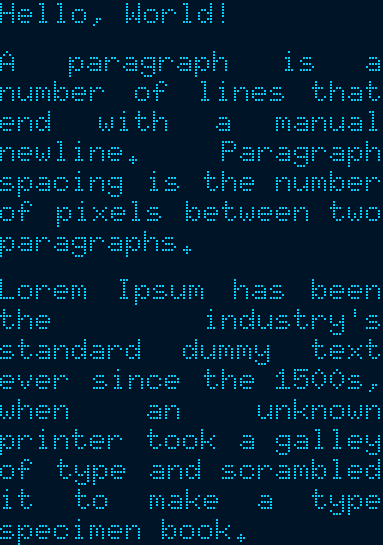 //! //!  //! //! ```rust,no_run //! use embedded_graphics::{ //! mono_font::{ascii::FONT_6X10, MonoTextStyle}, //! pixelcolor::BinaryColor, //! prelude::*, //! primitives::Rectangle, //! }; //! use embedded_graphics_simulator::{ //! BinaryColorTheme, OutputSettingsBuilder, SimulatorDisplay, Window, //! }; //! use embedded_text::{ //! alignment::HorizontalAlignment, //! style::{HeightMode, TextBoxStyleBuilder}, //! TextBox, //! }; //! //! fn main() { //! let text = "Hello, World!\n\ //! A paragraph is a number of lines that end with a manual newline. Paragraph spacing is the \ //! number of pixels between two paragraphs.\n\ //! Lorem Ipsum has been the industry's standard dummy text ever since the 1500s, when \ //! an unknown printer took a galley of type and scrambled it to make a type specimen book."; //! //! // Specify the styling options: //! // * Use the 6x10 MonoFont from embedded-graphics. //! // * Draw the text fully justified. //! // * Use `FitToText` height mode to stretch the text box to the exact height of the text. //! // * Draw the text with `BinaryColor::On`, which will be displayed as light blue. //! let character_style = MonoTextStyle::new(&FONT_6X10, BinaryColor::On); //! let textbox_style = TextBoxStyleBuilder::new() //! .height_mode(HeightMode::FitToText) //! .alignment(HorizontalAlignment::Justified) //! .paragraph_spacing(6) //! .build(); //! //! // Specify the bounding box. Note the 0px height. The `FitToText` height mode will //! // measure and adjust the height of the text box in `into_styled()`. //! let bounds = Rectangle::new(Point::zero(), Size::new(128, 0)); //! //! // Create the text box and apply styling options. //! let text_box = TextBox::with_textbox_style(text, bounds, character_style, textbox_style); //! //! // Create a simulated display with the dimensions of the text box. //! let mut display = SimulatorDisplay::new(text_box.bounding_box().size); //! //! // Draw the text box. //! text_box.draw(&mut display).unwrap(); //! //! // Set up the window and show the display's contents. //! let output_settings = OutputSettingsBuilder::new() //! .theme(BinaryColorTheme::OledBlue) //! .scale(2) //! .build(); //! Window::new("TextBox example with paragraph spacing", &output_settings).show_static(&display); //! } //! ``` //! //! ## Cargo features //! //! * `plugin` (*experimental*): allows implementing custom plugins. //! * `ansi` (default enabled): enables ANSI sequence support using the `Ansi` plugin. //! //! [embedded-graphics]: https://github.com/embedded-graphics/embedded-graphics/ //! [the embedded-graphics simulator]: https://github.com/embedded-graphics/embedded-graphics/tree/master/simulator //! [simulator README]: https://github.com/embedded-graphics/embedded-graphics/tree/master/simulator#usage-without-sdl2 //! [`Horizontal`]: HorizontalAlignment //! [`Vertical`]: VerticalAlignment #![cfg_attr(not(test), no_std)] #![deny(clippy::missing_inline_in_public_items)] #![deny(clippy::cargo)] #![deny(missing_docs)] #![warn(clippy::all)] #![allow(clippy::needless_doctest_main)] pub mod alignment; mod parser; pub mod plugin; mod rendering; pub mod style; mod utils; use crate::{ alignment::{HorizontalAlignment, VerticalAlignment}, plugin::{NoPlugin, PluginMarker as Plugin, PluginWrapper}, style::TextBoxStyle, }; use embedded_graphics::{ geometry::{Dimensions, Point}, pixelcolor::Rgb888, primitives::Rectangle, text::renderer::{CharacterStyle, TextRenderer}, transform::Transform, }; use object_chain::{Chain, ChainElement, Link}; pub use parser::{ChangeTextStyle, Token}; pub use rendering::{cursor::Cursor, TextBoxProperties}; /// A text box object. /// /// The `TextBox` struct represents a piece of text that can be drawn on a display inside the given /// bounding box. /// /// Use the [`draw`] method to draw the text box on a display. /// /// See the [module-level documentation] for more information. /// /// [module-level documentation]: crate /// [`draw`]: embedded_graphics::Drawable::draw() #[derive(Clone, Debug, Hash)] #[must_use] pub struct TextBox<'a, S, M = NoPlugin<<S as TextRenderer>::Color>> where S: TextRenderer, { /// The text to be displayed in this `TextBox` pub text: &'a str, /// The bounding box of this `TextBox` pub bounds: Rectangle, /// The character style of the [`TextBox`]. pub character_style: S, /// The style of the [`TextBox`]. pub style: TextBoxStyle, /// Vertical offset applied to the text just before rendering. pub vertical_offset: i32, plugin: PluginWrapper<'a, M, S::Color>, } impl<'a, S> TextBox<'a, S, NoPlugin<<S as TextRenderer>::Color>> where <S as TextRenderer>::Color: From<Rgb888>, S: TextRenderer + CharacterStyle, { /// Creates a new `TextBox` instance with a given bounding `Rectangle`. #[inline] pub fn new(text: &'a str, bounds: Rectangle, character_style: S) -> Self { TextBox::with_textbox_style(text, bounds, character_style, TextBoxStyle::default()) } /// Creates a new `TextBox` instance with a given bounding `Rectangle` and a given `TextBoxStyle`. #[inline] pub fn with_textbox_style( text: &'a str, bounds: Rectangle, character_style: S, textbox_style: TextBoxStyle, ) -> Self { let mut styled = TextBox { text, bounds, character_style, style: textbox_style, vertical_offset: 0, plugin: PluginWrapper::new(NoPlugin::new()), }; styled.style.height_mode.apply(&mut styled); styled } /// Creates a new `TextBox` instance with a given bounding `Rectangle` and a given `TextBoxStyle`. #[inline] pub fn with_alignment( text: &'a str, bounds: Rectangle, character_style: S, alignment: HorizontalAlignment, ) -> Self { TextBox::with_textbox_style( text, bounds, character_style, TextBoxStyle::with_alignment(alignment), ) } /// Creates a new `TextBox` instance with a given bounding `Rectangle` and a given `TextBoxStyle`. #[inline] pub fn with_vertical_alignment( text: &'a str, bounds: Rectangle, character_style: S, vertical_alignment: VerticalAlignment, ) -> Self { TextBox::with_textbox_style( text, bounds, character_style, TextBoxStyle::with_vertical_alignment(vertical_alignment), ) } /// Sets the vertical text offset. #[inline] pub fn set_vertical_offset(&mut self, offset: i32) -> &mut Self { self.vertical_offset = offset; self } /// Adds a new plugin to the `TextBox`. #[inline] pub fn add_plugin<M>(self, plugin: M) -> TextBox<'a, S, Chain<M>> where M: Plugin<'a, <S as TextRenderer>::Color>, { TextBox { text: self.text, bounds: self.bounds, character_style: self.character_style, style: self.style, vertical_offset: self.vertical_offset, plugin: PluginWrapper::new(Chain::new(plugin)), } } } impl<'a, S, P> TextBox<'a, S, P> where <S as TextRenderer>::Color: From<Rgb888>, S: TextRenderer + CharacterStyle, P: Plugin<'a, <S as TextRenderer>::Color> + ChainElement, { /// Adds a new plugin to the `TextBox`. #[inline] pub fn add_plugin<M>(self, plugin: M) -> TextBox<'a, S, Link<M, P>> where M: Plugin<'a, <S as TextRenderer>::Color>, { let parent = self.plugin.inner.into_inner(); TextBox { text: self.text, bounds: self.bounds, character_style: self.character_style, style: self.style, vertical_offset: self.vertical_offset, plugin: PluginWrapper::new(parent.plugin.append(plugin)), } } /// Deconstruct the textbox and return the plugins. #[inline] pub fn take_plugins(self) -> P { self.plugin.inner.into_inner().lookahead } } impl<'a, S, M> Transform for TextBox<'a, S, M> where S: TextRenderer + Clone, M: Plugin<'a, S::Color>, { #[inline] fn translate(&self, by: Point) -> Self { Self { bounds: self.bounds.translate(by), ..self.clone() } } #[inline] fn translate_mut(&mut self, by: Point) -> &mut Self { self.bounds.translate_mut(by); self } } impl<'a, S, M> Dimensions for TextBox<'a, S, M> where S: TextRenderer, M: Plugin<'a, S::Color>, { #[inline] fn bounding_box(&self) -> Rectangle { self.bounds } } impl<'a, S, M> TextBox<'a, S, M> where S: TextRenderer, M: Plugin<'a, S::Color>, S::Color: From<Rgb888>, { /// Sets the height of the [`TextBox`] to the height of the text. #[inline] pub fn fit_height(&mut self) -> &mut Self { self.fit_height_limited(u32::max_value()) } /// Sets the height of the [`TextBox`] to the height of the text, limited to `max_height`. /// /// This method allows you to set a maximum height. The [`TextBox`] will take up at most /// `max_height` pixel vertical space. #[inline] pub fn fit_height_limited(&mut self, max_height: u32) -> &mut Self { // Measure text given the width of the textbox let text_height = self .style .measure_text_height( &self.character_style, self.text, self.bounding_box().size.width, ) .min(max_height) .min(i32::max_value() as u32); // Apply height self.bounds.size.height = text_height; self } }