Expand description
Message context menu commands.
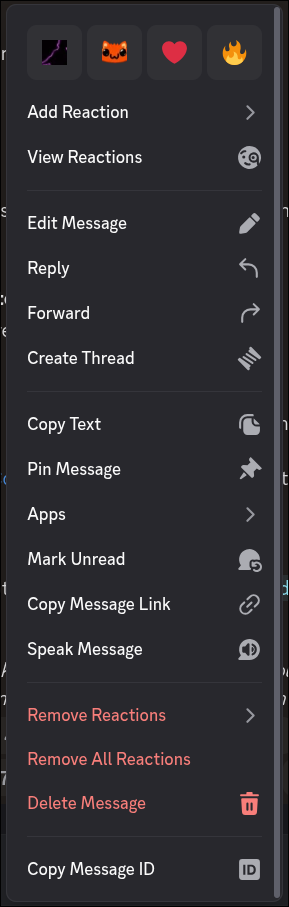
Message commands are one of the simplest command types there are to work with in Discord. They’re shown as an option of a message’s context menu1, don’t require a description, and don’t take arguments other than the message they were called on.
1 Context menus are the pop-ups that appear with multiple options when you right click on a message on desktop, or when you press and hold a message on mobile. Click here to see a screenshot of one.
§Quick Start
Let’s make a simple message command that repeats the message sent. To start with, we have to
define our command handler function. All message command handler functions take two arguments,
MessageContext and Message. Our handler then will look like follows:
async fn echo(ctx: MessageContext, message: Message) {
    // Our code will go here.
}
Great! Now, let’s register it in a new Bot.
let bot = Bot::new(()).command(Command::message("Echo Message Content", echo));

bot.run("token").await.unwrap();
Run the bot and send a message in a server where the bot is. Right click on the message, go in “Apps”, and in your bot’s name option you’ll see an “Echo Message Content” option. Well done!
Now, if we try to click on that option, Discord will show an error. That’s because we have to respond to the command call for Discord to know we actually received that command call. Let’s do so by echoing the message the command was called on.
async fn echo(ctx: MessageContext, message: Message) {
    ctx.respond(message.content).await.unwrap();
}
Try re-running your command, and now you’ll see your bot now responds with the same message content you run the command on. Great!
§Proper Error Handling
As a small tweak, it’s better for error handling not to panic if responding ever fails. After
all, it’s a network call, and it’s quite common for those to fail every now and then. Let’s add
a proper Result return value to our handler.
async fn echo(ctx: MessageContext, message: Message) -> Result<(), TwilightError> {
    ctx.respond(message.content).await?;

    Ok(())
}
Great. For context, TwilightError is the error type
returned when a Discord API call fails. It’s called TwilightError because it’s a wrapper over
errors returned by twilight_http, which is the library Dyncord is built on.
You can return practically any error type as long as it follows some bounds. Returning
Result is always better than panicking, and handling errors is explained in depth in
the errors module. Go check it out to learn about error handling.
Modules§
- context
- Message command context type.
Structs§
- Message
- Text message sent in a
Channel. - Message
Command - A command that appears as an option in a message’s context menu, under “Apps”.
- Message
Command Builder - A builder for message commands that allows setting optional extra metadata.
- Message
Command Group - A group of message commands.
- Message
Command Group Builder - A message command group builder, which allows setting extra metadata.
Traits§
- Message
Command Handler - Trait implemented by message command handler functions.