dot_writer/lib.rs
1//! # Graphviz Writer
2//!
3//! This is an ergonomic library for plotting graphs. It outputs the [Graphviz](https://www.graphviz.org/)
4//! language [DOT](https://www.graphviz.org/doc/info/lang.html). Graphs written in DOT can then be easily
5//! converted to SVG or other image formats using the Graphviz [dot executable](https://graphviz.org/doc/info/command.html).
6//!
7//! The structs in this library leverage the Rust type system and lifetimes to ensure that it's hard
8//! to use them to construct an invalid DOT graph. It's important to note that this means you need
9//! to make sure that child structs go out of scope before using their parents again. This is to make sure that
10//! the [`Drop`] writes the closing brackets correctly. The compiler will tell you if you forget to do this though.
11//!
12//! ## Non Goals
13//!
14//! This library only writes DOT in a strongly typed way. It doesn't read DOT or render DOT into image files.
15//! For that you'll need a different library, or the existing [Graphviz executable](https://www.graphviz.org/).
16//!
17//! ## Usage
18//!
19//! The end point into using the library is the [`DotWriter`] struct. The [`DotWriter`], can write to any struct
20//! that implements [`std::io::Write`], a trait from the standard library. For example, you can write directly to
21//! stdout ([`std::io::stdout()`]) or to a vector of bytes ([`Vec<u8>`]).
22//!
23//! To begin usign the library create a [`DotWriter`] struct as like this:
24//!
25//! ```
26//! use dot_writer::DotWriter;
27//!
28//! let mut output_bytes = Vec::new();
29//! let mut writer = DotWriter::from(&mut output_bytes);
30//! ```
31//!
32//! Once a [`DotWriter`] exists you can use `.digraph()` or `.graph()` to start writing a DOT graph.
33//! Then you can write edges using using `.edge()`. See [`Scope`] for more functionality.
34//! Here's a simple "Hello world!" example:
35//!
36//! ```
37//! use dot_writer::DotWriter;
38//!
39//! let mut output_bytes = Vec::new();
40//! {
41//! let mut writer = DotWriter::from(&mut output_bytes);
42//! writer.set_pretty_print(false);
43//! writer
44//! .digraph()
45//! .edge("Hello", "World"); // digraph goes out of scope here, writing closing bracket
46//! // writer goes out of scope here, freeing up output_bytes for reading
47//! }
48//! assert_eq!(
49//! String::from_utf8(output_bytes).unwrap(),
50//! "digraph{Hello->World;}"
51//! );
52//! ```
53//!
54//! If instead you used [`std::io::stdout()`] or wrote to a file using
55//! [File or BufReader](https://doc.rust-lang.org/std/fs/struct.File.html),
56//! you could then use the [dot executable](https://graphviz.org/doc/info/command.html) to create an image file:
57//!
58//! ```bash
59//! $ echo "digraph {Hello->World;}" | dot -Tsvg > mygraph.svg
60//! ```
61//!
62//! This generates the following image (you can open in firefox or chrome, or switch the image type to `png`
63//! and use an image viewer of your choice):
64//!
65//! 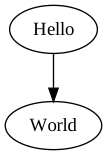
66//!
67//! Heres a more complex example, demonstrating clustering, colors, labeling and shapes.
68//! Note that chaining calls to `edge()` produces a series of nodes that are all connected.
69//! Also note that there is just one call to `.digraph()`, as each call would create a new graph:
70//!
71//! ```
72//! use dot_writer::{Color, DotWriter, Attributes, Shape, Style};
73//!
74//! let mut output_bytes = Vec::new();
75//! {
76//! let mut writer = DotWriter::from(&mut output_bytes);
77//! writer.set_pretty_print(false);
78//! let mut digraph = writer.digraph();
79//! {
80//! let mut cluster = digraph.cluster();
81//! cluster.set_style(Style::Filled);
82//! cluster.set_color(Color::LightGrey);
83//! cluster.node_attributes()
84//! .set_style(Style::Filled)
85//! .set_color(Color::White);
86//! cluster.edge("a0", "a1").edge("a2").edge("a3");
87//! cluster.set_label("process #1");
88//! // cluster goes out of scope here to write closing bracket
89//! }
90//! {
91//! let mut cluster = digraph.cluster();
92//! cluster.node_attributes()
93//! .set_style(Style::Filled);
94//! cluster.edge("b0", "b1").edge("b2").edge("b3");
95//! cluster.set_label("process #2");
96//! cluster.set_color(Color::Blue);
97//! // cluster goes out of scope here to write closing bracket
98//! }
99//! digraph.edge("start", "a0");
100//! digraph.edge("start", "b0");
101//! digraph.edge("a1", "b3");
102//! digraph.edge("b2", "a3");
103//! digraph.edge("a3", "a0");
104//! digraph.edge("a3", "end");
105//! digraph.edge("b3", "end");
106//! digraph.node_named("start")
107//! .set_shape(Shape::Mdiamond);
108//! digraph.node_named("end")
109//! .set_shape(Shape::Msquare);
110//! // digraph goes out of scope here to write closing bracket
111//! // then writer goes out of scope here to free up output_bytes for reading
112//! }
113//! assert_eq!(
114//! String::from_utf8(output_bytes).unwrap(),
115//! "digraph{subgraph cluster_0{style=\"filled\";color=lightgray;node[style=\"filled\",color=white];a0->a1->a2->a3;label=\"process #1\";}subgraph cluster_1{node[style=\"filled\"];b0->b1->b2->b3;label=\"process #2\";color=blue;}start->a0;start->b0;a1->b3;b2->a3;a3->a0;a3->end;b3->end;start[shape=Mdiamond];end[shape=Msquare];}"
116//! );
117//! ```
118//!
119//! This produces (after render with dot) the following lovely graph:
120//!
121//! 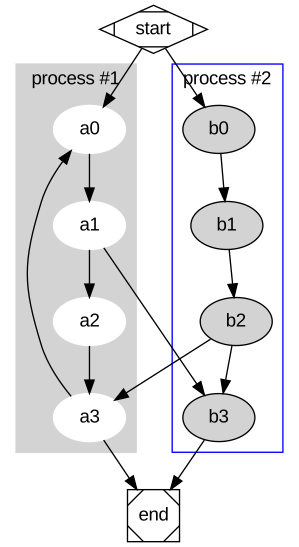
122
123#[allow(clippy::cargo, clippy::pedantic, clippy::nursery)]
124mod attribute;
125mod scope;
126mod writer;
127
128pub use attribute::{
129 ArrowType, Attributes, AttributesList, Color, Rank, RankDirection, Shape, Style,
130};
131pub use scope::{EdgeList, Node, NodeId, PortId, PortPosId, PortPosition, Scope};
132pub use writer::DotWriter;