CortexBrain © 2026
Enabling developers to effectively monitor and analyze distributed applications for rapid and efficient problem solving
Written in Rust and eBPF for low-overhead and high-performance
📬Contacts
-
Tettamanti Lorenzo 📧 lorenzotettamanti5@gmail.com
-
Lorenzo Bradanini 📧 lorenzolollobrada@gmail.com
ℹ️ What is CortexBrain ?
CortexBrain is an ambitious open-source project designed to build an intelligent, lightweight, and highly efficient monitoring platform for distributed cloud and hybrid (cloud–edge) workflows. By leveraging the power of eBPF, CortexBrain can successfully manage networking and observability in a distributed cluster, limiting resource waste and improving overall performance.
Comprehensive information about CortexBrain’s core architecture, installation, and practical applications is available in the Official Documentation and on the CortexFlow blog.
⚡ Why CortexBrain ?
-
🔎 Deeper Insights: CortexBrain integrates eBPF to produce deeper kernel-level insights of your system without modifying your application code
-
🚁 No sidecar overhead: Sidecarless architecture that eliminates additional CPU and memory overhead associated with sidecar proxies
-
🔒 Safety: The linux BPF Verifier ensures that all the programs are safe to run.A JIT compiler converts bytecode into native CPU instructions for optimal execution efficiency. CortexBrain can trace network traffic such as ingress (incoming) TCP/UDP connections and apply policies directly at kernel level by attaching the programs in different hooks such as TC (traffic control) and XDP hooks. All the intercepted events are successfully propagated in the user space thanks to BPF maps and dedicated data structures.
🧑🏻🔬 Current Development Focus
Our current development efforts are dedicated to the following key features:
-
🧪[Experimental] GPU Observability: Introducing GPU tracing and monitoring capabilities to efficiently support AI/ML applications
-
🤖 Extending AI integrations - Extending the current MCP server to seamlessly integrate with coding agent platforms and enable AI-assisted system analysis
-
🚁 Simplify the pipeline - Simplify the monitoring pipeline to reduce the overall overhead and reduce points of failures
-
📡 [Experimental] Cloud-Edge Multi-Cluster Integration: Extending observability accross hybrid cloud and edge environments

Documentation
Table of Contents
- Architecture: Latest version architecture overview
- Quickstart: Quickstart guide
- Developer Guide: Full developer guide
- Common Issues: Common documented issues encountered while programming with the eBPF framework
- MCP server: Architecture, building and configuration with opencode
- CLI: Full CLI documentation covering setup and commands
🤖 Getting Started
🥷 Installation
CortexBrain provides a simple installation for users thanks to his command line interface. You can find the installation guide in the official documentation
Install the CLI using cargo
Start your local cluster
Install CortexBrain components
List all the installed services
💪🏻 Contributing
Do you think the project is missing something? Contributing is the best way to show your skills and leave your mark on a project. If you know DevOps/Kubernetes, networking, security, or you just enjoy maintaining a repository, please write an email to lorenzotettamanti5@gmail.com
| Role | Skills | Tasks | Related Issues and Milestones |
|---|---|---|---|
| CortexBrain Core Developer | - Kubernetes - Networks - Rust programming language | - Help us to build and optimize the core functionalities (Client,DNS,Proxy,Telemetry,etc..) | - Rust - Core - eBPF |
| General Mantainers | - Github - Practical organition - Documentation | - Keep the repository organized and clean - Write/Update documentation - Spot typos in the repository | - Documentation - question |
| Code Reviewers/Testers | - Rust - Kubernetes - Docker | - Review code and suggest changes/optimizations - Write tests for CI/CD | Code refactoring |
🤖 How to Contribute?
We welcome contributions from the community! To contribute to the project, please follow these steps:
- Fork the repository.
- Check out Developer guide
- Create a new branch for your feature (
git checkout -b feature/feature-name). - Submit a Pull Request with a detailed explanation of your changes.
🙋Proposing New Features
If you would like to contribute a new feature, we ask you to open a discussion before submitting a PR. This is to ensure that all new features align with the project's goals and to avoid overlapping work or conflicting views.
Please initiate a discussion in the GitHub Discussions section where we can collectively review, refine, and approve your idea before you begin implementation. Pull Requests for new features that have not been discussed beforehand may be declined to maintain project coherence and ensure alignment with the broader roadmap.
By collaborating in this manner, we can maintain clarity and consistency, ensuring that all contributors are working towards the same objectives. Thank you for your understanding and contributions!
AI Policy
We accept Pull Requests containing AI-generated code, subject to certain conditions. First of all, make sure the new functionalities are well documented; secondly, prove that you can understand and explain the idea behind the code you have submitted. We don't discourage the use of AI to help make new updates; we just want to make sure that there was a clear human thinking process behind the code you submit.
Towars AI generated content
The codebase is entirely written by humans, and the AI is used to flatten the knowledge gap required to fully understand the Linux kernel codebase- things like: where is this tracepoint located? Or what is the offset for the tgid field in this kernel structure?. We used AI-assisted development to speed up the building of the backbones of the documentation, but all the sections were carefully reviewed by humans. The illustration of the architecture was enhanced with AI, this is the version we submitted to the AI agent


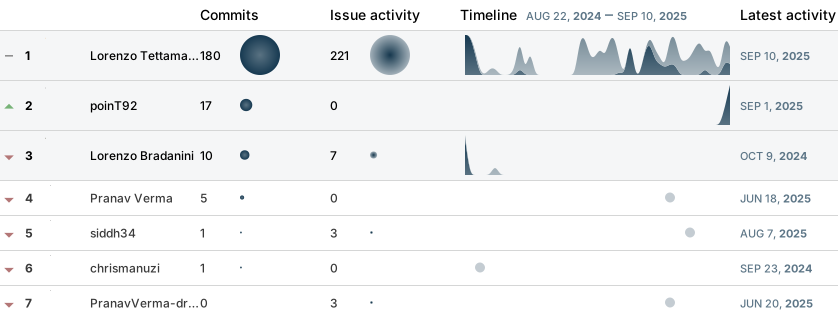
🐐 Top contributors