Expand description
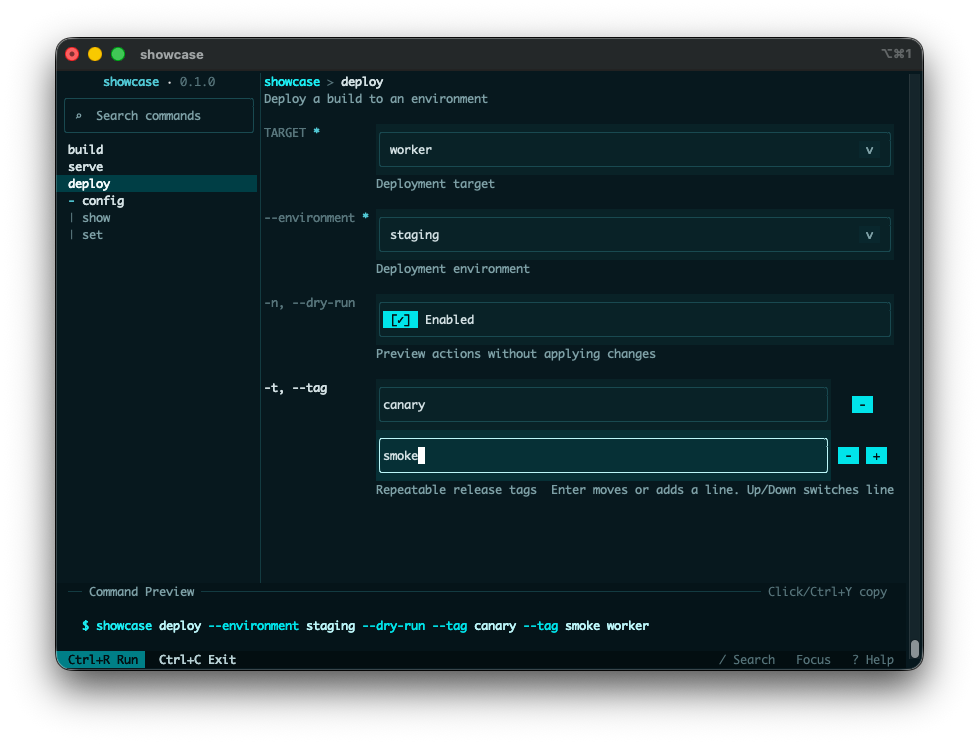
clap-tui turns a clap CLI into an interactive terminal UI while preserving the original
command-line interface.
You can keep clap as the source of truth, collect input in the TUI, and then hand the
selected command value back to your normal application dispatch.
It reduces trial-and-error for complex CLIs by making commands, flags, and values easier to explore before execution. It also improves discoverability without changing the CLI behavior your existing scripts and docs already rely on.
This crate was heavily inspired by Trogon.
clap-tui is a community crate and is not an official clap project.
§Quick Start
Add a Tui subcommand and delegate to Tui::run.
The recommended integration model is to define a normal tui subcommand in your own CLI and
run Tui from that dispatch branch:
use clap::Parser;
use clap_tui::Tui;

#[derive(Debug, Parser, PartialEq, Eq)]
#[command(name = "tool")]
enum Command {
    Tui,
    Hello {
        #[arg(long, default_value = "world")]
        name: String,
    },
}

fn dispatch(command: Command) {
    match command {
        Command::Tui => {}
        Command::Hello { name } => println!("Hello, {name}!"),
    }
}

fn main() -> Result<(), clap_tui::TuiError> {
    match Command::parse() {
        Command::Tui => {
            if let Some(command) = Tui::<Command>::new().hide_entrypoint("tui")?.run()? {
                dispatch(command);
            }
        }
        command => dispatch(command),
    }

    Ok(())
}§Choosing An Entry Point
Use Tui (recommended).
- Use
Tui::<T>::run()when you want typed results from a derive-based parser. - Use
Tui::<T>::run_with_argv()when you also need the canonical argv used for typed reparsing. - Use
TuiAppwhen you are working directly with a hand-builtclap::Commandor need a lower-level integration surface.
§Typed Outcomes
You can also use Tui with a single struct instead of an enum:
use clap::Parser;
use clap_tui::Tui;

#[derive(Debug, Parser, PartialEq, Eq)]
#[command(name = "tool")]
struct Cli {
    #[arg(long)]
    name: String,
}

fn main() -> Result<(), clap_tui::TuiError> {
    if let Some(cli) = Tui::<Cli>::new().run()? {
        println!("Hello, {}!", cli.name);
    }
    Ok(())
}
Tui::run returns:
Some(T)when the user submits a valid commandNonewhen the user cancels before submissionErr(TuiError)for runtime failures or clap-driven flows such as help and version handling
See TuiError for the detailed error taxonomy.
§Retaining Canonical Argv
Use Tui::run_with_argv when the application also needs canonical argv:
use clap::Parser;
use clap_tui::Tui;

#[derive(Debug, Parser)]
#[command(name = "tool")]
struct Cli {
    #[arg(long, default_value = "world")]
    name: String,
}

fn main() -> Result<(), clap_tui::TuiError> {
    if let Some(invocation) = Tui::<Cli>::new().run_with_argv()? {
        eprintln!("Running argv: {:?}", invocation.argv);
        println!("Hello, {}!", invocation.command.name);
    }
    Ok(())
}
TuiInvocation::argv is canonical argv with the program name as its first element.
§Feature Flags
- The default
mousefeature enables mouse capture and mouse-driven controls.
§Runtime Expectations
- The default
CrosstermRuntimerequires a terminal supporting raw mode and an alternate screen.
§Customization
TuiConfigcontrols theme, layout, key bindings, and initial command selection.ThemeandThemePresethelp you start from a built-in look and adjust from there.Runtimeplus the exported runtime event types support custom event loops or embedding into existing runtimes.
§Examples
The crate ships with five public examples:
simplefor minimalCommand::Tuisetuprun_with_argvfor a minimal typed invocation with canonical argvshowcasefor a realistic, compact command treesubcommandsfor typed dispatch across command treesclap_featuresfor the fullTuiAppcompatibility fixture
Structs§
- AppKey
Event - Runtime customization surface for advanced integrations.
Keyboard event used by custom
Runtimeimplementations. - AppKey
Modifiers - Runtime customization surface for advanced integrations. Key modifiers used by keyboard and mouse events.
- AppMouse
Event - Runtime customization surface for advanced integrations.
Mouse event used by custom
Runtimeimplementations. - Crossterm
Runtime - Runtime customization surface for advanced integrations. Default runtime backed by crossterm and arboard.
- Keymap
- Public configuration and theming types. Key bindings for main actions.
- Layout
Config - Public configuration and theming types. Layout configuration.
- Theme
- Public configuration and theming types. UI colors used across the TUI.
- Tui
- TUI application entry points and typed invocation result.
Direct typed TUI execution for a derive-based
clapparser. - TuiApp
- TUI application entry points and typed invocation result.
Build and run a TUI from a hand-built
clap::Command. - TuiConfig
- Public configuration and theming types.
Top-level configuration for
crate::Tuiandcrate::TuiApp. - TuiInvocation
- TUI application entry points and typed invocation result. A typed command invocation together with the canonical argv that produced it.
Enums§
- AppEvent
- Runtime customization surface for advanced integrations.
Input event emitted by a custom
Runtimeimplementation. - AppKey
Code - Runtime customization surface for advanced integrations.
Key code used by
AppKeyEvent. - AppMouse
Button - Runtime customization surface for advanced integrations.
Mouse button used by
AppMouseEventKind. - AppMouse
Event Kind - Runtime customization surface for advanced integrations.
Mouse event kind used by
AppMouseEvent. - Theme
Preset - Public configuration and theming types. Built-in theme presets.
- TuiError
- Error type returned by public
clap-tuioperations. Errors returned byclap-tui.
Traits§
- Runtime
- Runtime customization surface for advanced integrations.
Runtime services required by
TuiApp.