Expand description
Render a Bevy 2D app into a terminal, using the kitty graphics protocol.
The protocol uploads a rectangle of RGBA pixels, then places it at a character cell. This crate turns what Bevy would have drawn into a set of uploads and placements. It does that in few enough bytes that it works over SSH.
§The two modes
KittyMode::Sprite | KittyMode::Frame | |
|---|---|---|
| What it sends | one upload per distinct bitmap, then placements | the whole composited plate |
| Fidelity | flat images only, no per-pixel shaders | everything the GPU composites |
| Cost | ~10 KB/s ongoing | ~307 KB per changed frame |
| Use | the real renderer, works over SSH | localhost, and the reference oracle |
Frame mode needs the frame feature. It is the ground truth to diff against
when sprite mode looks wrong. Several real bugs were found that way.
§Usage
use bevy::prelude::*;
use bevy_kitty::prelude::*;

// Mark the camera whose view gets painted into the terminal.
commands.spawn((Camera2d, KittyCamera));
Then add KittyPlugin with a KittyConfig naming your virtual
resolution. Input arrives as [KittyClick] and [KittyKey] messages. Nothing
in this crate needs to know what your game does with a click.
§What this crate does not do
Limits of the approach:
- No
Mesh2d, no custom materials. A placement renderer cannot draw arbitrary geometry. Those needframemode. - No rounded corners or gradients on UI nodes. A placement is a rectangle,
so
border_radiusis ignored.BackgroundGradientneedsframemode. - No per-pixel full-screen shaders in sprite mode. A flat alpha tile approximates a colour grade acceptably. CRT curvature and lightning do not survive.
- Text cannot be sharper than the cell grid. Legible is achievable.
§Traps
Each of these cost real debugging time. They all fail silently.
ViewVisibilitylies about text when headless. The render pipeline sets it by frustum culling.Text2d’sAabbis computed after layout, so culling never marks it visible and every string vanishes with no error. The text pass readsInheritedVisibility. The sprite pass keepsViewVisibility, because for sprites it genuinely works.- Terminal cells are not square. At 1920x1080 over 212x51 they are
9.06 x 21.18 px. Sizing an image with kitty’s
c/rkeys rounds to whole cells, so the error differs per axis. On a 5x7 glyph that is +20.8% wide but +0.8% tall. The result is visibly squashed text. The glyph pass pre-scales glyphs to exact pixels and places them withc/romitted. The sprite pass keeps cell sizing. - One image id per bitmap, one placement id per entity. Sharing a placement id between image ids makes kitty stack images rather than replace them. That looks like ghosting.
- The text pass must run after
update_text2d_layout. That system fillsTextLayoutInfo.glyphs. Query earlier and you get an empty vector and blank text, with no error. - An SSH pty reports the cell grid but not the pixel size.
termasks the terminal for it with aCSI 14 tquery. Guessing a cell size gets the aspect wrong. - Do not measure bandwidth with a sliding window. It double-counts the one-time uploads, so the figure reads about five times too high. Count whole-run, and split uploads from placements.
§Where the output goes
Escape sequences go to stdout. bevy_log writes to stderr, so verbose logging
never corrupts the graphics stream. Never println! from a game using this
crate.
§How Bevy graphics become kitty graphics
A walk through the terminal renderer, from Bevy components to the bytes on the wire. Every escape sequence, size and byte count below was captured from a real run, not written by hand. So are the figures: each one is generated from that capture, either by decoding the frame-mode oracle or by replaying the sprite-mode byte stream.
Where the numbers come from. This crate was extracted from a game, and the capture and the figure generator both stayed there. So the figures committed here are evidence of a real run, but they cannot be regenerated from this repository alone: doing that needs the game’s binary and its
scripts/illustrate-kitty-doc.py. The recipe at the end is written for that repo, and is kept because a figure that disagrees with the renderer is a bug rather than a stale picture. Making the figures reproducible from this crate’s own examples is unfinished work.
Code, all of it in this crate:
| Where | What |
|---|---|
src/proto.rs | the kitty protocol encoder. No Bevy at all |
src/term.rs | terminal geometry: TermSize, FitBox |
src/sprite.rs | the Sprite pass |
src/text.rs | the glyph pass, for Text2d and UI text |
src/ui.rs | the bevy_ui pass (step 8) |
src/frame.rs | GPU readback mode (the oracle) |
src/input.rs | terminal mouse and keyboard |
src/pixels.rs | where sprite pixels come from |
The split is worth knowing before reading on, because it explains the shape of what
follows: the renderer never asks “what game is this”, it asks “what Sprite and
Text2d entities exist”. The host game supplied about 295 lines of glue and a
headless boot, and no rendering at all. README.md covers using this
in another project.
§The problem
This is what has to come out of a terminal.
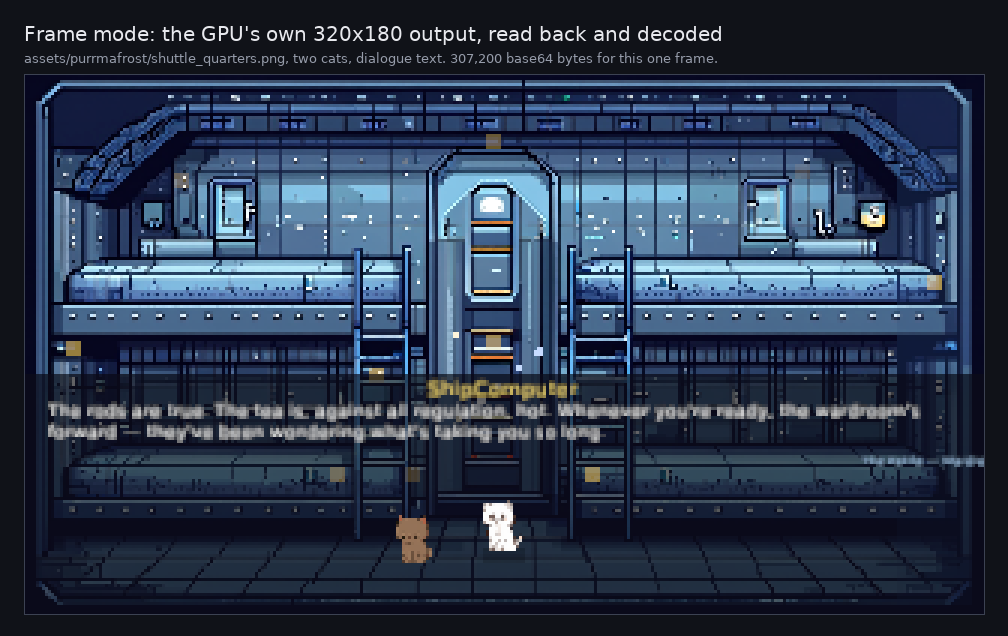
The anchor for everything below. Frame mode read this straight back off the GPU, so it is exactly what Bevy composited. Note what is in it: one large room background, two 64x64 cats, and a screenful of tiny text.
Bevy draws with a GPU into a window. A terminal has neither. What kitty gives us instead is an image protocol: upload a rectangle of RGBA pixels, then place it at a character cell. So the job is to turn “what Bevy would have drawn” into a set of uploads and placements, and to do it in few enough bytes that it works over SSH.
Two strategies fall out of that, and the renderer implements both.
| frame mode | sprite mode | |
|---|---|---|
| What it sends | the whole composited 320x180 image | one upload per distinct bitmap, then placements |
| Fidelity | everything the GPU composites | flat images only, no per-pixel shaders |
| Cost | ~307 KB per changed frame | ~10 KB/s ongoing (measured below) |
| Use | localhost, and as the reference oracle | the real renderer, works over SSH |
Sprite mode is the interesting one. Frame mode is kept because it is the ground truth to diff against when sprite mode looks wrong. Here they are side by side, both reconstructed from the captured bytes rather than photographed off a screen.
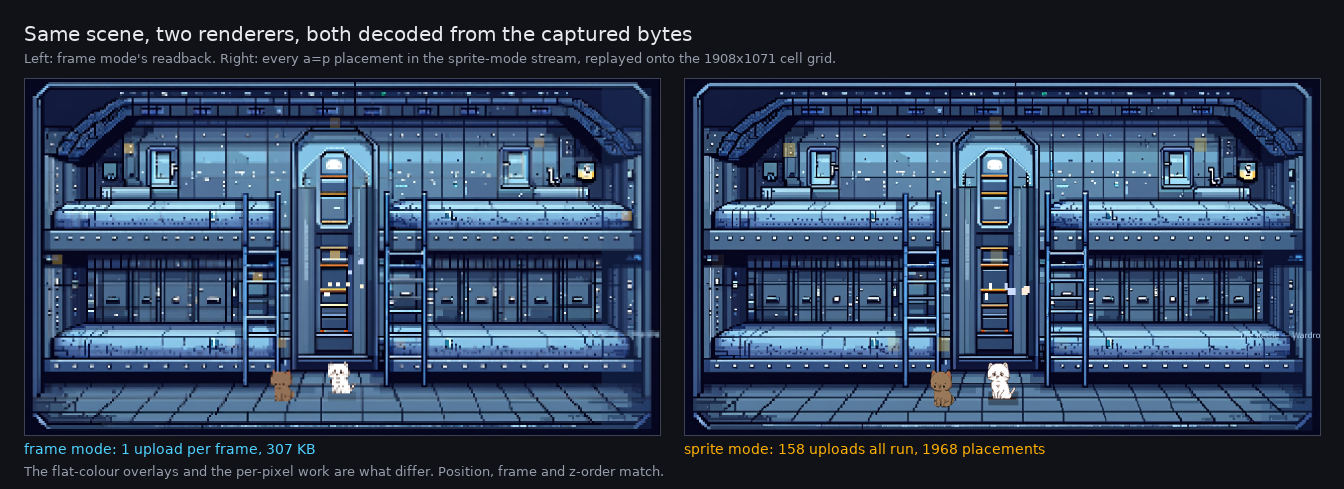
Look at the cats: same pose, same position, same front-to-back order. Then look at the overall brightness, which is where the two diverge. Sprite mode cannot reproduce the composited colour-grade overlay, so the scene comes out a little cooler and flatter. That difference is the honest cost of the approach.
§Step 0: boot without a window
The host app builds DefaultPlugins with primary_window: None, disables
WinitPlugin, and adds ScheduleRunnerPlugin to drive frames. In the game this came
from it then calls the game’s own configure_game(), so the terminal build runs the
same systems as the browser build and cannot drift from it.
The renderer goes on top, and this is its entire required integration:
app.add_plugins(KittyPlugin {
    config: KittyConfig { virtual_size: UVec2::new(320, 180), ..default() },
});
// and, on the camera whose view gets painted:
commands.entity(camera).insert(KittyCamera);
The camera is then pointed at an offscreen image rather than a window:
// In bevy 0.19 RenderTarget is a COMPONENT the Camera requires, so inserting
// our own overrides the default Window target.
let mut target: ImageRenderTarget = handle.clone().into();
target.scale_factor = sf;
commands.entity(camera).insert(RenderTarget::Image(target));
Sprite mode needs that target even though it never reads the pixels back:
Camera::world_to_viewport derives its coordinate space from the render target,
and with no window there would otherwise be no space to project into.
From the real log, showing the hi-dpi trick explained in step 6:
[kitty] render target armed: 1280x720 physical at 4.0x, logical stays 320x180§Step 1: the terminal says how big it is
Everything downstream is sized from the terminal’s pixel dimensions.
ioctl(TIOCGWINSZ) -> cols=212 rows=51 xpixel=1920 ypixel=1080Over SSH the pty reports the cell grid but usually not the pixel size, so the
renderer asks the terminal directly with CSI 14 t and reads back
CSI 4 ; height ; width t. Guessing a cell size instead gets the aspect wrong,
which visibly misplaces every glyph.
FitBox then maps the game’s 320x180 world into that pixel space. Two real
terminal shapes, so the mapping is visible rather than asserted:
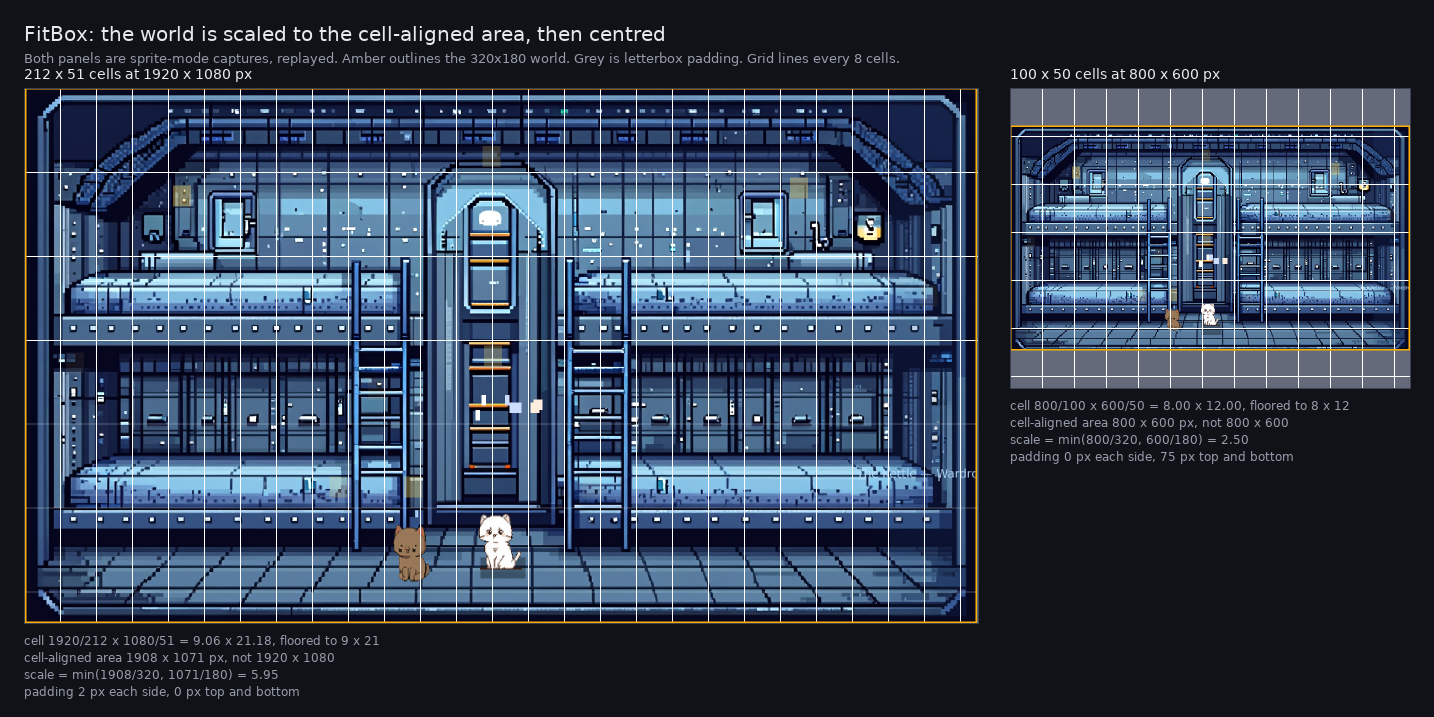
Look at the grey bars. A 16:9 world in a 4:3 terminal letterboxes vertically, and the arithmetic under each panel is computed by the same formula the crate uses. The grid lines are drawn every 8 cells so they survive being shrunk for the page.
Two subtleties, both of which were bugs first.
Fit the cell-aligned area, not the raw pixel count. Because the cell size is floored, 212 columns of 9 px cover 1908 and not 1920. Scaling against 1920 put the far edge of the world at column 213 of a 212-column grid, so the rightmost sliver was drawn somewhere else entirely. Costing 0.8% of scale buys the guarantee that every placement lands on a cell that exists.
The cell is not square. This is the one to look at closely, because two later bugs come out of it.
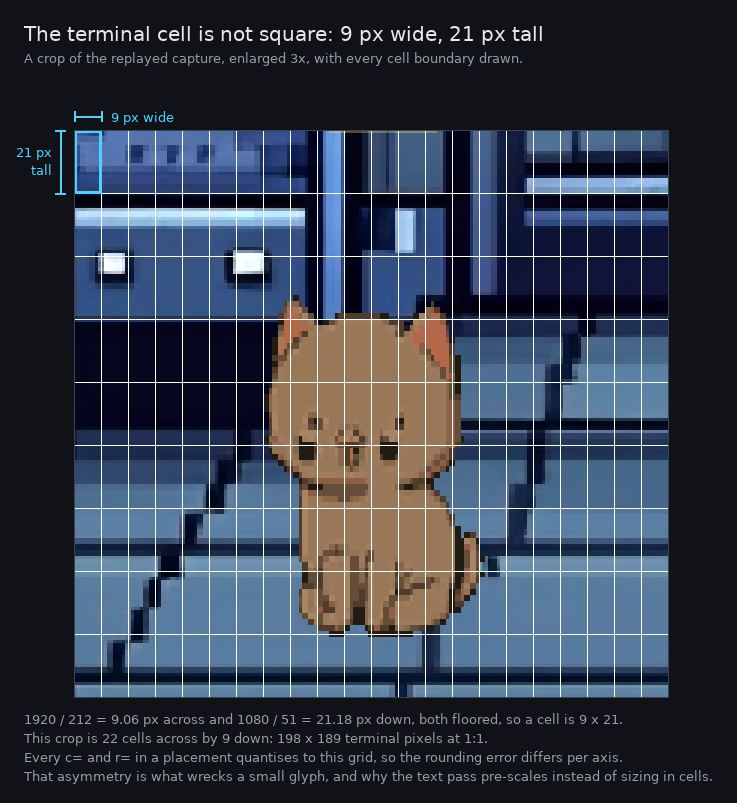
The cell is more than twice as tall as it is wide. Every c= and r= in a
placement quantises to this grid, so a rounding error on one axis is not the same
size as the error on the other. That asymmetry is the source of the glyph
distortion in step 6.
§Step 2: where the data is intercepted
Worth being explicit, because the obvious guess is wrong: sprite mode does not
intercept Bevy’s render pipeline. There is no custom RenderGraph node, no
extraction into the render world, no wgpu hook. It never touches the GPU path.
It is two ordinary systems doing ordinary ECS queries. This is the whole interception:
// bevy_kitty/src/sprite.rs, render_sprites
sprites: Query<(Entity, &Sprite, &GlobalTransform, &ViewVisibility, Option<&Anchor>),
               Without<KittyCamera>>

// bevy_kitty/src/text.rs, render_glyphs
texts: Query<(Entity, &TextLayoutInfo, &ComputedTextBlock, &TextBounds,
              &Anchor, &GlobalTransform, &InheritedVisibility)>
Note what is NOT in those queries: any game type. KittyCamera is the crate’s own
marker component, which is why the same two systems work for any Bevy 2D app.
Bevy’s own renderer reads those same components to build its draw calls. We are a second consumer of the same source of truth, running beside the real renderer rather than downstream of it. Three things make that work.
Timing. Both systems run in PostUpdate, and the text one is explicitly
ordered:
app.add_systems(PostUpdate, render_sprites.in_set(KittySet::Render));
app.add_systems(PostUpdate,
    render_glyphs.in_set(KittySet::Render)
        .after(bevy::sprite::update_text2d_layout));
By PostUpdate transforms and animation have settled. The .after() is not
decoration: update_text2d_layout is the system that FILLS
TextLayoutInfo.glyphs, so querying before it yields an empty vector and no text.
Pixels come from outside the ECS. The components say what and where, never
what it looks like. Bevy frees a sprite image’s CPU copy once it is on the GPU, so
Assets<Image> is usually empty for them. That is why pixels arrive through a
PixelSource trait rather than from a query: the default implementation reads the
original file back off disk, and the alternatives are Assets<Image> for images
generated at runtime and Bevy’s font atlas for glyphs, which Bevy deliberately
keeps CPU-persistent.
The camera is borrowed as a coordinate oracle. The offscreen render target
exists so Camera::world_to_viewport has a coordinate space to project into, not
so anything reads pixels back from it. Calling the camera’s own projection is what
makes our placements land where Bevy would have drawn them.
The cost of reading the ECS instead of the pipeline is that some components are
only meaningful when the pipeline is fully running. ViewVisibility is set by
frustum culling, and headless it never marked Text2d visible, so every string
silently vanished. Text therefore reads InheritedVisibility, the propagated
authored intent that the game’s own UI code toggles. Note that sprites still use
ViewVisibility in the query above, because for them it genuinely works. Two
similar-looking components, different trustworthiness.
Frame mode is the opposite approach, and exists partly as the contrast:
RenderTarget::Image plus GpuReadbackPlugin, observing ReadbackComplete to
collect the composited pixels. That is why frame mode reproduces shaders and
sprite mode cannot.
§Step 3: what is on screen, in Bevy’s terms
This game draws with exactly two component families, which makes the translation
tractable: Sprite and Text2d. No meshes, no custom materials.
The renderer also handles a third, bevy_ui, which this game does not use but most
Bevy apps do. That pass is covered in step 8, because it is easier to follow once the
sprite and glyph passes make sense.
Each source becomes a different kind of upload.
| Bevy source | Pixels come from | Example |
|---|---|---|
Sprite with a disk image | the file, decoded with the image crate | room background, cat spritesheets |
Sprite + TextureAtlas | one cell cropped out of the sheet | a walk-cycle frame |
Sprite, generated image | CPU pixels from Assets<Image> | the word-duel Giphy sticker |
Sprite, no image, color set | a 1x1 tile of that colour, stretched | dialogue panels, weather, colour grades |
Text2d | Bevy’s own font atlas, one glyph at a time | every string in the game |
Sprite pixels are read from disk rather than from Bevy, because Bevy frees a sprite image’s CPU-side copy after uploading it to the GPU. The font atlas is the exception: Bevy keeps it CPU-persistent, so glyphs are read straight out of it.
Two traps sit in that table, both of which cost real time.
A colour-only sprite does not have a dangling image handle. ImagePlugin
inserts a real 1x1 white Image at Handle::default(), CPU data and all, so an
“is this handle known?” test answers yes for every UI panel in the game. Get that
wrong and each panel draws as a single white pixel, which reads as a colour bug
rather than a dispatch bug. The default handle has to be excluded by name.
A flat colour is uploaded as one pixel, not as a tile. Kitty stretches a placement to whatever cell span it is given, and every pixel of a flat colour is identical, so a 1x1 source scaled up is bit-identical to a full-size one. That is not a shortcut: the game sizes its full-screen effect overlays at ten times the virtual resolution so camera shake cannot reveal an edge, and 3200x1800 as real pixels is a 23 MB buffer to allocate and base64-encode every time the day/night tint shifts a step. The cache also ends up holding one image per colour instead of one per (colour, size) pair.
§Step 4: one worked example, a cat
Take Artie standing in the crew quarters. In Bevy that entity is roughly:
Sprite {
    image: Handle<Image>("sprites/peachgoma/artie_sheet.png"),
    texture_atlas: Some(TextureAtlas { layout, index: 1 }),  // walk frame 1
    color: /* a per-NPC tint */,
    flip_x: false,                                          // true when facing left
    custom_size: None,
}
GlobalTransform { translation: (x, y, ~1.0025), scale: (s, s, 1.0) }
The renderer turns that into a cache key, because kitty cannot tint, mirror or non-uniformly scale a placement. Anything it cannot do per-placement has to be baked into the pixels, and therefore has to be part of the key. Here is that happening, one step at a time:
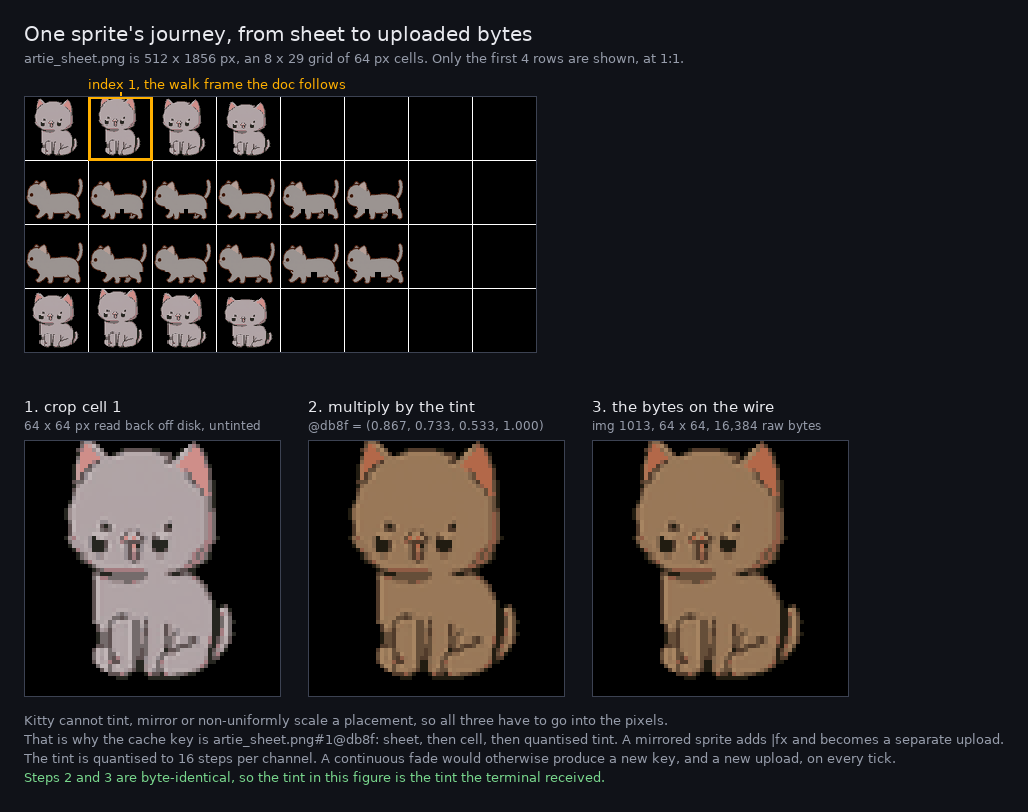
Panels 2 and 3 are byte-identical, which the generator asserts rather than assumes: the third panel is decoded from the base64 the terminal received. The tint is what turns the sheet’s neutral grey cat into this particular NPC.
The key that names those pixels is artie_sheet.png#1@db8f: the sheet, then #1
for the atlas cell, then @db8f for the tint quantised to 16 steps per channel. A
mirrored sprite gets a |fx suffix, so the facing-left pixels are a separate
cached image from the facing-right ones. The quantisation is deliberate: fading
effects sweep alpha continuously, and at full precision every step produced a new
key and therefore a new upload.
The key is built from the asset’s file name rather than its AssetId, purely so
it can be read. AssetId’s debug form is 60-odd characters of type name
(AssetId<bevy_image::image::Image>{ index: 68, generation: 0}) that says nothing
about which sheet or which frame, and is long enough to bury the rest of the key.
Cache miss, so: crop cell 1 out of the sheet, multiply every pixel by the tint, and upload once. From the real log:
uploaded bitmap 'artie_sheet.png#1@db8f' (64x64) as img 1013On the wire, one upload (base64 pixels, chunked at 4096 bytes as the protocol requires):
ESC _ G a=t,f=32,s=64,v=64,i=1013,q=2 ,m=1 ; <base64 RGBA> ESC \
        │     │      │             │
        │     │      │             └─ quiet: no reply, so the game's stdin stays clean
        │     │      └─ image id 1013. Sprites live in the >=1001 band
        │     └─ 64x64 source pixels
        └─ a=t: transmit only, do not display yet
Then every frame, place it. World position goes through the camera, then
FitBox:
GlobalTransform (x, y, z)
  -> Camera::world_to_viewport  -> viewport px in 320x180 space
  -> minus half the draw size    -> top-left rather than centre
  -> FitBox::map                 -> cell (row, col) + sub-cell pixel offset
which emits a cursor move and a placement. Rather than annotate the escape sequence by hand, here is that exact placement decoded back out of the capture and drawn on the cell grid it addresses:
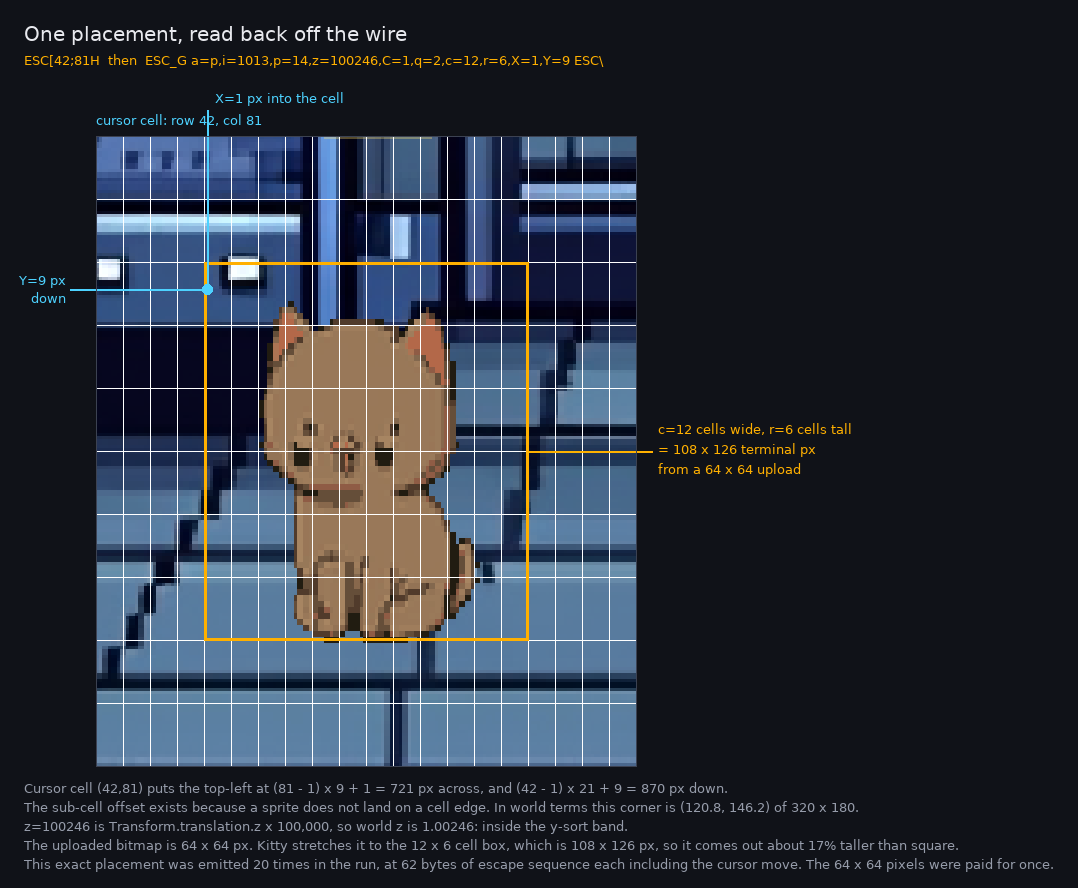
Each key in the escape sequence is one thing in the picture. c and r are the
amber box, X and Y are the cyan offset into the first cell, and the cursor move
picks the cell the box starts in. The offset exists because a sprite’s position is
continuous while the cell grid is not.
That placement is 62 bytes, cursor move included, and 51 bytes is the measured mean across all 1968 placements in the captured run. It is the entire per-frame cost of the cat moving: image 1013 is placed 20 times across the captured run, and its 64x64 pixels were paid for once.
§Step 5: the invariant that makes it cheap, and the two ways it broke
Each distinct bitmap owns one image id, uploaded once ever. Each on-screen thing owns one placement id, held for life. Moving re-points a placement. Changing frame re-points it at another image.
Both halves were learned the hard way.
Ghosting. The first version uploaded each animation frame as a separate image but let all four share one placement id. kitty replaces a placement only when the image id AND placement id both match, so instead of replacing, the four frames stacked and blended.
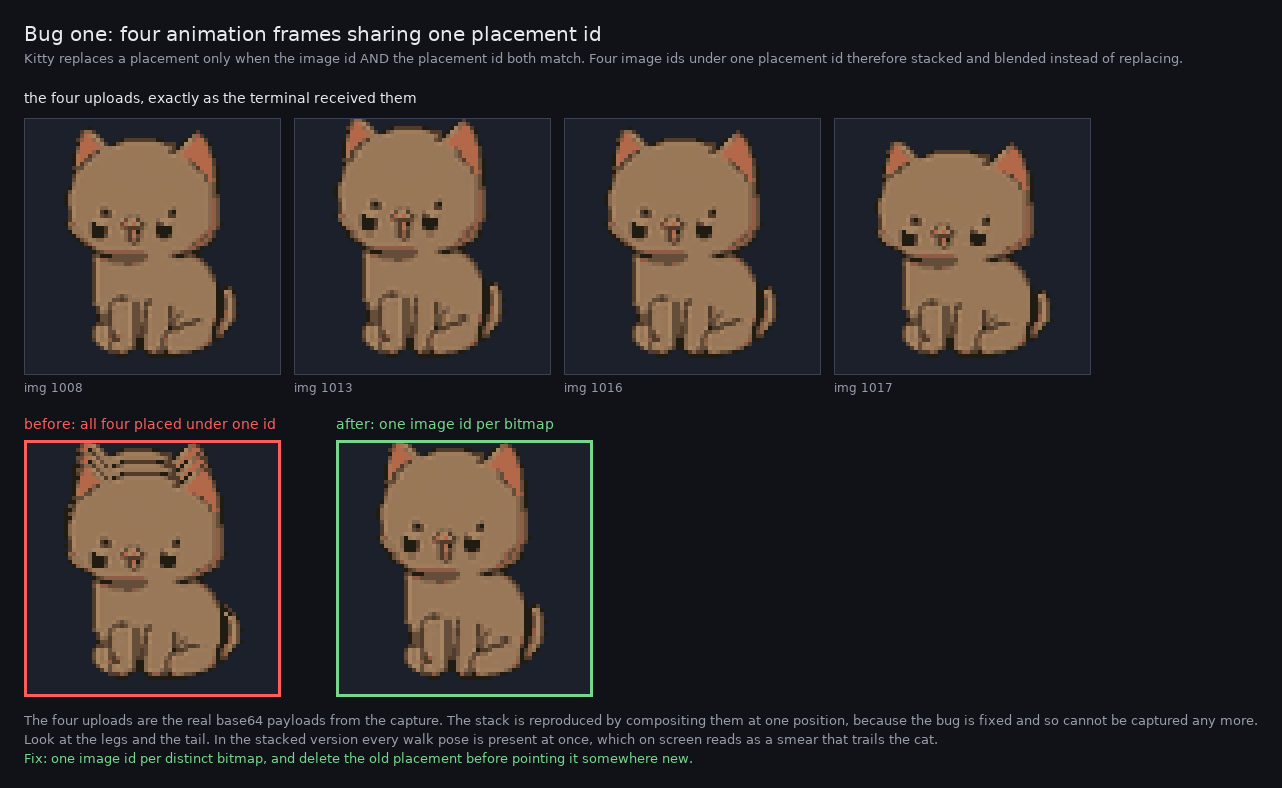
Look at the tail and the front legs in the red panel. Every walk pose is present at once, which on a moving sprite reads as a smear trailing behind the cat. The four uploads are the real captured payloads, and the stack is reproduced by compositing them, because the bug is fixed and so cannot be captured any more.
Fix: one image id per distinct bitmap, and delete the old placement before pointing it somewhere new.
Re-uploading. The second version gave each entity an image id and re-transmitted pixels whenever its frame changed. That re-sent 64x64 sprite sheets about 48 times per 4 seconds, roughly 2 MB, which defeated the whole point. Fix: bitmaps own the ids, entities only borrow them.
There is a verification for this that is worth keeping: every placement id must map to exactly one image id at a time. In the captured run, 158 distinct images were uploaded and zero were re-uploaded.
§Step 6: text, as reusable glyphs
Text is the same idea, one letter at a time, and it reuses what Bevy already computed rather than rasterising anything.
Text2d ---(bevy's text systems)--> TextLayoutInfo {
             scale_factor,
             glyphs: [ PositionedGlyph { position, atlas_info { texture, rect }, section_index } ]
         }
For each glyph the renderer:
- crops
atlas_info.rectout of Bevy’s font atlas, whose pixels stay readable on the CPU, - multiplies by the section’s
TextColor(atlas glyphs are white plus a coverage channel, meant to be tinted), - keys the result by
(atlas texture, rect, colour, target size), so the same letter in the same colour at the same size is uploaded once, - places it, positioned by the transform copied verbatim from
bevy_sprite_render’sextract_text2d_sprite, including its Y flip and its1/scale_factor.
The reuse is the whole win. From the real log, one frame of the intro:
glyph scan #3: 14 text entities (0 invisible, 1 without laid-out glyphs), 167 glyphs total
glyph tick #3: 167 (re)placements, 69 new glyph uploads, 176187 escape bytes, 69 glyph images cached, 167 live slots
167 glyphs on screen, drawn from 69 uploaded images, and the ratio keeps improving as the cache warms. Both halves of that ratio, taken out of the capture:
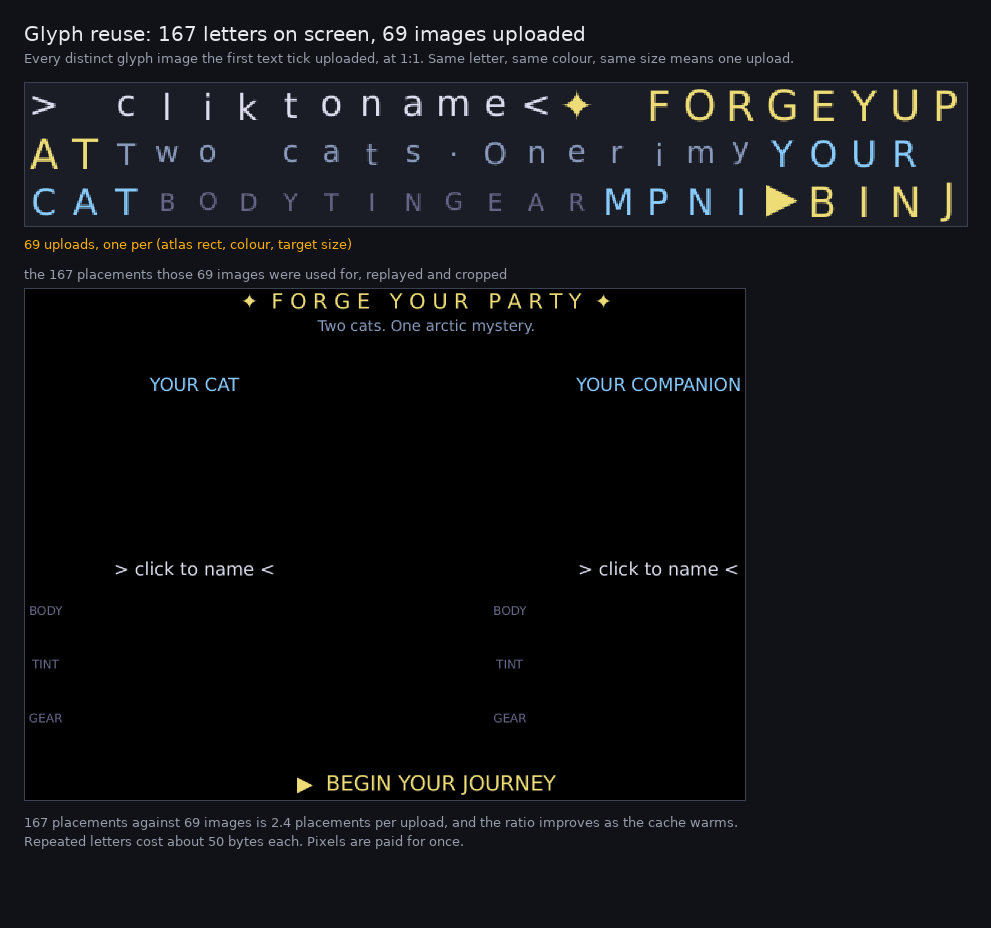
The top sheet has each distinct image once. The bottom screen uses them 167 times. Every repeated letter in the same colour at the same size is a placement against an image already on the terminal, so it costs about 50 bytes and no pixels.
A glyph upload looks like a small sprite upload:
ESC _ G a=t,f=32,s=24,v=19,i=100001,q=2 ,m=0 ; <base64> ESC \
                            ^^^^^^ glyphs live in the >=100_001 band
and its placement omits c/r entirely:
ESC [ 28;37 H   ESC _ G a=p,i=100001,p=100001,z=5100000,C=1,q=2,X=7,Y=18 ESC \
                                                        ^^^^^^^ text sits above the world
Why no c/r: those keys size an image in whole cells, and a cell is 9 x 21
px, so the rounding error differs per axis. That is the second bug, and it is easier
to see than to describe:
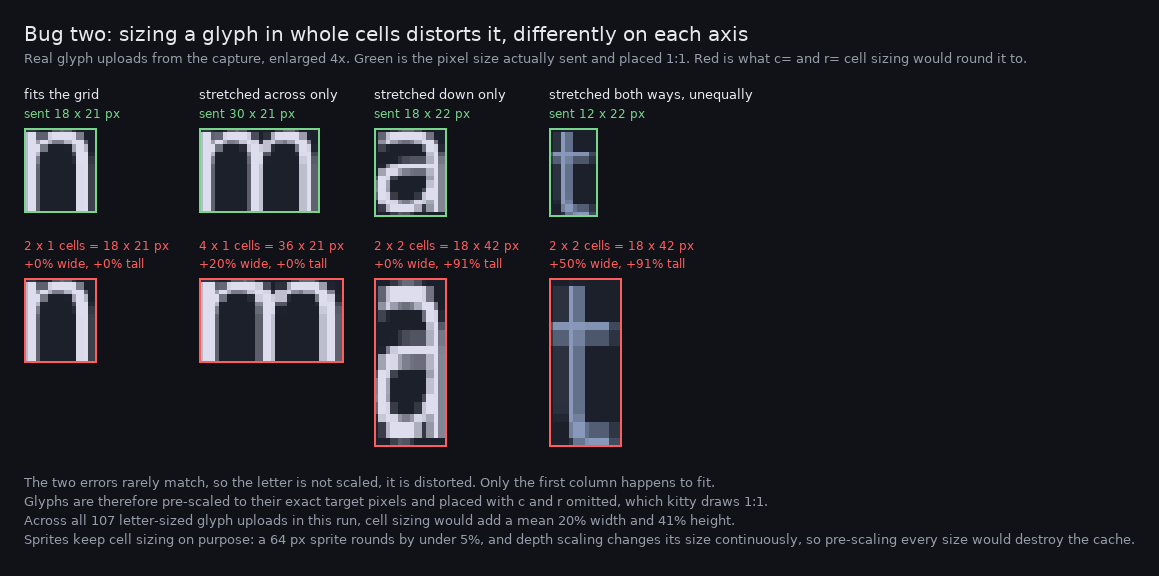
Compare each red letter to the green one above it. The first column happens to land on the grid exactly. The others gain 20% width, or 91% height, or both at once by different amounts, so the letter is not scaled, it is distorted. Averaged over the 107 letter-sized glyph uploads in this run, cell sizing would add 20% width and 41% height.
Glyphs are therefore pre-scaled to their exact target pixel size and placed 1:1. Sprites keep cell sizing on purpose: a 64 px sprite rounds by under 5%, and depth-scaling changes their size continuously, so pre-scaling every size would destroy the cache.
That pre-scaling also has to average when it shrinks, not sample. The glyphs are rasterised at 4x and then usually reduced to fit the terminal, and nearest-neighbour sampling on the way down throws away most of the pixels, undoing exactly the detail the hi-dpi target was asked for.
Text is also rasterised at 4x. The game authors fonts at 4 to 10 px for a 320x180
screen, so at 1x a letter is a ~5x7 blob and upscaling cannot add detail. Setting
the render target’s scale_factor makes Bevy rasterise the glyphs larger in the
first place. The target’s pixel size is scaled by the same factor, so the
logical viewport stays exactly 320x180 and no coordinate maths changes.
§Step 7: z-order
kitty has a z key for stacking, so ordering is just a mapping. The catch is
scale, and the multiplier is sized for it.
world z  ->  z * 100_000
text     ->  z * 100_000 + 1_000_000    above the y-sort band
Pulled apart, on the busiest frame in the capture:
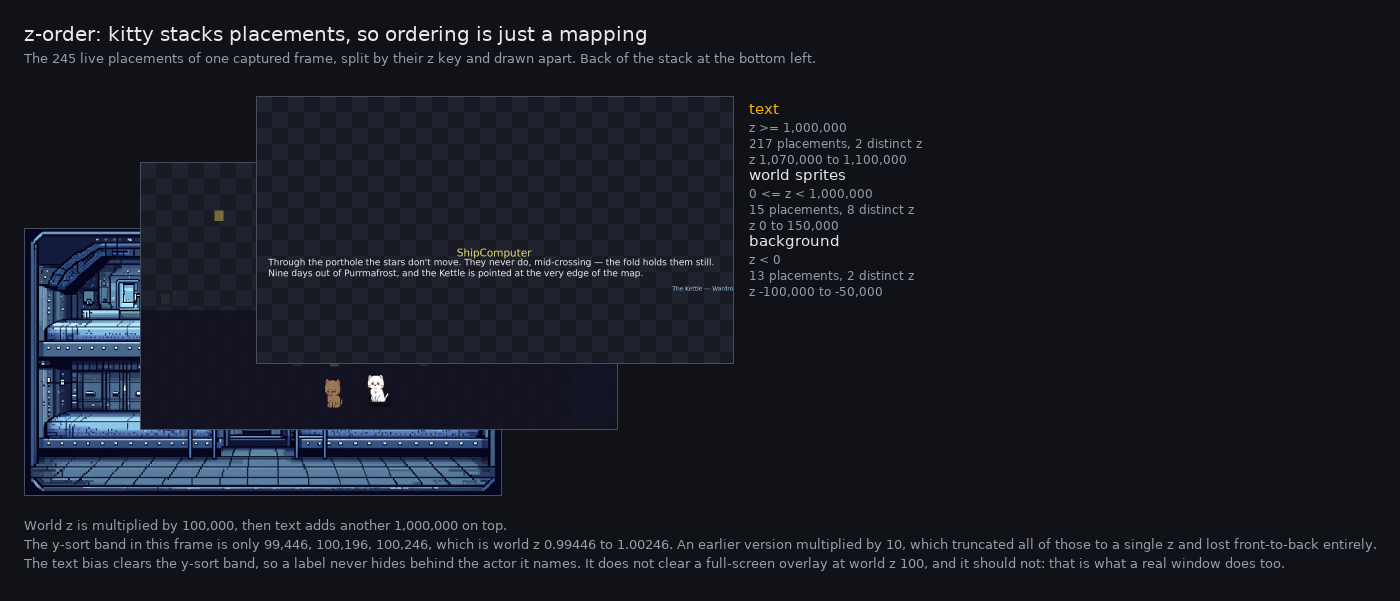
Each panel is the placements from one z band and nothing else, so the checkerboard shows what each layer does not draw. The background is 13 placements at negative z, the world is 15 across 8 distinct z values, and the text is 217 placements sitting above the lot.
The middle band is where the multiplier earns itself. In that frame the y-sort z values are 99,446 and 100,196 and 100,246: world z 0.99446 to 1.00246, a band under 1% wide. An early version multiplied by 10, which truncated all three to the same integer and lost front-to-back ordering entirely.
Be precise about what that guarantees, because the obvious phrasing is wrong. Text
clears the y-sort band, where world z sits around 1.0, so a label is never hidden
behind the actor it names. It does not clear everything: this game’s colour-grade
overlay is at Layer::Grades = 100.0, which maps to 10_000_000 and therefore tints
the text along with the scene. That is correct, and it is what a real window does
too. Anything wanting to sit above text raises its own world z, exactly as it would
on the GPU.
§Step 8: bevy_ui, which this game does not use
Everything so far is world space, because that is how this game draws. Most Bevy apps
build their menus and HUDs with bevy_ui instead, so the renderer handles that too.
It turns out to be the easier of the two, which is the opposite of what you would
guess. UI coordinates are already screen coordinates: bevy_ui lays out in pixels with
a top-left origin, so there is no camera projection and no Y flip. Compare the sprite
pass, which goes world position, then Camera::world_to_viewport, then FitBox.
What replaces that work is two things world-space sprites do not have:
ComputedStackIndex, the paint orderbevy_uicomputed from the tree. It is authoritative and not derivable from a transform, because two siblings at the same position stack by document order.CalculatedClip, the rect an ancestor’sOverflowimposes. A scrolled list has children whose boxes extend past the viewport, and drawing them unclipped paints over everything around the list.
Each node becomes up to nine rectangles: a background, four borders and four outline
edges, each with its own placement id. A BorderColor sets each edge separately, which
is how a one-sided divider is drawn, so a single outline rect could not express it.
Text is the part that comes free. bevy_ui’s Text widget fills the same
TextLayoutInfo and rasterises into the same font atlas as Text2d, so the glyph pass
from step 6 already handles it. One pass, one cache, both kinds of text: an “A” in a
menu button and an “A” in a world label, at the same size and colour, are one upload.
Measured on the crate’s chat_ui example, a 21-node interface with panels, borders,
chips and a message log:
ui tick #1: 21 nodes (0 invisible), 25 (re)placements, 5 new uploads, 1923 escape bytes
glyph tick #1: 157 (re)placements, 82 new glyph uploads, 43263 escape bytes
ui tick #2: 21 nodes (0 invisible), 0 (re)placements, 0 new uploads, 0 escape bytes
Twenty-five rectangles from five uploads, because every flat colour is a 1x1 tile keyed by colour alone. Then nothing at all until something changes.
Two traps live in this pass, and both fail silently.
bevy_ui will not choose an image-target camera. DefaultUiCamera accepts either a
single entity marked IsDefaultUiCamera or the highest-ordered camera whose
RenderTarget is a window. An offscreen camera is filtered out, and headless there
is no window either, so without that marker bevy_ui finds no camera at all, never
propagates a render-target size, and resolves every Val::Percent(100) against zero.
The interface then collapses to its content size. It still renders, correctly, in a
fraction of the terminal, which is exactly what makes it expensive to diagnose: it looks
like a scaling bug rather than a missing component.
UI positions are physical pixels; Text2d positions are world units. The UI pass
divides by ComputedNode::inverse_scale_factor and the text pass divides by
TextLayoutInfo::scale_factor. Similar purpose, different numbers, and swapping them
scales the whole interface by the text-scale factor.
What the pass cannot do: rounded corners (border_radius is resolved and then ignored,
because a placement is a rectangle) and gradients (BackgroundGradient needs a per-pixel
evaluation). At terminal scale a 4 px radius is a fraction of a cell.
§What it costs, measured
A 14 second run at 6 fps into a 1920x1080 terminal, counted by packet type:
| Packet | Count | Bytes | Share |
|---|---|---|---|
| upload, continuation chunks | 1333 | 5,402,069 | 91.8% |
| upload, first chunk | 158 | 344,156 | 5.8% |
| placement | 1968 | 100,523 | 1.7% |
| delete | 1306 | 40,173 | 0.7% |
That table hides the only thing about it that matters, which is that the two halves are not the same kind of number at all.
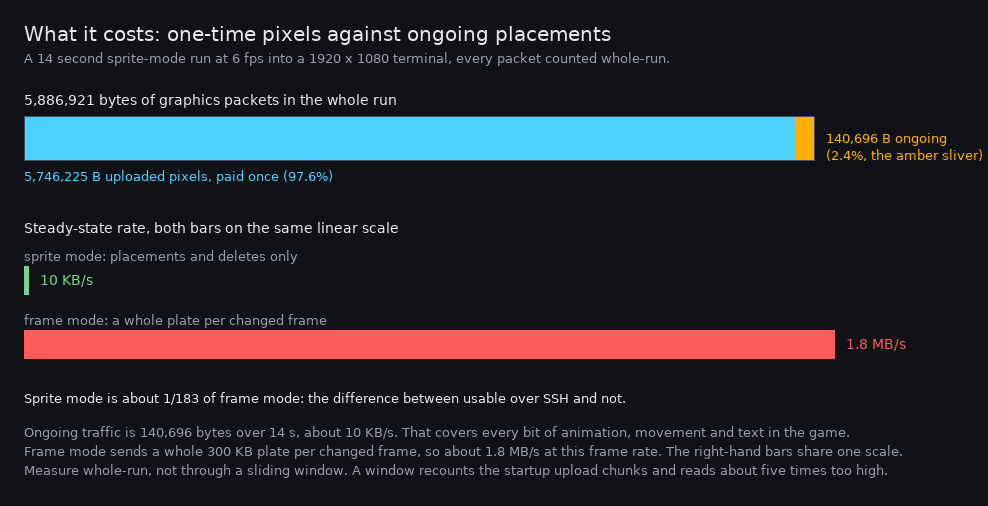
The amber sliver in the top bar is the part that repeats. Everything blue is paid once at startup and never again. The lower bars share one linear scale on purpose: a log scale would make sprite mode look merely better instead of 183 times cheaper.
Read it as two numbers:
- one-time pixels: 5.75 MB. 158 images: the room background, the cat animation frames, the glyphs, the colour tiles. Paid once at startup.
- ongoing: 140,696 bytes over 14 s, about 10 KB/s. That is every bit of animation, movement and text in the game.
For comparison, frame mode sends ~307 KB per changed frame, so around 1.8 MB/s at this frame rate. Sprite mode is about a 183rd of that in steady state, which is the difference between usable over SSH and not.
A trap worth recording: measuring this with a sliding window double-counts the one-time upload chunks and makes steady state look like ~500 KB/s. Count whole-run and split uploads from placements.
§What this design cannot do
Honest boundaries, so nobody re-derives them:
- Per-pixel full-screen shaders. CRT scanlines, live colour grades and lightning cannot be reproduced by moving flat images. Frame mode gets them free off the GPU. A flat alpha tile approximates a colour grade acceptably.
- Text sharper than the cell grid. The game’s 4 px fonts are inherently degraded at terminal scale. Legible is achievable, pixel parity is not.
- Rounded corners and gradients on UI nodes. A placement is a rectangle, so
border_radiusis ignored andBackgroundGradientneeds frame mode. See step 8. RenderLayers. The sprite pass draws every visibleSpritewithout consulting the camera’s layers. Equivalent for one camera on one layer, which is this game; wrong for anything that hides entities by layer.- Audio. kitty’s protocol is images only, and no terminal has an adopted audio
escape sequence. Sound therefore rides its own channel, and that channel is now
its own crate:
bevy_remote_audio, which ships reference listeners in Python and Rust. Its socket sink is the one to use over SSH, because it leaves stdout and the tty alone and so keeps both sound and input. Its stdout sink shares this graphics stream instead, using a privateESC _ RAUD;APC block: terminals ignore APC blocks they do not understand, andbevy_kittyexports its ownESC _ Gintroducer as a constant so the non-collision can be asserted rather than assumed. Measured on a real 5.79 MB capture: two audio blocks, 91 bytes, and zero of them landing inside a graphics escape.
§Seeing it run
The examples are the smallest working thing, and need no assets:
cargo run --example bouncing_sprite
cargo run --example hello_text
cargo run --example chat_ui        # a real bevy_ui interface
Note that stdout is the graphics stream, so a host app’s logs have to go to stderr or a file.
§Reproducing the numbers here
Run in the game repo this was extracted from, not here: the capture needs its binary
and assets, and illustrate-kitty-doc.py lives there. Kept verbatim because it is
what makes every figure above checkable.
set -x
out=$(mktemp -d)

# capture a run. No tty here, so the terminal size is forced rather than queried.
cd game
RUST_LOG=bevy_kitty=debug BEVY_ASSET_ROOT=$PWD PG_AUDIO=off PG_KITTY_MODE=sprite \
  PG_KITTY_NO_INPUT=1 PG_KITTY_FPS=6 PG_KITTY_TERM_SIZE=212x51@1920x1080 \
  timeout 14 ./target/debug/kitty > "$out/run.bin" 2> "$out/run.log"

# a second terminal SHAPE, which is what the letterbox figure compares against
RUST_LOG=bevy_kitty=debug BEVY_ASSET_ROOT=$PWD PG_AUDIO=off PG_KITTY_MODE=sprite \
  PG_KITTY_NO_INPUT=1 PG_KITTY_FPS=6 PG_KITTY_TERM_SIZE=100x50@800x600 \
  timeout 14 ./target/debug/kitty > "$out/run43.bin" 2> "$out/run43.log"

# per-bitmap upload lines (the cache keys quoted above) are at debug level
rg "uploaded bitmap" "$out/run.log"

# frame mode writes whole plates, which can be decoded back to PNG and looked at
PG_KITTY_MODE=frame BEVY_ASSET_ROOT=$PWD PG_AUDIO=off PG_KITTY_NO_INPUT=1 \
  PG_KITTY_TERM_SIZE=212x51@1920x1080 \
  timeout 14 ./target/debug/kitty > "$out/frame.bin" 2> "$out/frame.log"
python3 scripts/decode-kitty-frame.py "$out/frame.bin" "$out/last.png" 320 180 -1

# then every figure in this document, from those three captures
python3 scripts/illustrate-kitty-doc.py --capture "$out" \
  --out ../docs/images/bevy-to-kitty --report
decode-kitty-frame.py is how the frame-mode oracle is actually used: decode the
last plate and compare it against what sprite mode drew.
illustrate-kitty-doc.py builds every figure above. It is worth knowing
what it does, because it is also a second, independent reader of the protocol: it
parses the captured stream into uploads, placements and deletes, replays them onto a
canvas the size of the real cell grid, and draws the result. So a figure disagreeing
with the game is evidence, not decoration. Pass --only <figure-stem> to rebuild one
figure, and --report to print every number the captions quote next to the capture it
came from. It needs Pillow, and no network or AWS.
Two rules it follows that matter if you edit it. Pixel art is only ever enlarged with nearest neighbour, because a smooth filter destroys the thing the figure is about. And no readable label is drawn over artwork: annotations live in a margin with a leader line pointing in.
The packet counts in the table above come from parsing run.bin for APC blocks and
grouping by the a= key. Two things to get right, both of which produced wrong
numbers first time round: count the whole run rather than a sliding window (a
window double-counts the one-time upload chunks and reads about five times too high),
and keep uploads separate from placements, because they are answers to different
questions.
§Where the seams are
Everything above is bevy_kitty doing its job. What the host app adds is small
enough to list, and in the game this came from it was all in one 295-line module:
| Host-app concern | How it reaches the crate |
|---|---|
PG_KITTY_* env vars | parsed into a KittyConfig |
OuterCamera | gets a KittyCamera marker inserted |
| 320x180 | KittyConfig::virtual_size |
| a terminal click | KittyClick message, routed into EditorClickReplay |
| input timing | ordered .after(KittySet::Input) |
| skipping character select | autostart_into_room, which stayed here on purpose |
The last one is the interesting entry. It is real game logic, and every game’s “skip the menu so a headless run reaches something worth looking at” is different, so generalising it would have been the wrong instinct.
There are two bevy_kitty examples with no game code at all, which is the actual
test of whether the seam holds:
cargo run -p bevy_kitty --example bouncing_sprite
cargo run -p bevy_kitty --example hello_text
cargo run -p bevy_kitty --example chat_ui # a real bevy_ui interfaceRe-exports§
Modules§
- frame
- Frame mode: capture the GPU’s composited framebuffer each tick and send the whole plate.
- input
- Terminal input: turn raw-mode stdin (mouse and keyboard) into Bevy messages.
- pixels
- Where sprite pixels come from.
- prelude
- Everything you need to add the renderer to an app.
- proto
- The kitty graphics protocol encoder. Pure functions that append escape sequences to a byte buffer: no Bevy, no terminal, no I/O, unit-testable in isolation.
- sprite
- The sprite pass: upload each distinct bitmap once, then emit cheap per-tick placement deltas.
- term
- Terminal geometry: how big the terminal is, and how the virtual world maps into it.
- text
- The text pass: render every
Text2das reusable glyph images. - ui
- The
bevy_uipass: draw UI node rectangles, borders and images.
Structs§
- Kitty
Camera - Marker for the camera whose view is painted into the terminal.
- Kitty
Config - How the renderer is configured. Inserted as a resource by
KittyPlugin, so systems can read it. - Kitty
Plugin - The renderer.
Enums§
- Kitty
Mode - Which terminal-render strategy to run.
- Kitty
Set - System sets this crate adds, so an app can order its own systems against them.
Functions§
- show_
cursor - Emit the show-cursor escape. Safe to call more than once.