Expand description
the mark up text with color program.
§Features
- mark up text with color.
- minimum support rustc 1.65.0 (897e37553 2022-11-02)
§Command help
aki-mcolor --helpUsage:
aki-mcolor [options]
mark up text with color
Options:
-r, --red <exp> write it in red
-g, --green <exp> write it in green
-b, --blue <exp> write it in blue
-c, --cyan <exp> write it in cyan
-m, --magenda <exp> write it in magenda
-y, --yellow <exp> write it in yellow
-u, --unmark <exp> write it in non-color
-H, --help display this help and exit
-V, --version display version information and exit
Option Parameters:
<exp> regular expression, color the entire match.
Environments:
AKI_MCOLOR_COLOR_SEQ_RED_ST red start sequence specified by ansi
AKI_MCOLOR_COLOR_SEQ_GREEN_ST greep start sequence specified by ansi
AKI_MCOLOR_COLOR_SEQ_BLUE_ST blue start sequence specified by ansi
AKI_MCOLOR_COLOR_SEQ_CYAN_ST cyan start sequence specified by ansi
AKI_MCOLOR_COLOR_SEQ_MAGENDA_ST magenda start sequence specified by ansi
AKI_MCOLOR_COLOR_SEQ_YELLOW_ST yellow start sequence specified by ansi
AKI_MCOLOR_COLOR_SEQ_ED color end sequence specified by ansi§Quick install
- you can install this into cargo bin path:
cargo install aki-mcolor- you can build debian package:
cargo deband install .deb into your local repository of debian package.
§Examples
§Command line example 1
Makes “ca” red and “b” green in standard input text.
echo "abcabca" | aki-mcolor -r "ca" -g "b"result output :

§Command line example 2
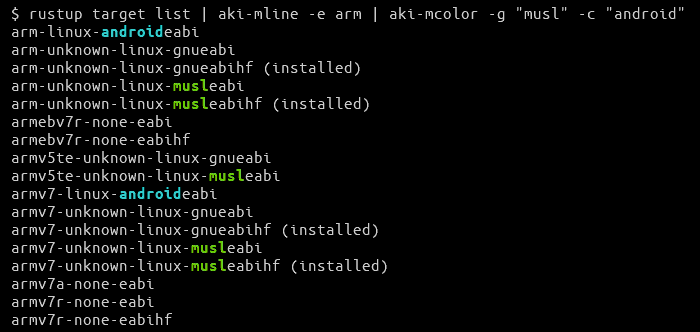
Extract “arm” from the rustup target list and make “musl” green and “android” cyan.
rustup target list | aki-mline -e arm | aki-mcolor -g "musl" -c "android"result output :
- aki-mline: extract match line command like grep.
§Command line example 3
You can also multiple same color match.
echo "abcdefg" | aki-mcolor -r "c" -g "d" -r "e"§Library example
See fn execute() for this library examples.
Modules§
Functions§
- execute
- execute mcolor
- execute_
with_ env - execute mcolor with environments