# Exceptionless Client for Rust
A Rust client for [Exceptionless](https://exceptionless.com) — capture errors, logs, and feature usage events with a clean, async-first API.
API docs: [docs.rs/exceptionless](https://docs.rs/exceptionless)
## What's Supported
This initial release focuses on core event reporting:
- **Error reporting** — submit exceptions with automatic stack trace capture and inner exception chaining
- **Log events** — send structured logs with severity levels
- **Feature tracking** — record feature usage for analytics
- **Custom metadata** — add tags, user identity, version, and arbitrary data to any event
- **Async/await** — all submission is non-blocking; built on `async-trait` and `reqwest`
- **Bearer authentication** — events submitted with your API key to `collector.exceptionless.io` (or a custom server)
### Not Yet Supported
- Event queuing and batch retry
- Settings/configuration from the Exceptionless server
- Session tracking
- Plugin system
- Log level filtering or structured logging integration (upcoming)
---
## Quick Start
### 1. Add the Dependency
```toml
[dependencies]
exceptionless = "0.1"
tokio = { version = "1", features = ["macros", "rt-multi-thread"] }
```
### 2. Create a Client
The simplest way to get started:
```rust
use exceptionless::ExceptionlessClient;
#[tokio::main]
async fn main() -> Result<(), Box<dyn std::error::Error>> {
let client = ExceptionlessClient::with_api_key("YOUR_API_KEY");
// Ready to report events
Ok(())
}
```
`send().await` returns a `SubmissionResult`. For production code, inspect the result if you need to distinguish success from retryable or discardable responses.
### 3. Report an Error
```rust
use core::num::ParseIntError;
use exceptionless::ExceptionlessClient;
#[tokio::main]
async fn main() -> Result<(), Box<dyn std::error::Error>> {
let client = ExceptionlessClient::with_api_key("YOUR_API_KEY_HERE");
// Simulate a parsing error
let result = parse();
match result {
Err(e) => {
// Send the error to Exceptionless
client
.error(&e)
.tag("parsing")
.source("user_input")
.send()
.await?;
println!("Error reported to Exceptionless");
}
Ok(num) => {
println!("Parsed number: {}", num);
}
}
Ok(())
}
fn parse() -> Result<i32, ParseIntError> {
parse_string_as_integer("not a number")
}
fn parse_string_as_integer(text: &str) -> Result<i32, ParseIntError> {
text.parse()
}
```
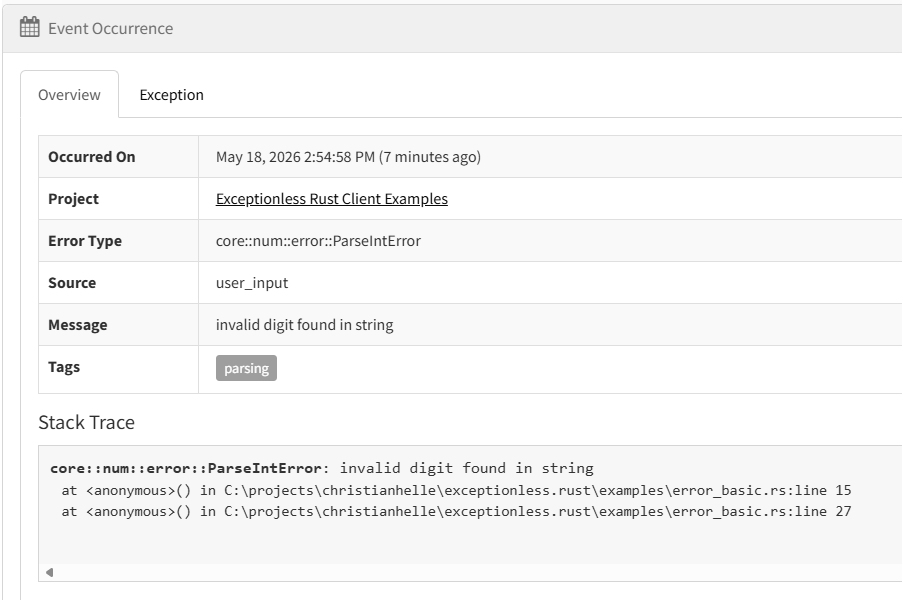
The client automatically captures the error message and type. Use builder methods to add context:
- `.tag(name)` — label the event (e.g., "auth", "database", "payment")
- `.source(module)` — identify where the error originated
- `.version(v)` — track which version encountered the error
- `.user_identity(id)` — associate the error with a user
- `.data(key, value)` — attach arbitrary metadata

### 4. Send a Log
```rust
use exceptionless::ExceptionlessClient;
#[tokio::main]
async fn main() -> Result<(), Box<dyn std::error::Error>> {
let client = ExceptionlessClient::with_api_key("YOUR_API_KEY");
client.log("User logged in")
.level("info")
.tag("authentication")
.user_identity("user@example.com")
.send()
.await?;
Ok(())
}
```
Common log levels are `"trace"`, `"debug"`, `"info"`, `"warn"`, `"error"`, and `"fatal"`. The client trims surrounding whitespace and omits blank values; it does not validate against a fixed enum yet.


### 5. Track Feature Usage
```rust
use exceptionless::ExceptionlessClient;
#[tokio::main]
async fn main() -> Result<(), Box<dyn std::error::Error>> {
let client = ExceptionlessClient::with_api_key("YOUR_API_KEY");
client.feature("export_to_pdf")
.tag("premium_feature")
.user_identity("user@example.com")
.send()
.await?;
Ok(())
}
```


---
## Configuration
### Custom Server
If you're self-hosting Exceptionless, point the client to your server:
```rust
use exceptionless::ExceptionlessClient;
use exceptionless::config::ClientConfig;
use exceptionless::transport::http::HttpTransport;
#[tokio::main]
async fn main() -> Result<(), Box<dyn std::error::Error>> {
let config = ClientConfig::new("YOUR_API_KEY")
.with_server_url("https://your-exceptionless-server.com");
let client = ExceptionlessClient::new(config, HttpTransport::default());
client.log("Server configured").send().await?;
Ok(())
}
```
### Disable the Client
For local development or testing, you can disable event submission:
```rust
let config = ClientConfig::new("YOUR_API_KEY")
.with_enabled(false);
```
When disabled, `send()` returns a configuration error before any request is sent, so tests should either use a test transport or skip submission.
---
## Examples
See the `examples/` directory for runnable patterns:
- `error_basic.rs` — Capture and send a simple error
- `log_structured.rs` — Send logs with custom metadata
- `feature_track.rs` — Record feature usage events
- `config_custom.rs` — Use a custom server URL
Run any example with:
```bash
cargo run --example error_basic
```
---
## Release Workflows
Manual release prep lives in GitHub Actions as `Release Scaffolding`.
- Trigger it with `workflow_dispatch`
- Optionally pass `base_version`, or set `RELEASE_BASE_VERSION` in the `release` environment or repository variables
- The workflow appends the GitHub run number to the base version to produce a unique pre-release version such as `0.1.0-42`
- It updates `Cargo.toml` in the runner, runs `cargo test` plus `cargo package --allow-dirty`, uploads the packaged `.crate` and checksum as workflow artifacts, and creates a GitHub prerelease with generated notes
Manual crates.io publishing now lives in GitHub Actions as `Publish to crates.io`.
- Trigger it with `workflow_dispatch`
- Pass the `release_tag` created by `Release Scaffolding`; the workflow checks out that exact tag and treats it as the source of truth for the publish version
- Configure the crates.io token as the `CARGO_REGISTRY_TOKEN` secret in the `release` environment, and restrict that environment to the repository default branch in GitHub so arbitrary refs cannot use the publish secret
- The workflow runs `cargo test --all-targets`, then `cargo publish --dry-run --locked --allow-dirty`, then `cargo publish --locked --allow-dirty --no-verify`
- It publishes to crates.io only; it does not create or modify the GitHub prerelease
---
## License
This project is open source and available under the MIT License
#
For tips and tricks on software development, check out [my blog](https://christianhelle.com)
If you find this useful and feel a bit generous then feel free to [buy me a coffee ☕](https://www.buymeacoffee.com/christianhelle)
MIT